
Noteit — Notes, To-Do List & Reminders
Fast, minimal notes in your browser. Rich text, search, pins, themes, and export to TXT/MD/PDF.
As of June 2026, Noteit — Notes, To-Do List & Reminders has — users in the Productivity category.
Usersno change0%
—
—
Ratingno change0%
—
— reviews
Reviewsno change0%
—
Version
1.0.1
Manifest V3
History
1 snapshotsTracking since Jun 16, 2026.
Not enough history yet for this metric — the chart fills in as we collect more snapshots.
View as table
| Date | Users | Rating | Reviews | Version |
|---|---|---|---|---|
| Jun 16, 2026 | — | — | — | 1.0.1 |
| Now | — | — | — | 1.0.1 |
Permissions & access
- Permissions
- storageunlimitedStoragealarmsnotifications
- Host access
- None declared
Screenshots



About
Noteit is a fast, beautiful notes app that lives one keystroke away — press Alt+N anywhere and start typing instantly.

WRITE ANYTHING


Rich text: bold, italic, underline, highlight, links (Ctrl+K)
Checklists — paste a list of tasks, select, one click → trackable checkboxes
Tables with full editing (add/remove rows & columns), code blocks and inline code
Paste screenshots and images straight into your notes — drag them anywhere in the text
Markdown shortcuts: type "-", "1." or "[]" + space, just like Notion or Obsidian


STAY ORGANIZED


Pin and star important notes, drag cards to arrange your own order
Instant search across every note with live highlighting
Smart open: Alt+N resumes the note you were just writing, or starts fresh


NEVER FORGET


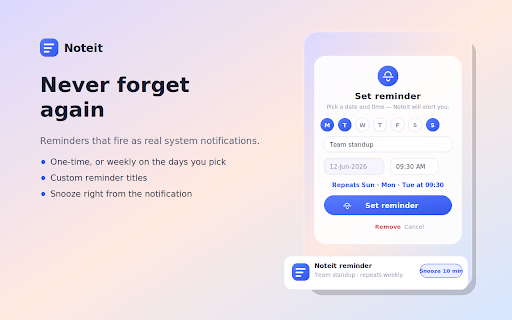
Reminders with system notifications — one-time or repeating weekly on the days you pick
Custom reminder titles and a Snooze button right on the notification
Pop any note into a floating window you can drag anywhere on your screen


MAKE IT YOURS


Light Glass and Deep Dark themes with adjustable blur intensity
Export notes as PDF, Markdown, or plain text
One-click backup and restore of everything


100% PRIVATE
All notes are stored locally on your device using Chrome's storage. Nothing is ever collected, transmitted, or shared. No account, no tracking, no servers.
Technical
- Version
- 1.0.1
- Manifest
- V3
- Size
- 168KiB
- Min Chrome
- 88
- Languages
- 1
- Featured
- No
Metadata
- ID
- cpnbdojgicdfnppnkjieileeienbkdob
- Developer ID
- ufe64963009edabadfefa47bd57ff61fe
- Developer Email
- [email protected]
- Created
- Jun 15, 2026
- Last Updated (Store)
- Jun 15, 2026
- Last Scraped
- Jun 16, 2026
- Website
- —
- Support URL
- —
- Privacy Policy
- https://sachintanwarhey-arch.github.io/noteit-privacy/
Data sourced from the Chrome Web Store · last verified Jun 16, 2026.