
Calendarito
Add events to Google Calendar from anywhere.
As of June 2026, Calendarito has — users in the Workflow & Planning category.
Usersno change0%
—
—
Ratingno change0%
—
— reviews
Reviewsno change0%
—
Version
0.1.0
Manifest V3
History
1 snapshotsTracking since May 3, 2026.
Not enough history yet for this metric — the chart fills in as we collect more snapshots.
View as table
| Date | Users | Rating | Reviews | Version |
|---|---|---|---|---|
| May 3, 2026 | — | — | — | 0.1.0 |
| Now | — | — | — | 0.1.0 |
Permissions & access
- Permissions
- sidePanelcookiesstorage
- Host access
- https://calendarito.com/*
Screenshots



About
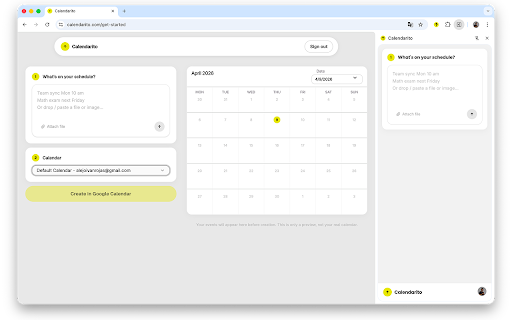
Calendarito brings your scheduling workflow into the browser. Open the side panel from any tab, type what's on your schedule — or attach a file, PDF, or image — and we turn it into structured Google Calendar events in seconds.

HOW IT WORKS

1. Sign in once on calendarito.com with your Google account.
2. Click the Calendarito icon in your toolbar to open the side panel.
3. Type naturally ("Team sync Monday 10am", "Math exam next Friday") or attach a file.
4. Review and edit the extracted events — adjust title, date, time, and color.
5. Choose a calendar and click "Create in Google Calendar".

That's it. No copy-pasting. No tab switching. No manual form filling.

WHAT YOU CAN SHARE
— Natural language descriptions of events
— Screenshots or photos of schedules, invitations, or whiteboards
— PDF documents with dates and event details
— Plain text files and CSV files

PRIVACY
We never store or view your events. They are extracted using AI and created directly in your Google Calendar. Your session is read locally from calendarito.com — no credentials are ever transmitted to third parties.

See our Privacy Policy at calendarito.com/privacy.
Technical
- Version
- 0.1.0
- Manifest
- V3
- Size
- 127KiB
- Min Chrome
- 88
- Languages
- 1
- Featured
- No
Metadata
- ID
- cplhjngmdbaicnjhfdoohhjaiahbfflb
- Developer ID
- u8c3216fa29ec065baeb2d4027b5d5eb4
- Developer Email
- [email protected]
- Created
- May 2, 2026
- Last Updated (Store)
- May 2, 2026
- Last Scraped
- Jun 8, 2026
- Website
- calendarito.com
- Support URL
- https://calendarito.com/get-started
- Privacy Policy
- https://calendarito.com/privacy
Data sourced from the Chrome Web Store · last verified Jun 8, 2026.