
Fetch Fast
Make HTTP requests from your browser
As of May 2026, Fetch Fast has 295 users and a 5.00/5 rating from 1 reviews in the Developer Tools category.
Usersup 24.5 percent+24.5%
295
295
Ratingno change0%
5.00
1 reviews
Reviewsno change0%
1
Version
2.3
Manifest V3
History
2 snapshotsTracking since Apr 24, 2026.
View as table
| Date | Users | Rating | Reviews | Version |
|---|---|---|---|---|
| Apr 24, 2026 | 237 | 5.00 | 1 | 2.3 |
| May 19, 2026 | 282 | 5.00 | 1 | 2.3 |
| Now | 295 | 5.00 | 1 | 2.3 |
Permissions & access
- Permissions
- None declared
- Host access
- <all_urls>
Screenshots
About
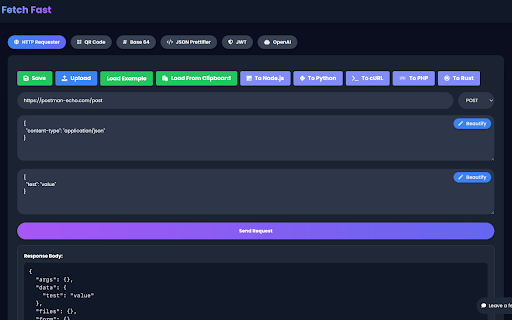
Fetch Fast is a lightweight, super-fast alternative to Postman for making HTTP requests directly from your browser.

Make HTTP requests directly from your browser with ease using Fetch Fast! This powerful and user-friendly Chrome extension is designed for developers, testers, and anyone who needs to interact with APIs or web services without leaving their browser.

Key Features:

Simple Interface: A clean, intuitive UI makes it easy to send requests and view responses.
Supports Various HTTP Methods: Whether it's GET, POST, PUT, DELETE, or others, Fetch Fast handles them all.
Customizable Headers and Body: Easily modify request headers and body to suit your testing needs.
Response Display: View status codes and response content directly in the extension.
JSON Support: Perfect for dealing with JSON data, with pretty print format for easy reading.
Whether you're testing APIs, debugging, or simply exploring web services, Fetch Fast is your go-to tool for making HTTP requests on-the-fly. Get started now and enhance your web development and testing workflow!
Technical
- Version
- 2.3
- Manifest
- V3
- Size
- 1.67MiB
- Min Chrome
- 88
- Languages
- 1
- Featured
- Yes
Metadata
- ID
- cphnklgdpghfegmlpihlfhgngfgepiee
- Developer ID
- ufb3178d18b681e9f22ede9e54b07b379
- Developer Email
- [email protected]
- Created
- Dec 10, 2023
- Last Updated (Store)
- Jul 10, 2024
- Last Scraped
- May 19, 2026
- Support URL
- —
Similar extensions
Alternatives to Fetch Fast, ranked by description similarity.

Postfly
A lightweight, Postman-like browser extension for rapid API testing and debugging.
1

API Request Simulator
Convert cURL commands into HTTP requests, send API calls directly in your browser, and view responses instantly.
13

HTTP Client
Lightweight HTTP client for developers. Send requests, save collections.
72
★ 5.0

Mini API Test
Test RESTful APIs Instantly – Without Leaving Your Browser!
API Tester is a lightweight, in-browser tool for developers who want…
10

API Tester - REST Client Testing Tool
Free REST API Tool, Use it to develop, test, debug RESTful APIs and HTTP request & REST services in Google Chrome Web Store.
10.0K
★ 2.7

QuickPost
A mini Postman Chrome extension built with React and Vite.
7
★ 5.0

Quick API Test
A lightweight, local-first API testing tool.
43
★ 5.0

Test API
Use Test API for restful api testing. This postman alternative test rest api online and use post request online to test API endpoint
816
★ 5.0
Data sourced from the Chrome Web Store · last verified May 19, 2026.