
Github projects time tracker
Add time spent (0.25 day increments) to issues in your Github project
As of May 2026, Github projects time tracker has 12 users and a 5.00/5 rating from 2 reviews in the Developer Tools category.
Usersdown 7.7 percent−7.7%
12
12
Ratingno change0%
5.00
2 reviews
Reviewsno change0%
2
Version
1.0
Manifest V3
History
2 snapshotsTracking since Apr 24, 2026.
View as table
| Date | Users | Rating | Reviews | Version |
|---|---|---|---|---|
| Apr 24, 2026 | 13 | 5.00 | 2 | 1.0 |
| May 19, 2026 | 11 | 5.00 | 2 | 1.0 |
| Now | 12 | 5.00 | 2 | 1.0 |
Permissions & access
- Permissions
- scriptingtabs
- Host access
- *://github.com/*/*/projects/*, *://git.realestate.com.au/*/*/projects/*
Screenshots

About
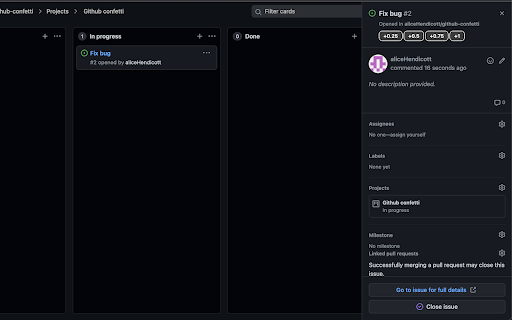
Track time spent working on issues in your Github project wall.

This extension adds buttons to the issue popups on the project walls allowing you to add 0.25 day increments to your issues to track time spent on cards.
Technical
- Version
- 1.0
- Manifest
- V3
- Size
- 25.27KiB
- Min Chrome
- 88
- Languages
- 1
- Featured
- No
Metadata
- ID
- cphikkfpglonpdpocclfmiddkfcbpemb
- Developer ID
- u36fd8b448ff0a88bd75f876397775522
- Developer Email
- [email protected]
- Created
- Mar 2, 2022
- Last Updated (Store)
- Mar 2, 2022
- Last Scraped
- May 19, 2026
- Website
- —
- Support URL
- —
- Privacy Policy
- —
Similar extensions
Alternatives to Github projects time tracker, ranked by description similarity.

Taazaa Worklog
Add time logs on GitHub issues
315
★ 5.0

TickBack
Simple browser add-on for GitHub to add tasks count on the issues page
—

Developer Time Logger
Log and track time spent on development tasks
66

Dev Task & Time Tracker
Organize your daily tasks and track the time spent on each one.
—

DevClocked - Automatic Time Tracker
Track your development time automatically across IDE and browser
—

Issue runner
Chrome extention that allows you to switch between github issues without going back to the issues list page
—

Fireboard
A work tracker for software developers
10

Faster PR
Personalize and copy a branch name, commit message, or pull request description (compatible with GitHub/GitLab/Trello/Jira/Monday).
1
Data sourced from the Chrome Web Store · last verified May 19, 2026.