
All in One SEO Checker
Complete SEO audit: on-page, technical, images, links, schema, Core Web Vitals, LLM, AEO & GEO signals.
As of June 2026, All in One SEO Checker has — users in the Developer Tools category.
Usersno change0%
—
—
Ratingno change0%
—
— reviews
Reviewsno change0%
—
Version
2.1.0
Manifest V3
History
1 snapshotsTracking since Jun 26, 2026.
Not enough history yet for this metric — the chart fills in as we collect more snapshots.
View as table
| Date | Users | Rating | Reviews | Version |
|---|---|---|---|---|
| Jun 26, 2026 | — | — | — | 2.1.0 |
| Now | — | — | — | 2.1.0 |
Permissions & access
- Permissions
- activeTabscripting
- Host access
- <all_urls>
Screenshots


About
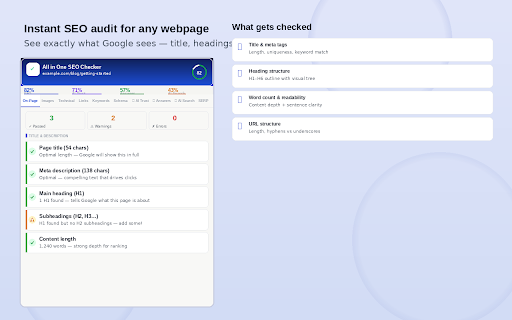
All in One SEO Checker is the most complete free SEO audit tool for Chrome. Open it on any webpage and instantly get a full health check across 10 audit categories — including the new AI-era signals that most SEO tools don't cover yet.

No account needed. No data collected. Works on any website. 100% free.

────────────────────────────────────────────
WHAT YOU CAN CHECK IN ONE CLICK
────────────────────────────────────────────

📝 ON-PAGE SEO
Check your title tag length (Google's sweet spot is 50–60 characters), meta description, H1 heading, subheadings (H2, H3…), title/H1 alignment, word count, content readability, and URL structure. A visual H1–H6 heading tree shows your page structure at a glance.

🖼️ IMAGE AUDIT
See every image on the page with a live thumbnail preview (including GIFs, WebP, SVG). Instantly spot images missing alt text — the description that helps Google and screen readers understand what an image shows. Filter to show only images with missing alt text or missing lazy loading.

⚡ TECHNICAL SEO
Is Google actually able to find and index your page? Check HTTPS security, robots meta tag, canonical URL, sitemap declaration, mobile viewport, character encoding, language attribute, and favicon. Includes a Core Web Vitals panel showing TTFB, FCP, LCP, DOM ready and full page load time — the real speed metrics Google uses for ranking.

🔗 LINKS
Full breakdown of internal links (to your own site) and external links (to other sites), with dofollow/nofollow badges on every link. A dedicated "Anchor issues" tab flags links with empty or generic anchor text like "click here" — a common but easily fixed SEO mistake.

🔑 KEYWORDS
See the top 20 most-used words on your page ranked by frequency and density. A visual bar chart makes it easy to spot keyword stuffing (over 5% density looks spammy to Google). Green dots show which keywords also appear in your title tag — good alignment.

📋 SCHEMA MARKUP
Detects all JSON-LD structured data on the page. Displays each type (Article, Product, FAQPage, HowTo, Organization, Recipe, etc.) with its raw markup. Validates required fields — for example, flags if an Article schema is missing the author or datePublished field. Missing structured data means you're not eligible for rich results like star ratings, FAQs or recipe cards in Google search.

🤖 AI TRUST SCORE (LLM Visibility)
A new category that checks whether ChatGPT, Gemini, Perplexity and other AI tools can identify, trust and cite your brand. Checks for author bylines, About/Team pages, Contact pages, Organization schema, social profile links, sameAs knowledge graph markup and privacy policy links.

💬 ANSWER BOX SCORE (AEO — Answer Engine Optimization)
Checks whether your content is likely to appear in Google's featured snippets, answer boxes and voice search results. Looks for FAQ schema, HowTo schema, question-style headings (How/What/Why), short answer paragraphs below headings, definition sentences and a table of contents.

🌐 AI SEARCH SCORE (GEO — Generative Engine Optimization)
Checks signals that make your content more likely to be included in Google AI Overviews, ChatGPT browsing answers and other AI-generated results. Covers statistics and data points, authoritative citations (.gov, .edu, journals), publication dates, structured lists, data tables, breadcrumbs and content depth.

🔍 SERP PREVIEW
See a live, accurate preview of how your page will appear in Google search results — exactly how the title and description will look, with character counts colour-coded green (optimal) or amber (needs work). No guessing.

────────────────────────────────────────────
EXPORT YOUR RESULTS
────────────────────────────────────────────

Copy your full audit to clipboard with one click, or download it as a .txt file to share with clients or your team. The report includes every check across all 10 tabs.

────────────────────────────────────────────
WHO IS THIS FOR?
────────────────────────────────────────────

→ SEO professionals who want a quick audit tool that lives in the browser
→ Digital marketers validating page optimisation before publishing
→ Developers checking technical SEO on pages they've built
→ Content writers who want to make sure their page is set up to rank
→ Business owners who want to understand why their pages aren't showing up in Google
→ Agencies doing client SEO audits — the export feature makes reporting easy

────────────────────────────────────────────
PRIVACY & SECURITY
────────────────────────────────────────────

All analysis runs locally in your browser. No data is ever sent to any external server. No account required. No tracking. Nothing stored. The extension only reads the page you're looking at — it does not access your browsing history, passwords or any other data.

────────────────────────────────────────────
COMPLETELY FREE
────────────────────────────────────────────

All 10 tabs and every feature are completely free. No premium tier, no paywalled checks, no limits.
Technical
- Version
- 2.1.0
- Manifest
- V3
- Size
- 34.96KiB
- Min Chrome
- 88
- Languages
- 1
- Featured
- No
Metadata
- ID
- cphababoloofcabgoccaojggnebidgil
- Developer ID
- u29ede64b29141f4f4e1427a528f816d4
- Developer Email
- [email protected]
- Created
- Jun 25, 2026
- Last Updated (Store)
- Jun 25, 2026
- Last Scraped
- Jun 26, 2026
- Support URL
- —
Data sourced from the Chrome Web Store · last verified Jun 26, 2026.