Big Clock | Minute
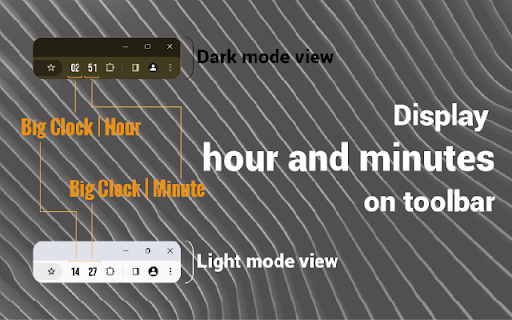
It is a add-on that displays the current hour and minute in the toolbar as a large readable add-on icon.
As of May 2026, Big Clock | Minute has 222 users and a 4.67/5 rating from 3 reviews in the Productivity category.
Usersdown 1.8 percent−1.8%
222
222
Ratingno change0%
4.67
3 reviews
Reviewsno change0%
3
Version
1.0.0
Manifest V3
History
1 snapshotsTracking since Apr 24, 2026.
View as table
| Date | Users | Rating | Reviews | Version |
|---|---|---|---|---|
| Apr 24, 2026 | 226 | 4.67 | 3 | 1.0.0 |
| Now | 222 | 4.67 | 3 | 1.0.0 |
Permissions & access
- Permissions
- tabsstoragemanagement
- Host access
- *://*/*
Screenshots



About
Big Clock - Display Hours and Minutes in the Browser Toolbar.

Big Clock is an add-on that provides legible and customizable hour and minute display in the browser toolbar. Available as two separate add-ons, Big Clock | Hour and Big Clock | Minute, this application shows the user the current hour and minute instantly through the toolbar icons.

Features

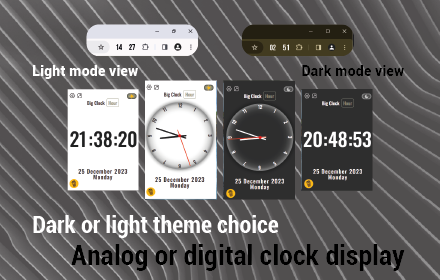
Dark and Light Mode Support: You can use it in dark or light mode depending on your browser theme.

Colored Icons: The icons are black or white depending on the selected theme color, the toolbar display is always stylish and harmonious.

Clock Display Format: You can set 24h or 12h clock display according to your preference.

Multi-Language Support: The plugin offers multi-language support for use in different languages.

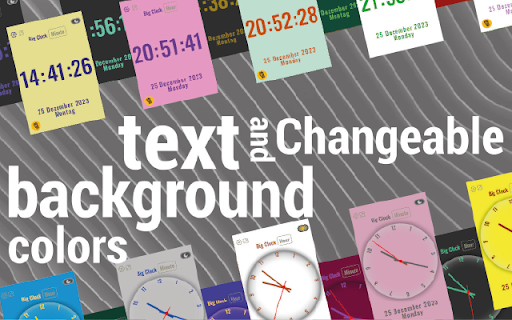
Customizable Design: Customize the text and background color, and add a unique style to your browser with the option of analog or digital clock view.

Popup Page: Keep track of time in more detail with the display of hours, minutes, seconds and current date on the popup page.

Customizable Date Display: Set the date display format according to your preference.

Visual Options: Decorate the popup background or clock background with customizable images. Import images from hard disk or URL.

Clock View in Separate Window: Option to open a separate window to see the clock view in a larger window.

Synchronized Use: Use Big Clock Hour and Big Clock Minute plugins together and settings are synchronized automatically.

Plain and Simple Operation: It offers a simple and straightforward usage experience with its user-friendly interface.

Keep track of time in style in your browser's toolbar with Big Clock. Especially if you use it to hide the taskbar of your operating system, this is for you. Install now for a professional and customizable clock experience!

Supported languages:
Deutsch
English
Español
Filipino
Français
Bahasa Indonesia
Italiano
Nederlands
Polski
Português
Türkçe
Русский
Čeština
Tiếng Việt
ไทย
中文
日本語
한국어
हिन्दी
বাংলা
العربية
فارسی
Technical
- Version
- 1.0.0
- Manifest
- V3
- Size
- 912KiB
- Min Chrome
- 88
- Languages
- 1
- Featured
- No
Metadata
- ID
- cpgehceoalhakjceioddjajneophlfko
- Developer ID
- u071ed1ab5b3f9e9ebafbfde66efd04f3
- Developer Email
- [email protected]
- Created
- Dec 28, 2023
- Last Updated (Store)
- Dec 28, 2023
- Last Scraped
- May 19, 2026
- Website
- —
- Support URL
- —
- Privacy Policy
- https://extension-bigclock-pp.netlify.app
Similar extensions
Alternatives to Big Clock | Minute, ranked by description similarity.
Big Clock | Hour
It is a add-on that displays the current hour and minute in the toolbar as a large readable add-on icon.
327
★ 5.0

World Clock
See multiple world clocks in toolbar popup!
4.0K
★ 4.4

Simple Clock+ (Clock • Stopwatch • Timer • World)
A clean popup with Clock, Stopwatch, Timer, and World Clocks. No permissions required.
12

World Clock Toolbar 2.0
EASY to access on your toolbar with a list of country that you visit often at a glance.
110
★ 5.0

Tiny Clock in Tab
Display date and time in your browser tab title. Lightweight, offline, no tracking.
—
★ 5.0

World Clock Popup Side Panel
Extension for displaying analog clocks in different time zones
30

Analog Clock
A simple analog clock popup extension.
7

Simple Clock Display
This is an extension that displays the current time of the PC in the four corners of the browser.
873
★ 5.0
Data sourced from the Chrome Web Store · last verified May 19, 2026.