
Type-ahead-find
Find text or links as you type
As of May 2026, Type-ahead-find has 8,000 users and a 4.48/5 rating from 382 reviews in the Workflow & Planning category.
Usersno change0%
8.0K
8,000
Ratingno change0%
4.48
382 reviews
Reviewsdown 0.3 percent−0.3%
382
Version
0.4.7
Manifest V3
History
1 snapshotsTracking since May 28, 2026.
View as table
| Date | Users | Rating | Reviews | Version |
|---|---|---|---|---|
| May 28, 2026 | 8.0K | 4.48 | 383 | 0.4.7 |
| Now | 8.0K | 4.48 | 382 | 0.4.7 |
Permissions & access
- Permissions
- storage
- Host access
- None declared
Screenshots
About
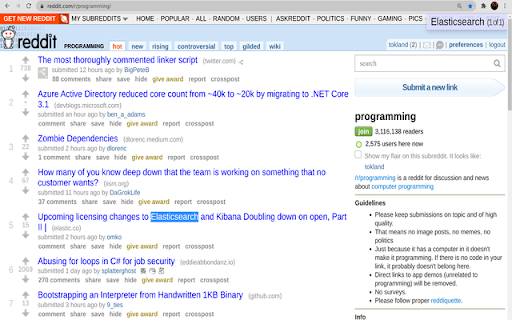
Type-ahead-find [1] is an accessibility feature to search links and text faster on a webpage. How to use it:

 * Start writing (or press /) to start text search.
 * Press ' to search only links.
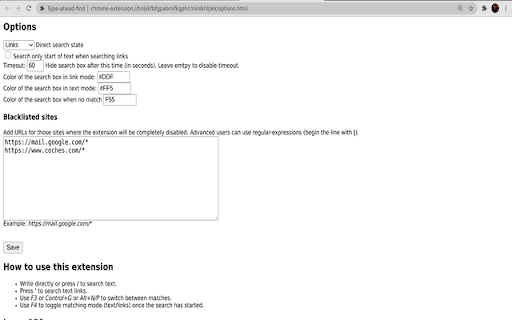
 * Change option "direct search state" to set the default search policy (text, links or disabled).
 * Use (Shift+)F3 or (Shift+)Control+G or Alt+N/P to switch between matches.
 * Use F4 to toggle matching mode (text/links) once the search is active.
 * Blacklist sites that set up their own shortcuts.
 * The search shows first matches in current viewport.

Limitations:

 * It cannot search inside iframes.
 * It does not search text in adjacent HTML nodes (i.e. "hello" won't be found in HTML <b>He</b>llo)
 * If the page already sets Javascript keybidings, the extension may misbehave. The best solution is to blacklist the site in the options page and disable the extension for this particular website.
Technical
- Version
- 0.4.7
- Manifest
- V3
- Size
- 18.32KiB
- Min Chrome
- 88
- Languages
- 1
- Featured
- No
Metadata
- ID
- cpecbmjeidppdiampimghndkikcmoadk
- Developer ID
- uc34024ef07bbb4fc4199ee78559b160e
- Developer Email
- [email protected]
- Created
- Dec 30, 2009
- Last Updated (Store)
- Mar 28, 2025
- Last Scraped
- May 28, 2026
- Website
- —
- Support URL
- https://github.com/Foxy/chrome-type-ahead
- Privacy Policy
- —
Similar extensions
Alternatives to Type-ahead-find, ranked by description similarity.

Plain Text Link Creator
Finds duplicate text in pages and makes in-page links.
19

Tab Ahead
Tab Ahead lets you type ahead to quickly find open tabs by title and URL.
1.0K
★ 4.7

Onlyshortcuts - Quick access to links with shortcuts
Reach frequently used web links faster by using pre-set, easy-to-remember shortcuts instead of typing out the full URL.
362
★ 3.4

Search Select
Navigate and view search results quickly with shortcuts.
18
★ 5.0

KeyCuts
A Chrome Extension that makes web navigation simple, easy, and convenient for its users.
6

Search Shortcuts
Custom DuckDuckGo bangs/shortcuts using the search bar
16

FillHistory
Quickly fill in links from browser history.
7
★ 5.0

Ctrl + Click Highlight Search Shortcut
Adds a Ctrl+Click Google search shortcut for selected/highlighted text in a new tab. Other keyboard shortcuts also configurable.
478
★ 5.0
Data sourced from the Chrome Web Store · last verified May 28, 2026.