
Blocky
Easily create time blocks in Google Calendar.
As of May 2026, Blocky has 33 users and a 5.00/5 rating from 2 reviews in the Workflow & Planning category.
Usersdown 2.9 percent−2.9%
33
33
Ratingno change0%
5.00
2 reviews
Reviewsno change0%
2
Version
0.2.10
Manifest V3
History
3 snapshotsTracking since Apr 1, 2026.
View as table
| Date | Users | Rating | Reviews | Version |
|---|---|---|---|---|
| Apr 1, 2026 | 34 | 5.00 | 2 | 0.2.10 |
| Apr 30, 2026 | 36 | 5.00 | 2 | 0.2.10 |
| May 27, 2026 | 34 | 5.00 | 2 | 0.2.10 |
| Now | 33 | 5.00 | 2 | 0.2.10 |
Permissions & access
- Permissions
- storage
- Host access
- None declared
Screenshots
About
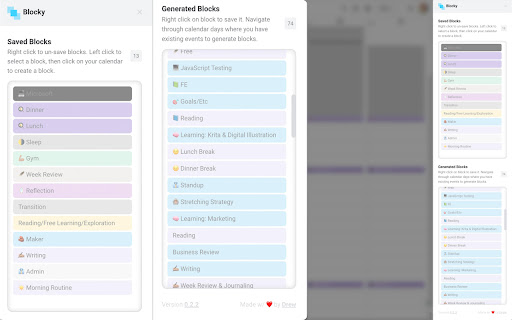
Blocky allows you to easily time blocks within Google Calendar.

Before, time blocking in Google Calendar took too much time. Now, it's quick and easy!

❌ Time blocking without Blocky usually looks like this:
1. Click another event
2. Copy title (for name consistency)
3. Close modal
4. Drag to create new event
5. Paste title in input
6. Update calendar selection
7. Click save
✅ Now:
1. Click block
2. Drag to create event

⭐️ How to create a new event from a block:
1. Click on generated or saved block in sidebar
2. Click on calendar to automatically create an event

⭐️ How to get more generated blocks:
The generated blocks section is created based on the events that you can currently see in your calendar. To have more generate, simply navigate through a few days or weeks and Blocky will automatically generated blocks based on these events.

⭐️ How to save blocks:
You can save blocks by right clicking on a generated block. One a block is saved, it will exist within the current browser  as long as you don't clear history (blocks are stored in local storage).
Technical
- Version
- 0.2.10
- Manifest
- V3
- Size
- 477KiB
- Min Chrome
- 88
- Languages
- 1
- Featured
- No
Metadata
- ID
- cpcobiephkdkdgpkpfhcgbdokhcimcmi
- Developer ID
- u12f9d68f05f7b32209b75eaab635af1b
- Developer Email
- [email protected]
- Created
- May 28, 2022
- Last Updated (Store)
- Jun 10, 2024
- Last Scraped
- May 27, 2026
- Website
- —
- Support URL
- —
- Privacy Policy
- https://blocky.drewrodrigues.com/privacy
Similar extensions
Alternatives to Blocky, ranked by description similarity.

Blockit - Time Blocking
Plan your day in time blocks. Stay focused. Get more done.
1
★ 5.0
Time Blocking with TaskBlock
The easiest way to boost productivity by time blocking right on your calendar.
100
★ 3.0

Shade Calendar – Time Blocking for Google Calendar
Color-code your time blocks in Google Calendar. Make your schedule easier to read, plan, and manage 📆
4.0K
★ 3.6

MarkFree
Availability picker overlay for Google Calendar — drag to select free slots, copy paste-ready text.
4

Scheduling Calendar
This Scheduling Calendar: Manage events, calendar reminders & sync calendars. Join video meetings in a shared calendar app.
5.0K
★ 4.5

ChatGPT for Google Calendar
This is a Chrome extension that simplifies event scheduling using natural language input right from your browser.
1.0K
★ 2.9

Easy Add to Calendar - Text to Events in Seconds
Add events to your calendar instantly—just highlight text and right-click. Fast, private, and works with any calendar.
312
★ 5.0

Calendar AI - Text & Screenshot to Event
Quickly add events to Google Calendar using natural language or images. Just type or paste a screenshot!
4
★ 3.0
Data sourced from the Chrome Web Store · last verified May 27, 2026.