
StorageAce
Easily manage Cookies, Local Storage and Session Storage for the selected tab.
As of May 2026, StorageAce has 10,000 users and a 4.83/5 rating from 18 reviews in the Developer Tools category.
Usersno change0%
10.0K
10,000
Ratingno change0%
4.83
18 reviews
Reviewsno change0%
18
Version
2.9.10
Manifest V3
History
1 snapshotsTracking since Apr 30, 2026.
View as table
| Date | Users | Rating | Reviews | Version |
|---|---|---|---|---|
| Apr 30, 2026 | 10.0K | 4.83 | 18 | 2.9.10 |
| Now | 10.0K | 4.83 | 18 | 2.9.10 |
Permissions & access
- Permissions
- tabsscriptingcookiesdownloadsstorageunlimitedStoragecontextMenus
- Host access
- <all_urls>
Screenshots


About
StorageAce provides ability to easily manage Cookies, Local Storage and Session Storage.

🅵🅴🅰🆃🆄🆁🅴🆂

❚█══ ℂ𝕠𝕠𝕜𝕚𝕖𝕤 ══█❚

★ Add Cookie
★ Import Cookies in JSON format
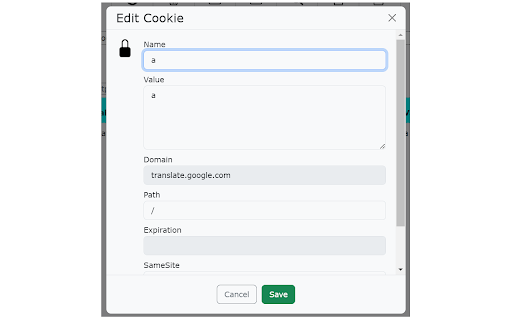
★ Edit Cookies using form
★ Edit Cookies using JSON Editor
★ Delete Cookies
★ Search Cookies by cookie name or cookie value
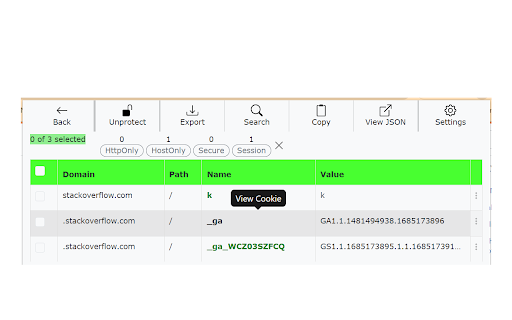
★ Sort Cookies by cookie domain, cookie name, cookie path and cookie value by clicking table column headers.
★ Protect Cookies (Set cookies as read-only)
★ Block cookies by domain, name and value filters
★ Export cookies in JSON, Netscape HTTP Cookie File, Semicolon separated name=value pairs, Perl::LWP formats. Also, you can export cookies in JSON format that can be imported by Puppeteer.
★ Backup Cookies
★ Select multiple Cookies and do actions like view, edit in JSON editor, delete, protect, unprotect, block, save etc.
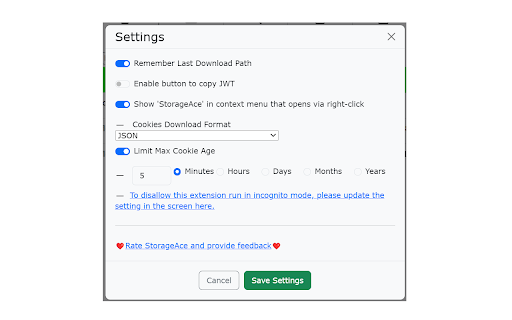
★ Limit Max Age of Cookies.
★ Quick Filters available for filtering cookies in one click.

❚█══ 𝕃𝕠𝕔𝕒𝕝𝕤𝕥𝕠𝕣𝕒𝕘𝕖 ══█❚

★ Add item in local storage
★ Import items in local storage in JSON format
★ Edit item in local storage using form
★ Edit item in local storage using JSON Editor
★ Delete items in local storage
★ Search items in local storage by key or value
★ Sort items in local storage by key/value by clicking table column headers.
★ Export local storage items in JSON format
★ Select multiple items of local storage and do actions like view, edit in JSON editor, delete etc.

❚█══ 𝕊𝕖𝕤𝕤𝕚𝕠𝕟𝕤𝕥𝕠𝕣𝕒𝕘𝕖 ══█❚

★ Add item in session storage
★ Import items in session storage in JSON format
★ Edit item in session storage using form
★ Edit item in session storage using JSON Editor
★ Delete items in session storage
★ Search items in session storage by key or value
★ Sort items in session storage by key/value by clicking table column headers.
★ Export session storage items in JSON format
★ Select multiple items of session storage and do actions like view, edit in JSON editor, delete etc.

❚█══ 𝕆𝕥𝕙𝕖𝕣 𝔽𝕖𝕒𝕥𝕦𝕣𝕖𝕤 ══█❚

★ Right-click and select "StorageAce" via Context menu
★ Incognito mode Supported and settings are synced in incognito and normal modes.
★ Beautified JSON View for storage items
★ Choose path for download.
★ Ability to Remember last download path.
★ Extra feature to allow copying JWT using "Copy JWT" button. It will copy the JWT in the selected storage type.

❚█══ Privacy ══█❚
StorageAce respects your privacy and all your data is safe.

If browser syncing is enabled, then the settings of the extension is synced to any Chrome browser that the user is logged into.

All your localStorage, sessionStorage and cookies remains offline.
Technical
- Version
- 2.9.10
- Manifest
- V3
- Size
- 251KiB
- Min Chrome
- 88
- Languages
- 50
- Featured
- Yes
Metadata
- ID
- cpbgcbmddckpmhfbdckeolkkhkjjmplo
- Developer ID
- ufaea4f5e1bf56abdfa003d52fe514870
- Developer Email
- [email protected]
- Created
- May 3, 2022
- Last Updated (Store)
- Jul 14, 2023
- Last Scraped
- May 27, 2026
- Website
- —
- Support URL
- —
- Privacy Policy
- —
Similar extensions
Alternatives to StorageAce, ranked by description similarity.

Easy Local Storage Manager
Premium tool to edit LocalStorage, Cookies & IndexedDB with JSON Tree. Switch profiles, decode JWTs, and sync data securely.
45
★ 3.7

Cookie Editor & Storage Manager
Manage cookies, localStorage, and sessionStorage from a Chrome side panel with search, bulk delete, and JSON import/export.
47
★ 5.0

Storage Manager
A modern and sleek Chrome extension for managing browser storage data
9

Storage & Cookie Manager
View, edit & manage LocalStorage, SessionStorage & Cookies. Includes JWT decoder, advanced search, and data snapshots.
25
★ 5.0

StorageNinja
Chrome Extension to manage Local Storage, Session Storage, and Cookies for the active tab
29
★ 5.0

Storage Viewer
A browser extension that gives you full control over cookies, localStorage, and sessionStorage. Inspect, edit, import/export, and…
47

Cookie & Storage Exporter
One-click export of current page cookies, localStorage, and sessionStorage to JSON format
109

Browser Storage - Cookie & Local Storage Manager
View and manage Cookies & Local Storage for the current tab. Inspect, add, and delete records with ease.
25
★ 5.0
Data sourced from the Chrome Web Store · last verified May 27, 2026.