
Gmail POP3 Refresh Button
Refreshes all POP3 accounts when the POP3 button is clicked
As of May 2026, Gmail POP3 Refresh Button has 4,000 users and a 4.30/5 rating from 30 reviews in the Workflow & Planning category.
Usersno change0%
4.0K
4,000
Ratingno change0%
4.30
30 reviews
Reviewsno change0%
30
Version
0.1.6
Manifest V3
History
1 snapshotsTracking since Apr 20, 2026.
View as table
| Date | Users | Rating | Reviews | Version |
|---|---|---|---|---|
| Apr 20, 2026 | 4.0K | 4.30 | 30 | 0.1.6 |
| Now | 4.0K | 4.30 | 30 | 0.1.6 |
Permissions & access
- Permissions
- storage
- Host access
- None declared
Screenshots
About
If you notice any bugs or have suggestions on how to improve this extension, feel free to contact me either by email or in the support tab!

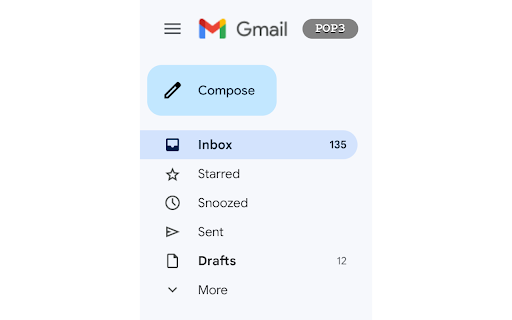
This small Chrome-Extension adds a button/shortcut on the Gmail Website for easy and fast refreshing of all POP3 Email-accounts liked to your Gmail account.

Before, you had to go into the settings and click the "Check mail now" link manually but this extension now does all this automatically.

IMPORTANT INSTRUCTIONS FOR USING THE EXTENSION

To use it properly first navigate to mail.google.com/#settings/accounts and scroll down to "Check email from other accounts:". Here you will see the Email-accounts that are linked to your Gmail account together with a Button "Check mail now" (this may vary depending on your language). Copy the link text ("Check mail now" in English), click on the extension icon in the upper right corner, Click on the "Gmail POP3" extension, paste it into the "Your language" field, and press "OK". If you now navigate to mail.google.com you should see a gray Button with the Text "POP3" in the upper left corner, next to the Gmail logo. Pressing this, now should automatically go to the settings, click the required link and navigate back to the inbox page (This does not work reliably 100% of the time and it might get stuck in the settings page. Is this the case, just press the "POP3" button one more time and it should work).

This Extension is heavily based on the "Easily refresh all your POP3 E-Mail accounts linked to Gmail" bookmarklet by David Mohr (https://david-mohr.com/blog/bookmarklet-refresh-pop3-accounts-gmail) so all credit goes to him for the internal workings.
Technical
- Version
- 0.1.6
- Manifest
- V3
- Size
- 23.18KiB
- Min Chrome
- 88
- Languages
- 1
- Featured
- Yes
Metadata
- ID
- conjkhfodbbomjjhfanalejcidfkabpa
- Developer ID
- u6b7a6d2b8f607e8ddee40ff191456306
- Developer Email
- [email protected]
- Created
- Oct 13, 2022
- Last Updated (Store)
- Jul 3, 2025
- Last Scraped
- May 30, 2026
- Website
- —
- Support URL
- —
- Privacy Policy
- —
Similar extensions
Alternatives to Gmail POP3 Refresh Button, ranked by description similarity.

Gmail++
Improves the user experience of Gmail
365
★ 2.3

Gmail POP Sync
Fetch and synchronize your external POP accounts at the frequency you select.
10.0K
★ 3.7

Tab-Snap
Get open tab URLs for window, or load a list of URLs into new tabs on this window.
30.0K
★ 4.5

Gmail POP3 Auto Refresh
Refresh unlimited POP3 email accounts of Gmail with a frequency of one minute for free.
6.0K
★ 4.3

Gmail Email Checker Plus
Check your Gmail unread emails instantly using the Gmail Atom Feed. Fast, secure, and beautiful.
6
★ 5.0

Gmail Taskbar Unread Badge
Add an unread email count badge to Gmail's PWA icon on supported OS's taskbar's or dock's
3.0K
★ 4.8

Send URL to Gmail
This simple extension forwards urls in gmail so you don't have to copy and paste them!
173
★ 2.0

Multi-Email/App Taskbar/Dock PWA Unread Badge
Add an unread email count badge to Gmail**/Outlook**'s PWA icon on supported OS's taskbar's or dock's
339
★ 3.7
Data sourced from the Chrome Web Store · last verified May 30, 2026.