
WeBWorKer
Add additional features to WeBWorK like real-time preview, parentheses checker, limited attempts warning, and more!
As of June 2026, WeBWorKer has 599 users and a 4.88/5 rating from 16 reviews in the Education category.
Usersdown 12.0 percent−12.0%
599
599
Ratingno change0%
4.88
16 reviews
Reviewsno change0%
16
Version
2.2.0
Manifest V3
History
8 snapshotsTracking since Apr 1, 2026.
View as table
| Date | Users | Rating | Reviews | Version |
|---|---|---|---|---|
| Apr 1, 2026 | 681 | 4.88 | 16 | 2.2.0 |
| Apr 8, 2026 | 676 | 4.88 | 16 | 2.2.0 |
| Apr 19, 2026 | 668 | 4.88 | 16 | 2.2.0 |
| Apr 29, 2026 | 667 | 4.88 | 16 | 2.2.0 |
| May 9, 2026 | 656 | 4.88 | 16 | 2.2.0 |
| May 17, 2026 | 577 | 4.88 | 16 | 2.2.0 |
| May 26, 2026 | 593 | 4.88 | 16 | 2.2.0 |
| Jun 4, 2026 | 591 | 4.88 | 16 | 2.2.0 |
| Now | 599 | 4.88 | 16 | 2.2.0 |
Permissions & access
- Permissions
- activeTabdeclarativeContentscriptingsidePanelstoragetabs
- Host access
- *://*/*
Screenshots

About
Are you tired of struggling under the weight of countless WeBWorK assignments?

WeBWorKer can help by doing the heavy lifting for you!

It contains a variety of helpful features:

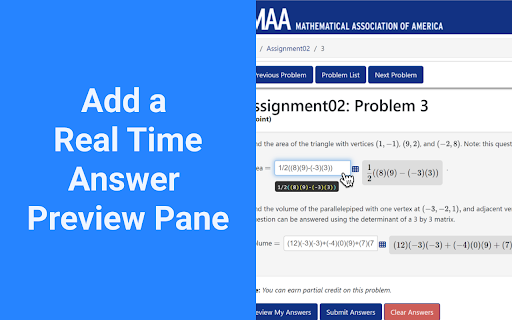
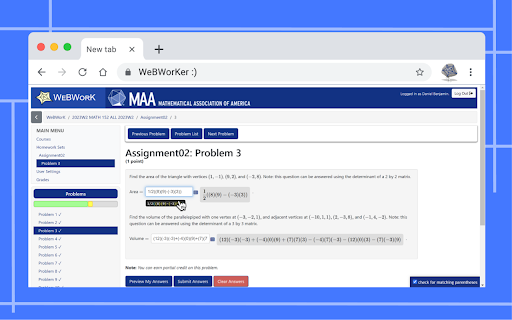
- Real-time formatted preview: Shows a live mathematical preview of your answers as you type them.
- Resizable input boxes: Easily expand answer boxes to see your complete expressions.
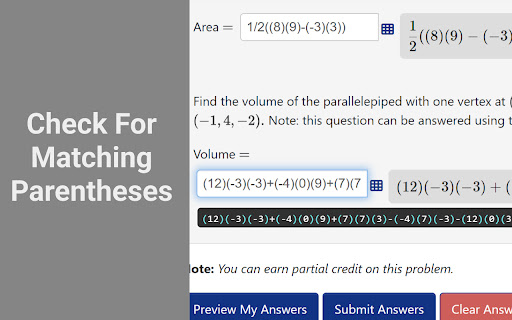
- Parentheses checker: Visual feedback showing if/where you missed parentheses. No more wasted attempts on bracket mistakes!
- Variable substitution: Define variables once (automatically from problem text or custom) and reuse them across multiple answer boxes. Press Ctrl+Enter to substitute before submitting.
- Enhanced homework table: Automatically fetches and displays problem counts and scores directly in the Homework Sets page.
- PDF viewer: Embeds PDF files directly in the page with a convenient "Open in New Tab" option.
- Quick Piazza access: Opens Piazza with the question number automatically copied for quick searching.
- Online resources: Uses keywords from the question to search the web for videos and learning materials.
- Custom query button: Configure your own search URL to learn more about topics covered in a question.
- Screenshot tool: Capture and save (or copy) question images for studying or reference.
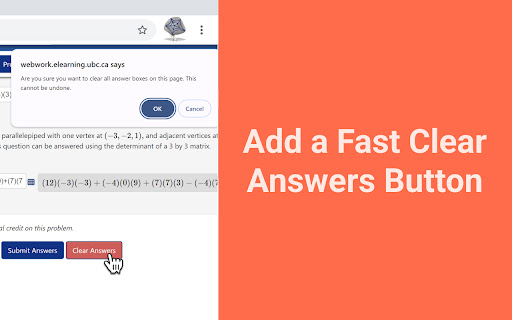
- Clear answers button: Quickly clear all answer boxes with one click and confirmation.
- Duplicate submit button: Adds an extra submit button at the top for convenience.
- Confirmation dialogue: Warns you before submitting answers when attempts are limited.
- Fully customizable: Toggle any feature on/off through the extension settings.
Technical
- Version
- 2.2.0
- Manifest
- V3
- Size
- 1.63MiB
- Min Chrome
- 96
- Languages
- 1
- Featured
- No
Metadata
- ID
- cokogomdladilchdakkknehhnnoipbke
- Developer ID
- u81bcbd3a907b46ba561a3bc7bac15dcf
- Developer Email
- [email protected]
- Created
- Jan 23, 2024
- Last Updated (Store)
- Jan 13, 2026
- Last Scraped
- Jun 4, 2026
- Website
- —
- Privacy Policy
- —
Similar extensions
Alternatives to WeBWorKer, ranked by description similarity.
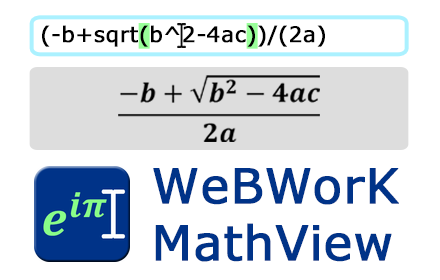
WeBWorK MathView
Preview nicely formatted math equations as you type them into WeBWorK answer boxes!
2.0K
★ 4.6

WebAssign Fixer
Webassign Fixer makes Webassign faster, cleaner, and easier to use, helping you focus on your learning.
61
★ 4.8

WebWork MathSync
Seamlessly sync handwritten math equations from your tablet or iPad directly to WebWork.
18

StudyTool
Homework Helper: Seamlessly Integrated with Any Website or Learning Management System
Click, Relax & Succeed: Your Stress-Free…
264
★ 3.9
TutorEva - AI Homework Helper beyond GPT-4
Crop and solve any questions on your screen with AI
808
★ 4.2

Desmos Sidebar
Allows for graphing calculator to be launched on any global site
5.0K
★ 5.0

Homework Helper - Study, Quiz, & Test Answers Solver with AI
Get INSTANT answers to homework, quizzes, and tests. Private. ALL websites work including Canvas, BlackBoard, McGrawHill, D2L
1.0K
★ 3.7

EduBoost: AI Homework Helper for Students
EduBoost AI Homework Helper explains concepts, guides steps, and builds real understanding — not just answers
—
★ 5.0
Data sourced from the Chrome Web Store · last verified Jun 4, 2026.