
OmniDev - Frontend Hero
The ultimate all-in-one toolbox for frontend developers. Inspect CSS, extract fonts, analyze SEO, and toggle dark mode in one click.
As of June 2026, OmniDev - Frontend Hero has 42 users and a 5.00/5 rating from 3 reviews in the Developer Tools category.
Usersup 366.7 percent+366.7%
42
42
Ratingno change0%
5.00
3 reviews
Reviewsup 200.0 percent+200.0%
3
Version
1.0.5
Manifest V3
90-day change · In the last 90 days this extension 2 version updates, changed permissions.
History
8 snapshotsTracking since Apr 1, 2026.
View as table
| Date | Users | Rating | Reviews | Version |
|---|---|---|---|---|
| Apr 1, 2026 | 9 | 5.00 | 1 | 1.0.0 |
| Apr 17, 2026 | 9 | 5.00 | 1 | 1.0.0 |
| May 1, 2026 | 28 | 5.00 | 2 | 1.0.2 |
| May 8, 2026 | 29 | 5.00 | 2 | 1.0.5 |
| May 13, 2026 | 30 | 5.00 | 2 | 1.0.5 |
| May 18, 2026 | 31 | 5.00 | 2 | 1.0.5 |
| May 31, 2026 | 35 | 5.00 | 3 | 1.0.5 |
| Jun 7, 2026 | 37 | 5.00 | 3 | 1.0.5 |
| Now | 42 | 5.00 | 3 | 1.0.5 |
Changelog
- May 1, 2026description
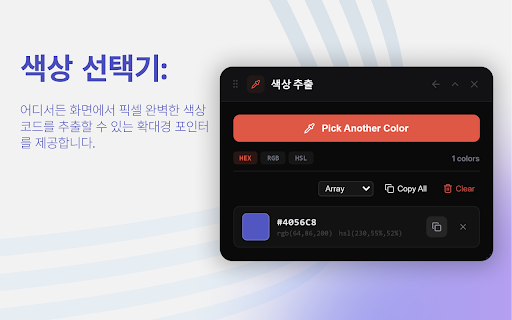
OmniFront: The Ultimate Frontend Power-Tool 🚀 Stop digging through deep nested menus in standard DevTools. OmniFront gives you a lightning-fast, visual superpower for inspecting, debugging, and perfecting your web applications. Whether you are a developer, designer, or QA engineer, OmniFront streamlines your workflow with a suite of professional tools designed for the modern web. 🎯 Deep CSS & Tailwind v4 Inspection Tired of tools that miss styles hidden in @layer or CCSS variables? - Tailwind v4 Ready: Our recursive scanner finds every utility, even those nested deep in CSS layers. - Modern Media Query Support: Fully supports the new range syntax (e.g., width >= 768px). - Visual Breakpoint Debugger: See exactly which rules are active at your current viewport and why. 📏 Professional Layout Tools - Smart Spacing Visualizer: Instantly see margins, padding, and borders. Works seamlessly with Shadow DOM and complex Web Components. - Precision Page Ruler: Measure any element with a professional crosshair cursor. Lock your measurements and see distances in real-time without interfering with the site’s text selection. - Viewport HUD: Keep track of your exact dimensions and active breakpoints at a glance. 🕵️♂️ Advanced Debugging & Performance - Enhanced Console Spy: Capture logs, 404 resource errors, and network failures that standard consoles might miss. - Live Core Web Vitals: Monitor LCP and CLS in real-time as you interact with the page. T- -ech Stack Analyzer: Instantly identify the frameworks, libraries, and fonts powering any site. ⚡ Productivity Boosters - Form Tester & Dummy Data Filler: Fill complex forms instantly—even those inside iframes or Shadow Roots. - Full-Page & Element Screenshots: Capture perfect, high-resolution snapshots of specific components or entire pages. - Color & Font Explorer: Extract the exact color palette and typography system used on any website. 🛡️ Built for Reliability OmniFront is engineered for the production environment. With our unique Tool Isolation system, a single error in a complex script won't crash the extension. Each tool runs in its own protected boundary, ensuring your debugging session is never interrupted. 🌍 Multi-Language Support Optimized for the global developer community with support for multiple languages and a clean, Apple-inspired "glassmorphism" UI that feels like a native part of your browser. OmniFront, Because great frontend work deserves better tools. Install now and supercharge your development workflow.
OmniFront: The Ultimate Frontend Power-Tool 🚀 Stop digging through deep nested menus in standard DevTools. OmniFront gives you a lightning-fast, visual superpower for inspecting, debugging, and perfecting your web applications. Whether you are a developer, designer, or QA engineer, OmniFront streamlines your workflow with a suite of professional tools designed for the modern web. 🎯 Deep CSS & Tailwind v4 Inspection Tired of tools that miss styles hidden in @layer or CCSS variables? - Tailwind v4 Ready: Our recursive scanner finds every utility, even those nested deep in CSS layers. - Modern Media Query Support: Fully supports the new range syntax (e.g., width >= 768px). - Visual Breakpoint Debugger: See exactly which rules are active at your current viewport and why. 📏 Professional Layout Tools - Smart Spacing Visualizer: Instantly see margins, padding, and borders. Works seamlessly with Shadow DOM and complex Web Components. - Precision Page Ruler: Measure any element with a professional crosshair cursor. Lock your measurements and see distances in real-time without interfering with the site’s text selection. - Viewport HUD: Keep track of your exact dimensions and active breakpoints at a glance. 🕵️♂️ Advanced Debugging & Performance - Enhanced Console Spy: Capture logs, 404 resource errors, and network failures that standard consoles might miss. - Live Core Web Vitals: Monitor LCP and CLS in real-time as you interact with the page. T- -ech Stack Analyzer: Instantly identify the frameworks, libraries, and fonts powering any site. ⚡ Productivity Boosters - Form Tester & Dummy Data Filler: Fill complex forms instantly—even those inside iframes or Shadow Roots. - Full-Page & Element Screenshots: Capture perfect, high-resolution snapshots of specific components or entire pages. - Color & Font Explorer: Extract the exact color palette and typography system used on any website. 🛡️ Built for Reliability OmniFront is engineered for the production environment. With our unique Tool Isolation system, a single error in a complex script won't crash the extension. Each tool runs in its own protected boundary, ensuring your debugging session is never interrupted. 🌍 Multi-Language Support Optimized for the global developer community with support for multiple languages and a clean, Apple-inspired "glassmorphism" UI that feels like a native part of your browser. 🧠 Website Technology Intelligence Go beyond basic tech detection with a deeper, evidence-based view of what powers a website. - Identify frameworks, UI libraries, analytics tools, tag managers, CDNs, CMS platforms, performance tools, and infrastructure signals. - Designed for modern apps using client-side rendering, bundled scripts, Shadow DOM, metadata, headers, network signals, and runtime clues. - See not just what was detected, but why it was detected, with confidence levels and supporting signals. - Surface useful business and organization signals behind a website where reliable public data is available. - Built to observe without disrupting the page, breaking interactions, or interrupting your browsing flow. OmniFront, Because great frontend work deserves better tools. Install now and supercharge your development workflow.
- May 1, 2026permissions
activeTab, storage, contextMenus, alarms
activeTab, storage, contextMenus, alarms, webRequest, webNavigation
Permissions & access
- Permissions
- activeTabstoragecontextMenusalarmswebRequestwebNavigation
- Host access
- <all_urls>
Screenshots



About
OmniFront: The Ultimate Frontend Power-Tool 🚀 Stop digging through deep nested menus in standard DevTools. OmniFront gives you a lightning-fast, visual superpower for inspecting, debugging, and perfecting your web applications. Whether you are a developer, designer, or QA engineer, OmniFront streamlines your workflow with a suite of professional tools designed for the modern web. 🎯 Deep CSS & Tailwind v4 Inspection Tired of tools that miss styles hidden in @layer or CCSS variables? - Tailwind v4 Ready: Our recursive scanner finds every utility, even those nested deep in CSS layers. - Modern Media Query Support: Fully supports the new range syntax (e.g., width >= 768px). - Visual Breakpoint Debugger: See exactly which rules are active at your current viewport and why. 📏 Professional Layout Tools - Smart Spacing Visualizer: Instantly see margins, padding, and borders. Works seamlessly with Shadow DOM and complex Web Components. - Precision Page Ruler: Measure any element with a professional crosshair cursor. Lock your measurements and see distances in real-time without interfering with the site’s text selection. - Viewport HUD: Keep track of your exact dimensions and active breakpoints at a glance. 🕵️♂️ Advanced Debugging & Performance - Enhanced Console Spy: Capture logs, 404 resource errors, and network failures that standard consoles might miss. - Live Core Web Vitals: Monitor LCP and CLS in real-time as you interact with the page. T- -ech Stack Analyzer: Instantly identify the frameworks, libraries, and fonts powering any site. ⚡ Productivity Boosters - Form Tester & Dummy Data Filler: Fill complex forms instantly—even those inside iframes or Shadow Roots. - Full-Page & Element Screenshots: Capture perfect, high-resolution snapshots of specific components or entire pages. - Color & Font Explorer: Extract the exact color palette and typography system used on any website. 🛡️ Built for Reliability OmniFront is engineered for the production environment. With our unique Tool Isolation system, a single error in a complex script won't crash the extension. Each tool runs in its own protected boundary, ensuring your debugging session is never interrupted. 🌍 Multi-Language Support Optimized for the global developer community with support for multiple languages and a clean, Apple-inspired "glassmorphism" UI that feels like a native part of your browser. 🧠 Website Technology Intelligence Go beyond basic tech detection with a deeper, evidence-based view of what powers a website. - Identify frameworks, UI libraries, analytics tools, tag managers, CDNs, CMS platforms, performance tools, and infrastructure signals. - Designed for modern apps using client-side rendering, bundled scripts, Shadow DOM, metadata, headers, network signals, and runtime clues. - See not just what was detected, but why it was detected, with confidence levels and supporting signals. - Surface useful business and organization signals behind a website where reliable public data is available. - Built to observe without disrupting the page, breaking interactions, or interrupting your browsing flow. OmniFront, Because great frontend work deserves better tools. Install now and supercharge your development workflow.
Technical
- Version
- 1.0.5
- Manifest
- V3
- Size
- 1.03MiB
- Min Chrome
- 88
- Languages
- 8
- Featured
- No
Metadata
- ID
- coknoejldppeedldfgmijhmbpmelpipm
- Developer ID
- uc7a97ee848ad125cf1f1389b08fcfa3e
- Developer Email
- [email protected]
- Created
- Mar 22, 2026
- Last Updated (Store)
- Apr 30, 2026
- Last Scraped
- Jun 7, 2026
- Website
- —
- Support URL
- https://jambo.team/contact
- Privacy Policy
- https://jambo.team/privacy/omni-dev
Data sourced from the Chrome Web Store · last verified Jun 7, 2026.