Blur YouTube Thumbnails
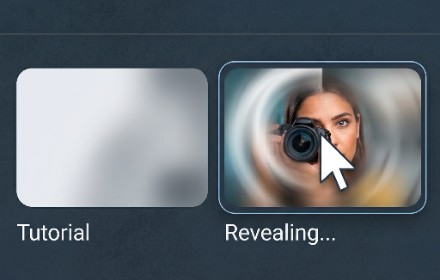
Blurs YouTube thumbnails to hide clickbait. Unblurs when hovering.
As of June 2026, Blur YouTube Thumbnails has 3 users in the Entertainment category.
Usersno change0%
3
3
Ratingno change0%
—
— reviews
Reviewsno change0%
—
Version
1.0
Manifest V3
History
6 snapshotsTracking since Apr 16, 2026.
View as table
| Date | Users | Rating | Reviews | Version |
|---|---|---|---|---|
| Apr 16, 2026 | — | — | — | 1.0 |
| Apr 22, 2026 | — | — | — | 1.0 |
| Apr 29, 2026 | 1 | — | — | 1.0 |
| May 11, 2026 | 2 | — | — | 1.0 |
| May 30, 2026 | 1 | — | — | 1.0 |
| Jun 5, 2026 | 2 | — | — | 1.0 |
| Now | 3 | — | — | 1.0 |
Permissions & access
- Permissions
- storage
- Host access
- *://*.youtube.com/*
Screenshots


About
Take control of your YouTube experience by eliminating visual distractions and clickbait thumbnails. Blur YouTube Thumbnails automatically obscures all video thumbnails across YouTube, allowing you to focus on titles, content, and intentional browsing instead of attention-grabbing imagery.

With a simple hover, you can instantly reveal any thumbnail you're interested in—giving you full control over what you see and when you see it. Whether you're studying, working, or just trying to reduce mindless scrolling, this extension helps you stay focused and intentional.

Customize your blur intensity to match your preference—from light softening to full obscuration. The extension works seamlessly across YouTube pages including the homepage, search results, recommendations, and channel views.

Built with privacy as a priority, everything runs 100% locally in your browser. No tracking, no analytics, no ads—just a clean, distraction-free YouTube experience.

Perfect for students, professionals, parents, and anyone looking to reduce digital noise and regain focus online.
Technical
- Version
- 1.0
- Manifest
- V3
- Size
- 16.14KiB
- Min Chrome
- 88
- Languages
- 1
- Featured
- No
Metadata
- ID
- cnmknagndehcocajchocakboaempmiml
- Developer ID
- ufb7c17981fe049bf5ad019afb6d762ea
- Developer Email
- [email protected]
- Created
- Apr 15, 2026
- Last Updated (Store)
- Apr 15, 2026
- Last Scraped
- Jun 13, 2026
- Website
- https://kominikee.com/
- Support URL
- https://www.extensions.kominikee.com/contact
Data sourced from the Chrome Web Store · last verified Jun 13, 2026.