
OKIOCAM Stop Motion
Use your webcam to make stop motion videos and automatically upload them to Google Drive.
As of June 2026, OKIOCAM Stop Motion has 40,000 users and a 3.00/5 rating from 6 reviews in the Education category.
Usersno change0%
40.0K
40,000
Ratingup 15.4 percent+15.4%
3.00
6 reviews
Reviewsup 20.0 percent+20.0%
6
Version
1.1.24
Manifest V3
History
6 snapshotsTracking since Apr 1, 2026.
View as table
| Date | Users | Rating | Reviews | Version |
|---|---|---|---|---|
| Apr 1, 2026 | — | 2.60 | 5 | 1.1.24 |
| Apr 18, 2026 | 60.0K | 2.60 | 5 | 1.1.24 |
| Apr 28, 2026 | 50.0K | 2.60 | 5 | 1.1.24 |
| May 8, 2026 | — | 2.60 | 5 | 1.1.24 |
| May 20, 2026 | 60.0K | 2.60 | 5 | 1.1.24 |
| Jun 3, 2026 | 60.0K | 3.00 | 6 | 1.1.24 |
| Now | 40.0K | 3.00 | 6 | 1.1.24 |
Permissions & access
- Permissions
- activeTabstorageidentity
- Host access
- None declared
Screenshots


About
Create fun and exciting stop motion videos with OKIOCAM Stop Motion! Access your videos from anywhere and on any device and easily use them with other Google cloud services such as Google Classroom, Docs, Slides, Sheets, and Forms.

★ Effortless stop motion videos
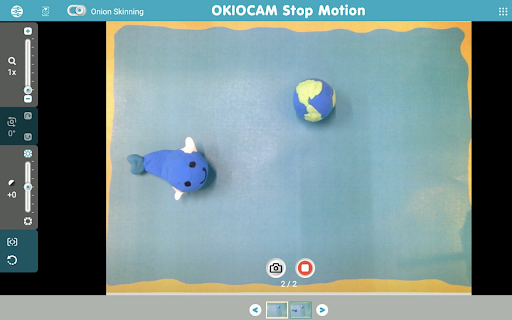
Use your webcam to take snapshots and then make them into awesome stop motion videos. Adjust the playback speed, add your own music (or choose from our selection of royalty-free songs!), trim and perfect your videos before they are automatically uploaded to Google Drive.

★ Onion Skinning
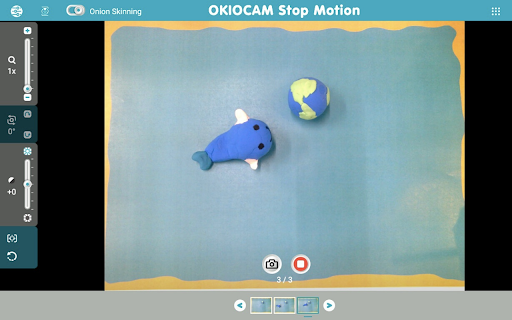
Use our Onion Skinning feature to ensure that your stop motion videos always come out flawless. Onion Skinning allows you to see a translucent version of the most recently taken snapshot, ensuring that you can line up your next snapshot with perfection.

★ Google Drive and Google Classroom integration
All stop motion videos are automatically saved to your Google Drive account, guaranteeing that they are secure and that you save a lot of time by not having to transfer and back up everything manually. Upload your videos directly to Google Classroom and use them as supporting documents for an Answer, an Assignment, or a Question.

★ Camera controls
Take advantage of the in-built camera controls. The Zoom (up to 6x) slider can help you zoom in to get the perfect shot. The Rotate control can rotate the camera display clockwise and counterclockwise in increments of 90°. Selfie Mode can reverse the camera feed to ensure that you aren’t viewing things backward.

If you own an OKIOCAM, you can also take advantage of these impressive features:

★ Additional camera controls
The Exposure slider lets you adjust your camera’s exposure settings on the fly. The One Button Auto Adjust feature will automatically correct your camera’s focus, exposure, and white balance settings to ensure that you get the very best shot.

About OKIOCAM:

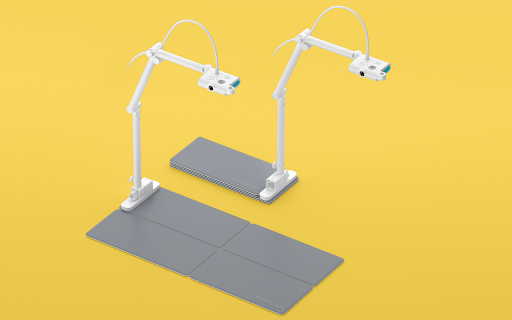
With an adjustable arm, ultra-thin foldable base, and a 360-degree rotating camera supporting super high definition resolutions, OKIOCAM makes it easy for teachers and students to take photos or videos of all their non-digital work. Whether it’s math homework, drawings, arts and crafts, STEM/STEAM projects, or 3D objects, OKIOCAM enables you to transport the physical classroom into the digital realm. Use OKIOCAM with our ever-growing exciting library of apps and extensions including Snapshot and Recorder, Stop Motion, and Time-Lapse for the complete experience.

Comments? Questions? Suggestions? Contact us at:
https://support.okiolabs.com
Technical
- Version
- 1.1.24
- Manifest
- V3
- Size
- 29.25MiB
- Min Chrome
- 117
- Languages
- 4
- Featured
- Yes
Metadata
- ID
- cnlaenhekjagkfjaglgfffkdblmddnnn
- Developer ID
- u6e439821a39296d912fa80f74c09dde1
- Developer Email
- [email protected]
- Created
- Jan 15, 2020
- Last Updated (Store)
- Nov 8, 2025
- Last Scraped
- Jun 3, 2026
- Website
- okiolabs.com
- Support URL
- https://okiolabs.zendesk.com/hc/en-us
- Privacy Policy
- https://okiolabs.com/privacy-policy/
Similar extensions
Alternatives to OKIOCAM Stop Motion, ranked by description similarity.

ideaocam
ideaocam
3.0K
★ 5.0

DocCam Viewer
Document Camera Viewer for Chromium Browsers
9.0K
★ 4.3

ClassInTheBox
A través de la extensión citbREC, puedes grabar una videoconferencia, un videotutorial, una clase o parte de ella.
1.0K
★ 5.0

edpuzzle
Import your favorite educational YouTube video into Edpuzzle with a click!
500.0K
★ 4.2

ADHOC - AI Study Assistant
Boost focus with ADHOC! Enjoy local AI video quizzes, a smart Pomodoro timer, active distraction tracking, and relaxing games.
15
★ 5.0

Recorder
Screen Recording with Simple Setup
281
★ 5.0

Learn Capture Lite
Capture and record your screen in high-quality 480p resolution with ease. Become a KOFIKLUB Member Today!
—

Zoom Avatar
Pixel art avatar with TTS and AI vision for Zoom calls
2
Data sourced from the Chrome Web Store · last verified Jun 3, 2026.