
PageFrame
Mark any URL with a colored border — instantly know which environment you're on.
As of June 2026, PageFrame has — users in the Developer Tools category.
Usersno change0%
—
—
Ratingno change0%
—
— reviews
Reviewsno change0%
—
Version
1.0.0
Manifest V3
History
1 snapshotsTracking since Jun 19, 2026.
Not enough history yet for this metric — the chart fills in as we collect more snapshots.
View as table
| Date | Users | Rating | Reviews | Version |
|---|---|---|---|---|
| Jun 19, 2026 | — | — | — | 1.0.0 |
| Now | — | — | — | 1.0.0 |
Permissions & access
- Permissions
- storagetabs
- Host access
- <all_urls>
Screenshots


About
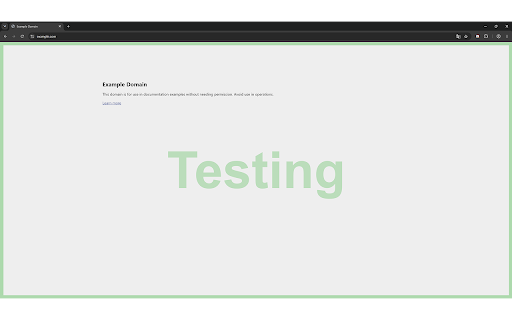
Ever opened a tab and wondered for a split second whether you're on production or staging? PageFrame solves that with a simple colored border around the page.

Define color profiles - give each one a name, border color, opacity, and width. Then assign them to URL patterns. Every time you visit a matching page, the border appears instantly. No clicks needed, no mental overhead.

How it works:
- Create named color profiles (e.g. "Production" in red, "Staging" in orange, "Local" in blue)
- Add URL rules with wildcards (`https://app.example.com/*`) or full regular expressions
- When multiple rules match a page, the profile highest in your list takes priority - you stay in control
- Optionally show a centered text label on matching pages - choose the text, size, color, and opacity

Built for developers and QA teams:
- Instantly distinguish production from staging from local environments
- Mark third-party tools, admin panels, or any URL you want to keep an eye on
- Each rule can be individually disabled with the Off checkbox - mute it without losing your setup

Flexible disable options:
- Disable all borders globally in one click
- Choose how long the disable lasts: Forever, This session, or until the next Reload
- Individual rules can be toggled off without affecting the rest

Clean and lightweight:
- Works on every page, including SPAs - re-evaluates on `pushState` / `replaceState` navigation
- Borders are rendered with a non-intrusive fixed overlay that never interferes with page content or layout
- Export and import your entire configuration as JSON - share it with your team or back it up

Privacy:
All settings are stored locally in your browser. No accounts, no sync, no data leaves your machine.
Technical
- Version
- 1.0.0
- Manifest
- V3
- Size
- 30.23KiB
- Min Chrome
- 88
- Languages
- 1
- Featured
- No
Metadata
- ID
- cngpncnpbbakikfghjgfgbogghhgppge
- Developer ID
- uc5ccc0eb8966116d4319a70f48ab5717
- Developer Email
- [email protected]
- Created
- Jun 18, 2026
- Last Updated (Store)
- Jun 18, 2026
- Last Scraped
- Jun 19, 2026
- Website
- —
- Support URL
- —
- Privacy Policy
- —
Data sourced from the Chrome Web Store · last verified Jun 19, 2026.