
Peel Banana
Remove Gemini AI watermarks from images. Privacy safe - 100% local, images never uploaded.
As of June 2026, Peel Banana has 10,000 users and a 4.72/5 rating from 43 reviews in the art category.
Usersup 66.7 percent+66.7%
10.0K
10,000
Ratingup 1.9 percent+1.9%
4.72
43 reviews
Reviewsup 59.3 percent+59.3%
43
Version
1.1.0
Manifest V3
90-day change · In the last 90 days this extension gained 4.0K users.
History
7 snapshotsTracking since Apr 5, 2026.
View as table
| Date | Users | Rating | Reviews | Version |
|---|---|---|---|---|
| Apr 5, 2026 | 6.0K | 4.63 | 27 | 1.1.0 |
| Apr 16, 2026 | 7.0K | 4.66 | 29 | 1.1.0 |
| Apr 26, 2026 | 8.0K | 4.68 | 31 | 1.1.0 |
| May 6, 2026 | 9.0K | 4.70 | 33 | 1.1.0 |
| May 22, 2026 | 10.0K | 4.72 | 36 | 1.1.0 |
| Jun 1, 2026 | 10.0K | 4.74 | 38 | 1.1.0 |
| Jun 9, 2026 | 10.0K | 4.76 | 41 | 1.1.0 |
| Now | 10.0K | 4.72 | 43 | 1.1.0 |
Permissions & access
- Permissions
- downloads
- Host access
- None declared
Screenshots



About
Peel Banana is a simple tool that erases the Gemini watermark from your images.
No editing skills needed. Just drop your image in and download the clean version.

Why Peel Banana?
Peel Banana Gemini watermark remover removes the "Gemini" watermark from AI-generated images in one click. No Photoshop, no online tools, no compromises on quality.

Unlike generic watermark removers that blur or smudge, Peel Banana uses the exact mathematical inverse of Gemini's watermarking process. The result? Clean restoration, not cover-up.

Your images stay yours. Everything happens locally in your browser. No uploads, no servers, no tracking. We couldn't see your images even if we wanted to.

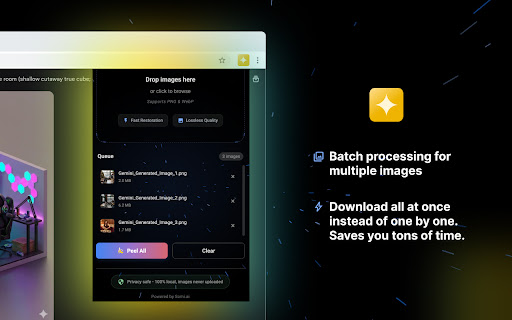
Built for speed. Drag, drop, done. Process dozens of images at once and download them all with a single click.

Features:
- One-click watermark removal.
- Batch processing for multiple images.
- Drag-and-drop simplicity.
- Bulk download option.
- Zero data collection. No accounts, no sign-ups, no analytics.

How to Use:
1. Download your image from Gemini using its download button (not "Save image as...").
2. Click the Peel Banana icon in your toolbar.
3. Drop your PNG files in.
4. Hit "Peel All".
5. Download and you're done.

Good to Know:
- Works with PNG files downloaded via Gemini's official download button.
- JPEGs saved via right-click won't work because compression destroys the data needed for restoration.
- Removes the visible watermark only. Invisible SynthID watermarks remain intact.


Peel Banana是一款簡單的工具,可以清除圖片上的 Gemini 浮水印。
不需要任何編輯技巧。只要把圖片拖進來,就能下載乾淨的版本。

為什麼選擇Peel Banana?
Peel Banana Gemini 浮水印移除工具,一鍵清除 AI 生成圖片上的「Gemini」浮水印。不需要 Photoshop,不需要線上工具,畫質也不打折。

一般的浮水印移除工具會造成模糊或污損,Peel Banana不一樣,它使用與 Gemini 浮水印技術完全相反的數學運算。結果?乾淨還原,而非遮蓋掩飾。

你的圖片由你掌控。所有處理都在你的瀏覽器本地完成。不上傳、不經過伺服器、不追蹤。就算我們想看你的圖片也看不到。

為速度而生。拖放即完成。一次處理數十張圖片,一鍵全部下載。

功能特色:
- 一鍵移除浮水印
- 批次處理多張圖片
- 拖放操作,簡單直覺
- 批量下載選項
- 零資料蒐集。不需帳號、不需註冊、沒有數據分析

使用方法:
1. 使用 Gemini 的下載按鈕下載圖片(不要用「另存圖片...」)
2. 點擊工具列中的剝香蕉圖示
3. 將 PNG 檔案拖放進來
4. 點擊「全部剝皮」
5. 下載,搞定

注意事項:
- 適用於透過 Gemini 官方下載按鈕下載的 PNG 檔案
- 右鍵另存的 JPEG 檔案無法使用,因為壓縮會破壞還原所需的資料
- 僅移除可見的浮水印。隱形的 SynthID 浮水印會保持不變
Technical
- Version
- 1.1.0
- Manifest
- V3
- Size
- 259KiB
- Min Chrome
- 88
- Languages
- 1
- Featured
- No
Metadata
- ID
- cngdhnfjakplnhplnmlgjalmfcochdgj
- Developer ID
- ua0ad1ba733d7bdc78af1bda55dd0afb0
- Developer Email
- [email protected]
- Created
- Jan 2, 2026
- Last Updated (Store)
- Jan 5, 2026
- Last Scraped
- Jun 9, 2026
- Website
- somi.ai
- Support URL
- —
- Privacy Policy
- https://somi.ai/privacy-policy
Similar extensions
Alternatives to Peel Banana, ranked by description similarity.

Gemini 批量去水印工具|Prompt Case
Gemini 批量圖片去水印工具,純本地瀏覽器處理,保護您的隱私。
Gemini Batch Image Watermark Remover.
10.0K
★ 4.7

Gemini & Nano Banana Watermark Remover — 1-Click Clean, Batch ZIP Export
Remove Gemini image watermarks. Process locally in the popup.
2.0K
★ 5.0

iMA Banana | Gemini
Auto Prompt & Watermark Removal | Professional prompt library for Gemini with interactive placeholders and watermark removal.
42
★ 5.0

Canva Banana
Generate custom design elements for Canva with AI - 為 Canva 生成自訂設計元素的 AI 工具
98
★ 5.0

PNG, GIF, JPEG Optimizer
Easy to use optimizer, resizer for image files. Your image files can be 10%-70% smaller. Supports PNG, Animation GIF, JPEG files.
2.0K
★ 4.7

Image Downloader – Bulk Save, Filter by Size & Ratio
Download and save all images from any website in one click. Filter by size, type, or aspect ratio — fast, private, and ad-free.
86
★ 5.0

大作采集器
“大作采集器”由大作官网(www.bigbigwork.com)提供。可快捷收藏采集网页中的图片。您可随时登录大作,查阅、下载、整理您收藏的图片。
依托大作图片搜索算法,可快捷搜索任意网页图片的相似图。收藏后,还可全网搜索更大分辨率原图。
4.0K
★ 3.7
Powerful Pixiv Downloader
强大的 Pixiv 批量下载器。Powerful Pixiv batch downloader. 強力な Pixiv ダウンローダー。
100.0K
★ 4.7
Data sourced from the Chrome Web Store · last verified Jun 9, 2026.