
LinkedIn to Airtable
Easily add LinkedIn profiles to Airtable with just one click
As of June 2026, LinkedIn to Airtable has 240 users and a 5.00/5 rating from 1 reviews in the Workflow & Planning category.
Usersup 1.3 percent+1.3%
240
240
Ratingno change0%
5.00
1 reviews
Reviewsno change0%
1
Version
0.0.20
Manifest V3
History
8 snapshotsTracking since Apr 1, 2026.
View as table
| Date | Users | Rating | Reviews | Version |
|---|---|---|---|---|
| Apr 1, 2026 | 237 | 5.00 | 1 | 0.0.20 |
| Apr 8, 2026 | 226 | 5.00 | 1 | 0.0.20 |
| Apr 19, 2026 | 221 | 5.00 | 1 | 0.0.20 |
| Apr 24, 2026 | 231 | 5.00 | 1 | 0.0.20 |
| May 8, 2026 | 230 | 5.00 | 1 | 0.0.20 |
| May 16, 2026 | 234 | 5.00 | 1 | 0.0.20 |
| May 25, 2026 | 232 | 5.00 | 1 | 0.0.20 |
| Jun 4, 2026 | 238 | 5.00 | 1 | 0.0.20 |
| Now | 240 | 5.00 | 1 | 0.0.20 |
Permissions & access
- Permissions
- storagecookies
- Host access
- https://www.linkedintoairtable.com/*, https://linkedintoairtable.com/*
Screenshots




About
Our browser extension simplifies adding LinkedIn profile data by allowing users to effortlessly store it in Airtable. With just one click on the LinkedIn profile page, customers can quickly and easily organize their information, streamlining their workflow.

Our extension is perfect for anyone who regularly uses LinkedIn to collect professional information. Whether you're a recruiter, salesperson, or researcher, our tool saves you time and effort by automatically capturing essential profile data and sending it directly to Airtable.

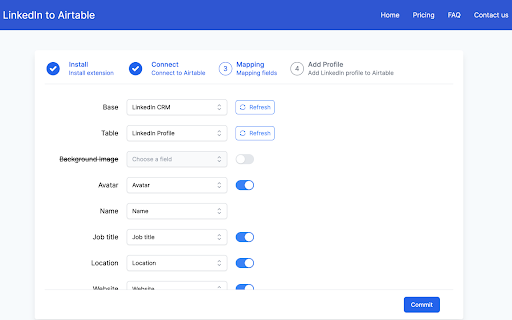
To use our extension, simply navigate to any LinkedIn profile page and click the "Add to Airtable" button. The extension will automatically pull the individual's name, avatar, job title, location, and other relevant information and add it to your Airtable base.

With our browser extension, you can effortlessly add LinkedIn profiles to your Airtable base and manage your professional contacts with ease.

Effortlessly Add LinkedIn Profiles to Airtable with our Browser Extension in 4 Simple Steps:
1. Install the browser extension from the Chrome Web Store.
2. Grant the extension access to your Airtable account by signing in.
3. Select the Airtable base and table where you want to store the profile information.
4. Navigate to a LinkedIn profile page. and click the "Add to Airtable" button on the top of the page. the extension will automatically extract the individual's name, job title, company, location, and other relevant information from the LinkedIn profile.

If you have any questions, please feel free to contact us anytime via email at [email protected].
Technical
- Version
- 0.0.20
- Manifest
- V3
- Size
- 237KiB
- Min Chrome
- 88
- Languages
- 1
- Featured
- No
Metadata
- ID
- cnbfnjnfadkcidlmddmmhkbfbngephmk
- Developer ID
- ua773b63375ddfb6b047c88b0769f1fbf
- Developer Email
- [email protected]
- Created
- Apr 13, 2023
- Last Updated (Store)
- Feb 6, 2026
- Last Scraped
- Jun 4, 2026
- Website
- linkedintoairtable.com
- Privacy Policy
- https://www.linkedintoairtable.com/privacy-policy
Similar extensions
Alternatives to LinkedIn to Airtable, ranked by description similarity.

Send to Sheets
Save LinkedIn profiles to your Google Sheet in 1 click
54
★ 3.7

personallyAi
Create personal emails with the touch of your hand
—
★ 5.0

Framewrk.ai Bridge
Extract professional profiles & contact data from LinkedIn
1

Buzz Builders AI
Let's you add contacts to your Buzz Builder CRM
5
★ 5.0

LeadFlow
Extracts LinkedIn profiles and checks or creates them in HubSpot.
6

LinkedIn Profile Capture
Capture LinkedIn profile data effortlessly. Export the collected profiles to CSV for easy access and analysis.
21

ProspectBuddy — LinkedIn Prospecting Tool for Airtable & Trello
LinkedIn leads to Airtable or Trello in one click — safe, manual prospecting with no automated actions.
58
★ 5.0

ProfileIn
Gather LinkedIn profiles with contact info and export them to CSV
7
★ 5.0
Data sourced from the Chrome Web Store · last verified Jun 4, 2026.