
Remove Google Docs Type @ To Insert
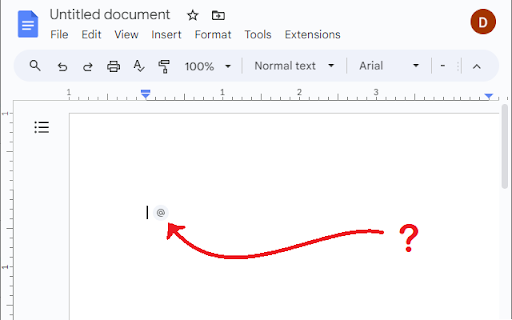
Removes the 'Type @ to Insert' bubble that appears whenever you type a new line in Google Docs.
As of May 2026, Remove Google Docs Type @ To Insert has 279 users and a 3.80/5 rating from 5 reviews in the Productivity category.
Usersdown 4.1 percent−4.1%
279
279
Ratingno change0%
3.80
5 reviews
Reviewsno change0%
5
Version
1.0.0
Manifest V3
History
3 snapshotsTracking since Apr 1, 2026.
View as table
| Date | Users | Rating | Reviews | Version |
|---|---|---|---|---|
| Apr 1, 2026 | 291 | 3.80 | 5 | 1.0.0 |
| Apr 29, 2026 | 274 | 3.80 | 5 | 1.0.0 |
| May 27, 2026 | 276 | 3.80 | 5 | 1.0.0 |
| Now | 279 | 3.80 | 5 | 1.0.0 |
Permissions & access
- Permissions
- None declared
- Host access
- None declared
Screenshots
About
The extension improves the user experience within Google Docs documents by eliminating the 'Type @ to Insert' bubble that consistently appears every time a user begins typing on a new line. Many users find this bubble both annoying and unnecessary, as it can disrupt the flow of typing and distract from the task at hand. By removing this feature, the extension caters to those who wish for a more streamlined and distraction-free writing environment in Google Docs, making it an essential tool for users looking to enhance their productivity and focus.
Technical
- Version
- 1.0.0
- Manifest
- V3
- Size
- 28.8KiB
- Min Chrome
- 88
- Languages
- 1
- Featured
- No
Metadata
- ID
- cmhjjklikiomopldckpajabdabjodmnc
- Developer ID
- u2041a3c56ae60c0f704f310bb074b313
- Developer Email
- [email protected]
- Created
- Jan 21, 2024
- Last Updated (Store)
- Jan 29, 2024
- Last Scraped
- May 27, 2026
- Website
- —
- Support URL
- —
- Privacy Policy
- —
Similar extensions
Alternatives to Remove Google Docs Type @ To Insert, ranked by description similarity.

Disable Link Preview in Google Docs
Prevents distracting link preview pop-ups in Google Docs for a cleaner experience.
11
★ 5.0

Typewriter
Types out text on Google Docs
166
★ 3.7

Spectre: AI Editor for Google Docs
Elevate your writing with the world's best AI addon for Google Docs. Tab, tab, tab through documents with our innovative…
17
★ 5.0

Google Docs Vim
Vim-style keyboard navigation and editing for Google Docs
2

Google Docs Focus Mode
Hide menus, toolbars, and sidebars in Google Docs. Pure distraction-free writing.
—

Docs One-Click Line
Googleドキュメントにワンクリックで水平線(区切り線)を挿入します。
3

Type GPT: Auto-Typer for Google Docs and more. Type like a Human
Let AI type for you: realistic typing simulation with typos and natural delays
2.0K
★ 4.3

Vim for Google Docs
Customizable Vim keybindings for Google Docs.
4
Data sourced from the Chrome Web Store · last verified May 27, 2026.