
TranscribeFlow
Easy and Seamless Audio Transcription & Precise AI Transcript Summaries
As of June 2026, TranscribeFlow has 91 users and a 3.40/5 rating from 5 reviews in the Accessibility category.
Usersup 8.3 percent+8.3%
91
91
Ratingdown 15.0 percent−15.0%
3.40
5 reviews
Reviewsup 25.0 percent+25.0%
5
Version
1.1
Manifest V3
History
4 snapshotsTracking since Apr 1, 2026.
View as table
| Date | Users | Rating | Reviews | Version |
|---|---|---|---|---|
| Apr 1, 2026 | 84 | 4.00 | 4 | 1.1 |
| Apr 20, 2026 | 89 | 4.00 | 4 | 1.1 |
| May 11, 2026 | 78 | 4.00 | 4 | 1.1 |
| Jun 6, 2026 | 86 | 4.00 | 4 | 1.1 |
| Now | 91 | 3.40 | 5 | 1.1 |
Permissions & access
- Permissions
- activeTabtabCapturestorageoffscreen
- Host access
- https://api.openai.com/*, https://transcribeflow.org/api/*
Screenshots


About
🎙️ TranscribeFlow – AI Transcription for Chrome Tabs
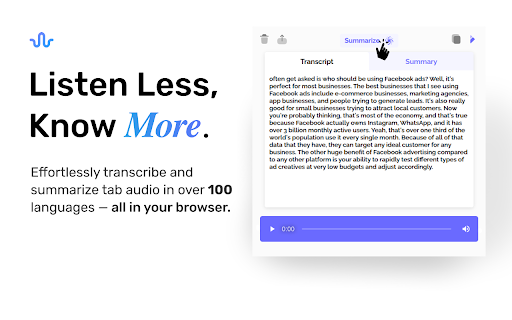
TranscribeFlow is your go-to Chrome extension for the transcription of any tab's audio — from meetings and webinars to YouTube videos and podcasts. Powered by AI, TranscribeFlow converts spoken audio into accurate, readable text, directly from your browser.

Whether you're a student, journalist, content creator, remote worker, or anyone who wants to capture audio insights as text — TranscribeFlow makes it effortless.

✨ Key Features:
🔊 Transcription of Any Tab
Transcribe audio from Zoom, Google Meet, YouTube, podcasts, webinars, and more — no downloads or integrations needed.

🧠 Powered by AI
Enjoy fast and accurate AI transcription backed by a powerful speech-to-text engine.

📝 AI Summarization
Go beyond transcription. Automatically generate concise summaries of your transcripts — perfect for quick reviews and sharing key points.

🎯 Multi-Use
Perfect for meeting notes, lecture capture, research, accessibility, and content repurposing.

💾 Save & Export
Download transcripts and summaries for future reference.

🧩 Use Cases:

Students transcribing lectures

Professionals capturing meeting notes automatically

Creators generating captions or blog content from videos

Journalists recording interviews directly from browser audio

Teams building searchable knowledge from conversations

🚀 Why TranscribeFlow?
Unlike tools that only work on specific platforms, TranscribeFlow works with any tab that has audio. No need for complex setups or uploading files. Just click, transcribe, and go.

🛠 How It Works:

Open the tab with the audio you want to transcribe.

Launch the TranscribeFlow extension.

Click "Start Transcription."

Watch your audio turn into text — instantly.

Optionally, generate a summary with one click.

🔐 Secure & Private
All transcriptions and summaries are processed securely. We don’t store or share your audio or text.

Start capturing and understanding everything you hear — instantly and accurately — with TranscribeFlow.

📥 Install now and never miss a word again.
Technical
- Version
- 1.1
- Manifest
- V3
- Size
- 3.67MiB
- Min Chrome
- 88
- Languages
- 1
- Featured
- No
Metadata
- ID
- cmdjoakdcogianplocglngnmmkmemiml
- Developer ID
- ua106e50e944be23bf68e4ae332e5e409
- Developer Email
- [email protected]
- Created
- Apr 8, 2025
- Last Updated (Store)
- Apr 15, 2025
- Last Scraped
- Jun 6, 2026
- Website
- —
- Support URL
- https://transcribeflow.org
- Privacy Policy
- https://transcribeflow.org/privacypolicy
Similar extensions
Alternatives to TranscribeFlow, ranked by description similarity.

Google Meet Transcription
Use Google Meet Transcription — AI automatic transcript for google meet. Transcribe calls instantly. You can get extension!
2.0K
★ 4.3

TransVoice Live Voice Translator
Translates audio from your browser tab in near-real-time.
78

Speech to Text Converter
Translate voice into text with speech to text converter. Fast audio to text transcription using automatic speech recognition.
4.0K
★ 4.5

Voice to Text Transcription
Convert speech to text in any input field using voice recognition
3

Transcripter
Your AI Webpage Assistant
14

Captions for Live Presentations
Multi-Language Captions for In-Person Spoken 🎤 Presentations - With Optional Real-Time Translation
20.0K
★ 3.7

GPT Reader/Transcriber: Free AI Text to Speech/Speech to Text (TTS/STT)
Free AI text to speech (tts) & speech to text (stt) with ChatGPT. Listen to natural voices or transcribe audio instantly.
30.0K
★ 4.6

Web2Audio
Convert any webpage into an AI-powered audio summary with premium text-to-speech voices
99
★ 5.0
Data sourced from the Chrome Web Store · last verified Jun 6, 2026.