
Contact Master
Contact Master
As of May 2026, Contact Master has 463 users and a 4.73/5 rating from 30 reviews in the Communication category.
Usersno change0%
463
463
Ratingno change0%
4.73
30 reviews
Reviewsno change0%
30
Version
1.1
Manifest V3
History
3 snapshotsTracking since Apr 1, 2026.
View as table
| Date | Users | Rating | Reviews | Version |
|---|---|---|---|---|
| Apr 1, 2026 | 463 | 4.73 | 30 | 1.1 |
| Apr 29, 2026 | 462 | 4.73 | 30 | 1.1 |
| May 27, 2026 | 466 | 4.73 | 30 | 1.1 |
| Now | 463 | 4.73 | 30 | 1.1 |
Permissions & access
- Permissions
- tabsstorageactiveTab
- Host access
- None declared
Screenshots


About
Title: Contact Master: Your Ultimate LinkedIn Contact Management Tool

Description:

Elevate Your LinkedIn Experience with Contact Master - The comprehensive Chrome extension designed for power users, professionals, and anyone looking to maximize their networking potential on LinkedIn.

Key Features:

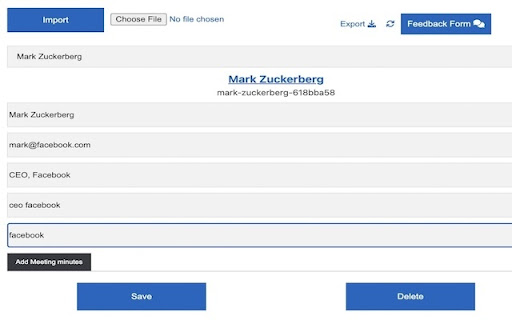
Advanced Contact Organization: Seamlessly categorize and organize your LinkedIn contacts with custom tags. Transform your cluttered contact list into a well-structured network, easily navigable and perfectly tailored to your professional needs.

Personalized Notes & Meeting Minutes: Add personal notes and detailed meeting minutes directly to each contact's profile. Keep track of vital information, follow-ups, and key conversation points, ensuring you never miss a beat in your professional interactions.

Powerful Tag-Based Search: Quickly locate the contacts you need with our enhanced search functionality. Filter your network by tags, notes, or specific criteria, saving time and streamlining your LinkedIn experience.

Seamless Integration with LinkedIn: Contact Master integrates directly with LinkedIn's interface, offering a cohesive and intuitive user experience. Manage your contacts without ever leaving LinkedIn's platform.

Why Choose Contact Master?

Designed by a LinkedIn Power User: Created with firsthand insights into the challenges of LinkedIn’s contact management, ensuring a solution that truly understands and addresses your needs.

Improve Networking Efficiency: With organized contacts and easy access to important details, networking becomes more strategic and effective.

Stay on Top of Your Professional Relationships: The detailed note-taking and meeting documentation features ensure that you are always prepared for your next interaction.

User-Friendly Interface: A simple, clean interface designed for ease of use, allowing you to focus on what's important - building and maintaining your professional network.

Getting Started:

It's easy! Just install Contact Master, and watch your LinkedIn networking transform. Manage your professional contacts more effectively and efficiently than ever before.

Privacy and Security:

Your privacy is paramount. Contact Master operates with the highest standards of data security and privacy, ensuring your information remains confidential and secure.

Join the Community of Efficient Networkers:

Download Contact Master today and revolutionize the way you manage your LinkedIn contacts. Say goodbye to cluttered lists and missed opportunities, and hello to a new era of professional networking!

New version July 1 2024.

Manually add a contact from any place.

Tags are organized for auto completion.
Technical
- Version
- 1.1
- Manifest
- V3
- Size
- 891KiB
- Min Chrome
- 88
- Languages
- 1
- Featured
- No
Metadata
- ID
- cmdcmljghmolhiphapkhgodlgebfgefb
- Developer ID
- uf746ad87f11b10fff04fa8bec4318499
- Developer Email
- [email protected]
- Created
- Dec 27, 2023
- Last Updated (Store)
- Jul 4, 2024
- Last Scraped
- May 27, 2026
- Website
- —
- Support URL
- —
Similar extensions
Alternatives to Contact Master, ranked by description similarity.

LinkedIn Email Finder
Automatically clicks the People button on LinkedIn company pages to quickly access employee listings.
114
★ 5.0

LinkedIn Cleaner
Take back control of your professional network with a single click.
16

LinkedIn Notes
Private notes & tags for LinkedIn profiles
7

Smart Inbox Organizer for LinkedIn
Organize LinkedIn conversations with tags, filters, and message templates - all in one simple tool.
10
★ 5.0

Superlinkin
A faster way to manage LinkedIn messages. Keyboard shortcuts, labels, and a clean inbox experience.
27

LinkedIn Helper
AI-powered assistant for LinkedIn: content creation, ad removal, and feed filtering
9

Contact Compass
Find contacts associated with any website domain or LinkedIn profile
17

Unetwrk Chrome Extension
A networking contact management platform for Chrome, for use with unetwrk.com.
16
★ 5.0
Data sourced from the Chrome Web Store · last verified May 27, 2026.