
SingleClick Cleaner
Single-click Chrome cleaner: clean up the trash in one single click
As of May 2026, SingleClick Cleaner has 10,000 users and a 4.23/5 rating from 60 reviews in the Functionality & UI category.
Usersno change0%
10.0K
10,000
Ratingno change0%
4.23
60 reviews
Reviewsno change0%
60
Version
3.0.0.0
Manifest V3
History
1 snapshotsTracking since Apr 24, 2026.
View as table
| Date | Users | Rating | Reviews | Version |
|---|---|---|---|---|
| Apr 24, 2026 | 10.0K | 4.23 | 60 | 3.0.0.0 |
| Now | 10.0K | 4.23 | 60 | 3.0.0.0 |
Permissions & access
- Permissions
- contextMenusbrowsingDatastorage
- Host access
- None declared
Screenshots

About
Google Chrome keeps a lot of data while you’re browsing the Internet – browsing history, cache, cookies, form data, temporary files and more. This data is usually used to speed up the browsing process. However, sometimes the cache gets too large and starts to slow down Chrome.  When this happens you definitely need to clean up your browser. You can clear history and all the data manually but it’s a tedious work and it’s boring. So, why not leaving it to our cleaner?

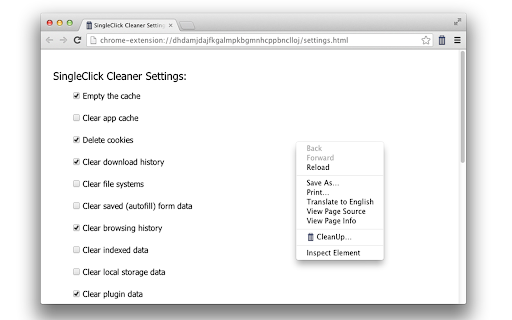
Single Click Cleaner will empty the cache, clear history, remove cookies, clear saved passwords and form data, zap the download history and more... in one single click!

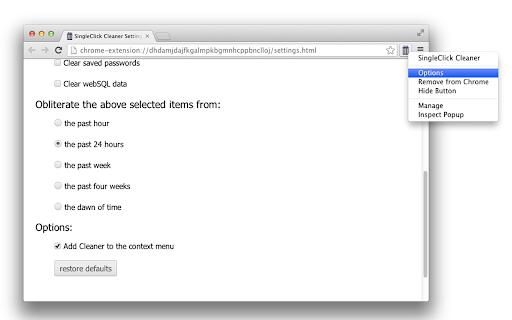
You want only specific items to be cleaned? Or maybe you need to clear the cache for a certain period only? No problem, Single Click Cleaner can do it all. Just go to the Options page and set your preferences.

Cleaner options:

 * Cache cleaner
 * App cache cleaner
 * Remove cookies
 * Delete download history
 * Clear file systems
 * Delete saved (autofill) form data
 * Clear Chrome history
 * Remove indexed data
 * Delete local storage data
 * Clear plugin data
 * Delete saved passwords
 * Clear webSQL data

Features:
 * Single-click cleaner (set cleaner options and then just click the cleaner icon, no confirmation screens etc.)
 * You choose what to clean when clicked (see the "Options" page)
 * Clear history, cache and browsing data for specified time period
 * Add/remove shortcut to the context menu

Notes:
 * Please, be aware that SingleClick Cleaner will delete only chrome history, but will not interfere with your google history (your search history on google.com). To deal with your google search history you should go to your account in the search engine itself and deal with the google history from there)
 * If you delete cookies, you'll be signed out from most current sites (don't select "clear cookies" if you don't want to log-in again every time you use the cleaner)
Technical
- Version
- 3.0.0.0
- Manifest
- V3
- Size
- 29.93KiB
- Min Chrome
- 88
- Languages
- 1
- Featured
- Yes
Metadata
- ID
- cknijndocnnlkpenngcdcpleddlmckkm
- Developer ID
- uacba69a502d35cf0d566422b1296c5bd
- Developer Email
- [email protected]
- Created
- Aug 2, 2013
- Last Updated (Store)
- Aug 12, 2024
- Last Scraped
- May 19, 2026
- Website
- https://singleclickapps.com/
- Support URL
- —
- Privacy Policy
- https://singleclickapps.com/privacy.html
Similar extensions
Alternatives to SingleClick Cleaner, ranked by description similarity.

Clear Browsing History
Clear Browsing History automatically deletes data on closure or instantly clears history with a click, including search history…
—

Delete Browsing History
Quickly clear browsing history or delete search history in a single click with this extension for Chrome.
3.0K
★ 4.2

Site History Cleaner
Delete browsing history for the current site with one click
13

Easy and Precise Cleaner
Easily clear browser cache with one click and automatically clean it after closing the browser for enhanced privacy and security.
—

Clean Master – System Cleaner
Clean cache, cookies, history, and site data with one click.
341

Google Chrome clear
A nifty one-click clean-up tool that zaps Chrome's cookies, cache, and history, and sweeps away all the leftover digital dust.
23
★ 5.0

Destroy your Chrome History
Resets your browsing history after inactivity or Instantly!.
19

Cookiekill+
Clear all cookies, localStorage, sessionStorage, and IndexedDB for the current site.
13
★ 5.0
Data sourced from the Chrome Web Store · last verified May 19, 2026.