
Batch Image Download Tool
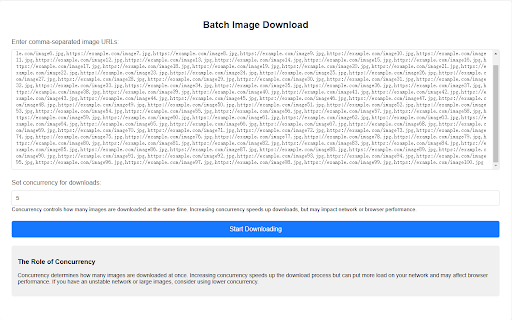
Paste comma-separated image URLs into the address bar, set the download concurrency, and start bulk downloading.
As of May 2026, Batch Image Download Tool has 137 users in the Productivity category.
Usersup 0.7 percent+0.7%
137
137
Ratingno change0%
—
— reviews
Reviewsno change0%
—
Version
1.0.0
Manifest V3
History
2 snapshotsTracking since Apr 24, 2026.
View as table
| Date | Users | Rating | Reviews | Version |
|---|---|---|---|---|
| Apr 24, 2026 | 136 | — | — | 1.0.0 |
| May 19, 2026 | 145 | — | — | 1.0.0 |
| Now | 137 | — | — | 1.0.0 |
Permissions & access
- Permissions
- None declared
- Host access
- https://www.crazywhy.com/*
Screenshots
About
The Batch Image Download Tool is designed to simplify the process of downloading multiple images from URLs. If you have a list of image URLs (for example, from a website or an online gallery), you can easily and quickly download all of them with just a few clicks, saving you time and effort. Instead of downloading images one by one manually, this tool automates the process and downloads them in batches.

Key Features:
1, Batch Downloading:
You can input a comma-separated list of image URLs and download all images in bulk.
This is particularly useful when you need to gather images from multiple sources or when working with a large number of images.

2, Concurrency Control:
The tool allows you to set the concurrency, which determines how many images are downloaded at the same time.
By adjusting the concurrency, you can speed up the download process, or reduce the load on your network if needed.

3, Image URL Validation:
The tool automatically checks the URLs you enter to ensure they are valid image links.
Invalid URLs will be flagged, allowing you to correct them before initiating the download process.

4, User-Friendly Interface:
The simple and clean interface makes it easy for users of all technical levels to input their image URLs and start the download process with minimal effort.
You can track the progress of the downloads in real time, with status updates and success/error messages.

5, Flexible Download Options:
You can download the images in their original format, or the tool can convert them into base64 format if needed.
The tool is designed to be compatible with most modern browsers and can handle various image formats (JPG, PNG, GIF, etc.).
Technical
- Version
- 1.0.0
- Manifest
- V3
- Size
- 7.54KiB
- Min Chrome
- 88
- Languages
- 2
- Featured
- No
Metadata
- ID
- ckjmfijodnfpjmlbabgcllgmcnencolj
- Developer ID
- u2fadc33b7c6688739e181471a4bb4e9d
- Developer Email
- [email protected]
- Created
- Jan 9, 2025
- Last Updated (Store)
- Jan 9, 2025
- Last Scraped
- May 19, 2026
- Website
- —
- Support URL
- —
- Privacy Policy
- —
Similar extensions
Alternatives to Batch Image Download Tool, ranked by description similarity.

Bulk Image Downloader
Download multiple images as a ZIP file from a list of URLs
29

Image Batch Downloader
One-click to extract and download all images from the current page.
—

Batch Image Downloader
With Batch Image Downloader, you can download all images from a webpage with just one click!
34
★ 1.0

Image Downloader
Browse and download images you need from any web pages or select all to bulk image download at once.
14

Bulk Image Downloader
Use this extension to upload an image file (CSV or JSON), automatically extract all images, and download them in a ZIP format.
63

Image Downloader - Download All Images
Download all images from websites with bulk download, batch editing, format conversion and filtering.
8
★ 5.0

Fatkun Batch Download Image
A simple and easy-to-use tool for batch downloading images from web pages.
4.0K
★ 3.7

Lazada Image Batch Download Tool Assistant
Download all images of Lazada product details page in batches with one click
108
★ 5.0
Data sourced from the Chrome Web Store · last verified May 19, 2026.