MicroTTS — Instant voice for any text
Right-click any text or page to hear premium multilingual AI voices — inline, one-click, privacy-first.
As of June 2026, MicroTTS — Instant voice for any text has 2 users in the Productivity category.
Usersno change0%
2
2
Ratingno change0%
—
— reviews
Reviewsno change0%
—
Version
1.3.3
Manifest V3
History
2 snapshotsTracking since May 10, 2026.
Not enough history yet for this metric — the chart fills in as we collect more snapshots.
View as table
| Date | Users | Rating | Reviews | Version |
|---|---|---|---|---|
| May 10, 2026 | — | — | — | 1.3.3 |
| May 15, 2026 | — | — | — | 1.3.3 |
| Now | 2 | — | — | 1.3.3 |
Permissions & access
- Permissions
- contextMenusstorageoffscreenclipboardReaddownloadsscriptingactiveTab
- Host access
- https://sr.microq.org/*
Screenshots

About
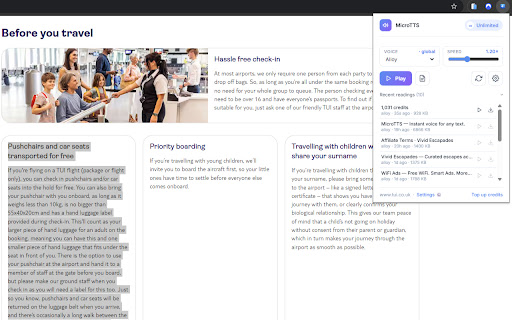
Premium Read Aloud brings professional‑grade text‑to‑speech directly into your browser. No copy‑paste. No switching tabs. Just select text, right‑click, and listen.

Designed for productivity, accessibility, and focus — this extension uses your personal API key to generate high‑quality audio through our secure TTS microservice.

Why users love it
Right‑click → Read aloud
Works on articles, PDFs, emails, dashboards, documentation — anywhere text exists.

Premium voice quality
Natural, expressive voices ideal for reading long content.

Instant playback
Audio streams directly in your browser.

Privacy‑first
Your API key is stored locally using Chrome Sync.
No tracking. No analytics. No ads.

Flexible credit system
Pay only for what you use. Perfect for light or heavy listeners.

Perfect for
People with reading fatigue or ADHD

Language learners

Professionals reviewing long documents

Students studying articles or research

Anyone who prefers listening over reading

How it works
Install the extension

Open the Options page and paste your API key

Select any text → right‑click → “Read this aloud”

Audio plays instantly

Security & Privacy
We do not collect browsing data

We do not sell or share personal information

Text is sent only to your TTS endpoint for audio generation

API key is stored securely in Chrome Sync
Technical
- Version
- 1.3.3
- Manifest
- V3
- Size
- 66.97KiB
- Min Chrome
- 88
- Languages
- 1
- Featured
- No
Metadata
- ID
- ckeojeojejjkgdadeneedfidegfjbogd
- Developer ID
- u11bd51b5d4dab352d00ae39b87e7617d
- Developer Email
- [email protected]
- Created
- May 9, 2026
- Last Updated (Store)
- May 9, 2026
- Last Scraped
- Jun 9, 2026
- Website
- —
- Support URL
- —
- Privacy Policy
- https://sr.microq.org/privacy
Data sourced from the Chrome Web Store · last verified Jun 9, 2026.