
SuiteUpload
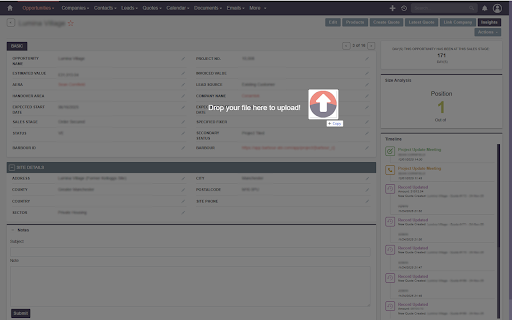
Drag and drop file and email upload for SuiteCRM. Works with both SuiteCRM 7 and 8.
As of June 2026, SuiteUpload has 55 users in the Productivity category.
Usersup 12.2 percent+12.2%
55
55
Ratingno change0%
—
— reviews
Reviewsno change0%
—
Version
1.0.1
Manifest V3
History
6 snapshotsTracking since Apr 18, 2026.
View as table
| Date | Users | Rating | Reviews | Version |
|---|---|---|---|---|
| Apr 18, 2026 | 49 | — | — | 1.0.1 |
| Apr 28, 2026 | 53 | — | — | 1.0.1 |
| May 7, 2026 | 53 | — | — | 1.0.1 |
| May 15, 2026 | 51 | — | — | 1.0.1 |
| May 24, 2026 | 55 | — | — | 1.0.1 |
| Jun 3, 2026 | 54 | — | — | 1.0.1 |
| Now | 55 | — | — | 1.0.1 |
Permissions & access
- Permissions
- storageactiveTabtabsscripting
- Host access
- None declared
Screenshots

About
For a limited time, we’re looking for SuiteUpload back-end beta testers. If your team is happy to give us feedback, we’ll provide the SuiteUpload back-end plugin free for 12 months, with discounted rates available after that. To apply, please email [email protected].

Transform Your SuiteCRM Workflow with Intelligent Drag-and-Drop

  Stop wasting hours manually logging emails and uploading files. SuiteCRM File Upload & Email Import Helper brings
  powerful automation to your CRM workflow. Simply drag emails from Outlook or files from your desktop directly onto
   any SuiteCRM record - the extension handles everything else automatically.

  ✨ REVOLUTIONARY EMAIL IMPORT

  🔥 DRAG OUTLOOK EMAILS DIRECTLY INTO SUITECRM
  • Drop .msg files from Outlook onto any SuiteCRM record
  • Automatic email parsing with full metadata extraction
  • Emails appear instantly in the record's History subpanel
  • Preserves sender, recipients (To/Cc/Bcc), subject, body, and attachments
  • HTML email formatting maintained
  • Intelligent detection of sent vs. received emails

  🧠 SMART EMAIL LINKING
  • Automatically links emails to related Contacts based on email addresses
  • Intelligent Account association - finds accounts by email and contact relationships
  • Creates proper email relationships across your CRM
  • No manual linking required - the system does it all

  📧 ADVANCED EMAIL PROCESSING
  • Exchange/Outlook email format support (.msg files)
  • Extracts embedded attachments from emails
  • Attachments automatically saved as Notes linked to the email
  • Recognizes system users vs. external contacts
  • Automatically prefixes subjects with (Sent) or (Received) based on direction
  • Preserves complete email threading and metadata

  📎 UNIVERSAL FILE UPLOADS
  • Drop ANY file type onto SuiteCRM records
  • PDF, Word, Excel, images, contracts, presentations - everything
  • Automatic Document record creation
  • Intelligent module relationship handling
  • Creates relationships automatically if they don't exist
  • Multiple file upload support

  ⚡ INTELLIGENT AUTOMATION

  🎯 SMART MODULE DETECTION
  • Works with ALL modules: Opportunities, Accounts, Contacts, Leads, Cases, Projects, custom modules
  • Automatically detects which record you're viewing
  • Supports both SuiteCRM 7.x and 8.x URL formats
  • Adapts to your CRM structure

  🔗 RELATIONSHIP INTELLIGENCE
  • Automatically creates document relationships if missing
  • Links emails to all relevant parties (sender, recipients, related accounts)
  • Finds and links contacts by email address
  • Associates emails with related accounts automatically
  • Maintains data integrity across your CRM

  ⚙️ CONFIGURABLE BEHAVIOR
  • Optional auto-refresh after upload to see changes immediately
  • Adjustable refresh delay (1-10 seconds)
  • HTTP and HTTPS support
  • Works with IP addresses and custom domains
  • Debug mode for troubleshooting

  🚀 HOW IT WORKS

  FOR OUTLOOK EMAILS:
  1. Configure your SuiteCRM domain in the extension popup
  2. Open an Opportunity, Contact, Account, or any record in SuiteCRM
  3. Drag an email from Outlook (as a .msg file)
  4. Drop it onto your browser window
  5. Magic happens:
     - Email content extracted and parsed
     - Email record created in SuiteCRM
     - Email appears in History subpanel
     - Attachments extracted and saved
     - Contacts automatically linked by email address
     - Related Accounts automatically associated
     - All relationships created automatically

  FOR FILES & DOCUMENTS:
  1. Navigate to any SuiteCRM record
  2. Drag a file from your desktop
  3. Drop it onto the browser window
  4. Document record created instantly
  5. File attached and linked to your record

  🎯 REAL-WORLD USE CASES

  SALES TEAMS:
  "Client sent a proposal via email? Drag the email onto the Opportunity record. The email, attached PDF proposal,
  and all contact relationships are created automatically. 30 seconds vs. 5 minutes of manual work."

  SUPPORT TEAMS:
  "Customer support email? Drop it on the Case record. The entire email thread with attachments appears in the case
  history, automatically linked to the customer's contact and account records."

  ACCOUNT MANAGERS:
  "Maintaining communication history is effortless. Every important email goes straight into the Account record with
   full context - who sent it, who received it, what was discussed, and any attached files."

  PROJECT MANAGERS:
  "Project documents scattered across email? Drag them onto the Project record. Signed contracts, meeting notes,
  design files - everything organized automatically."

  ⚙️ TECHNICAL SETUP

  This extension requires a companion backend module on your SuiteCRM server. The backend provides:

  • MAPI library integration for .msg file parsing
  • Secure file processing and validation
  • Email metadata extraction engine
  • Intelligent contact/account matching
  • Relationship creation and management
  • Document revision tracking

  INSTALLATION:
  • Frontend (This Extension): Free - Install from Chrome Web Store
  • Backend Module: Available on SuiteCRM Store - Professional email parsing engine


  🔒 PRIVACY & SECURITY

  • All data stays on YOUR servers - no external transmission
  • Email content processed entirely on your SuiteCRM instance
  • No third-party services or data collection
  • Settings stored locally in your browser
  • Secure, private, and transparent
  • Enterprise-grade security

  💼 PERFECT FOR

  • Sales professionals logging client communications
  • Support teams managing case correspondence
  • Account managers maintaining relationship history
  • Project managers organizing project files
  • Anyone tired of manual email forwarding to CRM
  • Teams wanting seamless Outlook-to-SuiteCRM workflow
  • Organizations requiring complete communication audit trails

  📋 TECHNICAL HIGHLIGHTS

  EMAIL PROCESSING:
  • Parses Outlook .msg files using MAPI library
  • Extracts: sender, recipients (To/Cc/Bcc), subject, date, body (text & HTML)
  • Handles Exchange format email addresses
  • Extracts and saves embedded attachments
  • Creates proper Email records in SuiteCRM
  • Links to emails_beans relationship table
  • Supports classic desktop Outlook only (.msg export). New “modern” Outlook does not allow .msg drag-and-drop.

  INTELLIGENT LINKING:
  • Searches email addresses across Contacts and Accounts
  • Creates email_addr_bean_rel relationships
  • Links to related accounts via contact relationships
  • Prevents duplicate associations
  • Maintains referential integrity

  DOCUMENT MANAGEMENT:
  • Creates Document and DocumentRevision records
  • Handles file uploads to SuiteCRM upload directory
  • Auto-creates missing module-document relationships
  • Supports custom modules automatically
  • Maintains version control

  COMPATIBILITY:
  • SuiteCRM 7.x and 8.x
  • Self-hosted installations (any domain/IP)
  • HTTP and HTTPS
  • Chrome and Edge browsers
  • Works with custom modules

  🏆 WHY USERS LOVE THIS EXTENSION

  ❌ STOP DOING THIS:
  • Forwarding emails to special CRM email addresses
  • Copy-pasting email content manually
  • Downloading attachments then re-uploading to CRM
  • Manually linking emails to contacts
  • Hunting for account relationships
  • Clicking through 8-step upload wizards

  ✅ START DOING THIS:
  • One drag motion = complete email import
  • Automatic contact and account linking
  • Attachments extracted automatically
  • Full communication history preserved
  • Hours saved every week
  • Complete audit trail maintained

  Transform your SuiteCRM and Outlook workflow today. Install now and experience true productivity!

  ---

  SYSTEM REQUIREMENTS:
  • Browser: Chrome or Edge (latest versions)
  • SuiteCRM: Version 7.x or 8.x
  • Backend Module: Required (available on SuiteCRM Store)
  • PHP Extensions: MAPI library (hfig/mapi) for email parsing
  • Permissions: Document write access, Email module access

  EMAIL FORMATS SUPPORTED:
  • Outlook .msg files (standard and Exchange format)
  • Embedded attachments
  • HTML and plain text email bodies
  • Multiple recipients (To, Cc, Bcc)
  •Supports classic desktop Outlook only (.msg export). New “modern” Outlook does not allow .msg drag-and-drop.
Technical
- Version
- 1.0.1
- Manifest
- V3
- Size
- 80.09KiB
- Min Chrome
- 88
- Languages
- 1
- Featured
- No
Metadata
- ID
- ckbhcffbniibojcgmmolijmpmbldlbli
- Developer ID
- uc92add9c12924603951b80a2f9c111fd
- Developer Email
- [email protected]
- Created
- Dec 9, 2025
- Last Updated (Store)
- Dec 14, 2025
- Last Scraped
- Jun 3, 2026
- Website
- appydays.xyz
- Support URL
- https://appydays.xyz/suiteupload/
- Privacy Policy
- https://appydays.xyz/suiteupload/privacy.html
Similar extensions
Alternatives to SuiteUpload, ranked by description similarity.

Outlook Calendar Automation
Automate calendar invites for Outlook with role-based templates, custom time windows, and timezone-aware scheduling
42
★ 5.0

Bulk Outlook Email to PDF Exporter
Export single or multiple Outlook emails and conversations to PDF
248
★ 4.0

Gmail Accelerator Pro for Sage CRM
View and File Emails, Create entities like Company, Person, Opportunties and more including custom entities.
11

CRM Window
Opens your CRM in a persistent popup window while browsing. Hover over the extension icon to see instructions.
3

LinkedIn CRM Sidebar
Track and organize LinkedIn contacts.
8
★ 5.0

MergeWriter
Send small batches of personalized emails using mail merge templates from Google Sheets inside Gmail, Outlook, Zoho, and cPanel.
30

Outlook Copilot Reply Assistant with M365 Copilot
Automatically pastes selected email content from Outlook on the web into M365 Copilot side panel and optionally sends it with Enter.
116

MLeads CRM Leads Sales Tracker
Effortlessly capture leads with one click—AI-powered email and name scraping for your MLeads CRM.
24
★ 5.0
Data sourced from the Chrome Web Store · last verified Jun 3, 2026.