
AutoClear - Очистка данных браузера
Автоматическая очистка истории браузера
As of May 2026, AutoClear - Очистка данных браузера has 72 users and a 4.00/5 rating from 8 reviews in the Privacy & Security category.
Usersup 1.4 percent+1.4%
72
72
Ratingno change0%
4.00
8 reviews
Reviewsno change0%
8
Version
1.0.4
Manifest V3
History
5 snapshotsTracking since Apr 1, 2026.
View as table
| Date | Users | Rating | Reviews | Version |
|---|---|---|---|---|
| Apr 1, 2026 | 71 | 4.00 | 8 | 1.0.4 |
| Apr 21, 2026 | 77 | 4.00 | 8 | 1.0.4 |
| May 6, 2026 | 64 | 4.00 | 8 | 1.0.4 |
| May 17, 2026 | 73 | 4.00 | 8 | 1.0.4 |
| May 31, 2026 | 66 | 4.00 | 8 | 1.0.4 |
| Now | 72 | 4.00 | 8 | 1.0.4 |
Permissions & access
- Permissions
- storagebrowsingDatahistorydownloadscookiesnotificationsalarms
- Host access
- <all_urls>
Screenshots
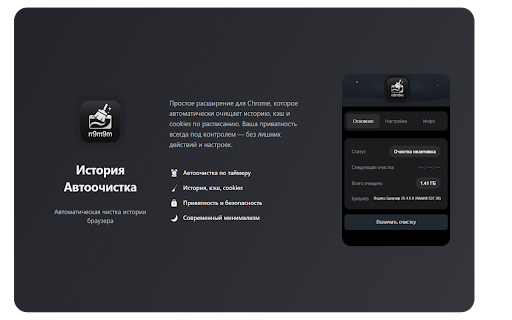
About
RU

История Автоочистка — это мощное расширение для Chrome и других браузеров на Manifest V3, которое автоматически очищает историю просмотров, загрузки, кэш и другие данные браузера. Оно помогает поддерживать конфиденциальность и оптимизировать производительность вашего браузера.

[ОСНОВНЫЕ ВОЗМОЖНОСТИ ✨]

🕒 АВТОМАТИЧЕСКАЯ ОЧИСТКА
- Настраиваемый интервал очистки (секунды, минуты, часы)
- Умный таймер с отображением времени до следующей очистки
- Возможность включения/отключения в один клик

🧹 РАСШИРЕННАЯ ОЧИСТКА ДАННЫХ
- История просмотров
- История загрузок
- Кэш браузера
- Данные форм
- Cookies
- И многое другое

🔒 БЕЗОПАСНОСТЬ
- PIN-код для защиты настроек
- Система восстановления доступа
- Защита от несанкционированного доступа

📊 МОНИТОРИНГ
- Подробные логи операций (для продвинутых пользователей)

[КАК ПОЛЬЗОВАТЬСЯ]

1. "Установка"
   - Установите расширение из Chrome Web Store
   - Нажмите на иконку расширения в панели инструментов

2. "Настройка"
   - Выберите интервал очистки
   - Отметьте типы данных для очистки
   - При желании установите PIN-код

3. "Использование"
   - Включите автоматическую очистку кнопкой "Включить очистку"
   - Следите за таймером до следующей очистки
   - Очистка работает при закрытом расширении

[ПРЕИМУЩЕСТВА ИСПОЛЬЗОВАНИЯ]
- 🚀 Повышение производительности браузера
- 🔒 Улучшение конфиденциальности
- 💾 Экономия места на диске
- ⚡ Автоматизация рутинных задач
- 🎯 Простой и понятный интерфейс

[ТЕХНИЧЕСКИЕ ОСОБЕННОСТИ]
- Поддержка темной и светлой темы
- Адаптивный дизайн
- Многоязычный интерфейс (Русский/Английский)
- Оптимизированная работа с хранилищем
- Защита от сбоев и ошибок

[СИСТЕМНЫЕ ТРЕБОВАНИЯ]
- Chrome версии 120 или выше
- Минимум 50 МБ свободного места

[ПОДДЕРЖКА]
Если у вас возникли вопросы или проблемы:
- Обратитесь пожалуйста на мою эл.почту

[БЕЗОПАСНОСТЬ]
- Все данные обрабатываются локально
- Нет отправки данных на серверы
- Безопасное хранение настроек
- Защита от несанкционированного доступа

ENG

AutoClear – Smart Browser Data Cleanup 🔄

[ABOUT THE EXTENSION]
AutoClear is a powerful Chrome extension that automatically clears your browsing history, downloads, cache, and other browser data. It helps maintain privacy and optimize your browser’s performance.

[KEY FEATURES ✨]

🕒 AUTOMATIC CLEANING
- Customizable cleaning intervals (seconds, minutes, hours)
- Smart timer showing time until the next cleanup
- One-click enable/disable functionality

🧹 ADVANCED DATA CLEANING
- Browsing history
- Download history
- Browser cache
- Form data
- Cookies
- And much more

🔒 SECURITY
- PIN protection for settings
- Recovery system for lost access
- Protection against unauthorized access

📊 MONITORING
- Detailed operation logs (for advanced users)

[HOW TO USE]

1. "Installation"
   - Install the extension from the Chrome Web Store
   - Click the extension icon in the toolbar

2. "Configuration"
   - Set your preferred cleaning interval
   - Select data types to be cleaned
   - Optionally set a PIN code

3. "Usage"
   - Enable automatic cleanup using the “Start Cleaning” button
   - Monitor the countdown to the next cleanup
   - The cleanup runs even when the extension window is closed

[ADVANTAGES]
- 🚀 Improved browser performance
- 🔒 Enhanced privacy
- 💾 Disk space saving
- ⚡ Automation of routine tasks
- 🎯 Simple and intuitive interface

[TECHNICAL FEATURES]
- Support for dark and light themes
- Responsive design
- Multilingual interface (Russian/English)
- Optimized storage handling
- Crash and error protection

[SYSTEM REQUIREMENTS]
- Chrome version 120 or higher
- At least 50 MB of free space

[SUPPORT]
If you have any questions or issues:
- Please contact me via email

[SECURITY]
- All data is processed locally
- No data is sent to servers
- Secure settings storage
- Protection from unauthorized access
Technical
- Version
- 1.0.4
- Manifest
- V3
- Size
- 187KiB
- Min Chrome
- 120
- Languages
- 2
- Featured
- No
Metadata
- ID
- cjjdlibbanfllfhlpemnmidikdlacbom
- Developer ID
- uaea1466db173b6246dcb788e97e65056
- Developer Email
- [email protected]
- Created
- May 6, 2025
- Last Updated (Store)
- May 28, 2025
- Last Scraped
- May 31, 2026
- Website
- https://httptest.ru/
- Support URL
- —
- Privacy Policy
- —
Similar extensions
Alternatives to AutoClear - Очистка данных браузера, ranked by description similarity.

Pure Clean: One-Click Browser Cleaner
Clear browser cache, history, cookies, and other data with one click to protect your privacy and improve browser speed.
395

Auto History Clear
Automatically clears your browsing history to maintain privacy and keep your browser clean.
31
★ 5.0

ClickClean – Browser Cleaner
Clean your browser data with one click — history, cache, cookies, downloads, and more. Fast, private, no tracking.
31

Tarayıcı Temizleyici Pro
Tarayıcı verilerinizi otomatik veya manuel olarak temizleyin. Geçmiş, çerezler, önbellek ve daha fazlası!
18

Clarity Clean
A premium Chrome extension for effortlessly managing and clearing your browsing data.
4
★ 5.0

History Autowipe
Automatically clears browsing history, cookies, or all data at custom intervals.
69

Clear By Keyword
Automatically clears browsing history for URLs containing specific keywords
4

Private Search Online — Auto History Wipe
Search privately with auto history wipe. No account/login, no tracking profile. Browser history deleted automatically on tab close.
25
★ 4.5
Data sourced from the Chrome Web Store · last verified May 31, 2026.