
Looi
A Minimal, Customisable New Tab page for Firefox, Chrome, and Edge.
As of June 2026, Looi has 5 users and a 5.00/5 rating from 1 reviews in the Productivity category.
Usersno change0%
5
5
Ratingno change0%
5.00
1 reviews
Reviewsdown 50.0 percent−50.0%
1
Version
1.2.1
Manifest V3
History
6 snapshotsTracking since Apr 3, 2026.
View as table
| Date | Users | Rating | Reviews | Version |
|---|---|---|---|---|
| Apr 3, 2026 | — | 5.00 | 2 | 1.2.1 |
| Apr 17, 2026 | 6 | 5.00 | 2 | 1.2.1 |
| May 2, 2026 | 5 | 5.00 | 2 | 1.2.1 |
| May 10, 2026 | 6 | 5.00 | 2 | 1.2.1 |
| May 18, 2026 | 6 | 5.00 | 1 | 1.2.1 |
| Jun 5, 2026 | 4 | 5.00 | 1 | 1.2.1 |
| Now | 5 | 5.00 | 1 | 1.2.1 |
Permissions & access
- Permissions
- storage
- Host access
- https://api.github.com/*, https://github.com/
Screenshots


About
Looi Extension – A Minimal, Customizable New Tab Experience

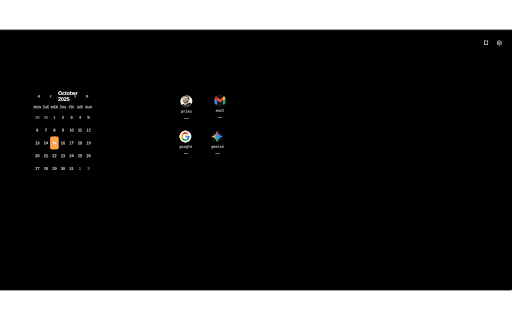
Looi transforms your new tab into a focused, beautiful, and productivity-oriented dashboard. Designed for users who value minimalism and personalization, Looi offers a distraction-free interface with robust sync and customization features for both Firefox and Chrome.

Features:
Modern, Minimal UI
Enjoy a clean, clutter-free new tab page that keeps your bookmarks, widgets, and daily tools easily accessible without unnecessary distractions.
Custom Backgrounds & Themes
Instantly personalize your dashboard by selecting background colors or uploading your own background images. Adapt the look to your mood or style.
Bookmark Management
Organize your bookmarks intuitively right from your new tab. Drag and drop, add, edit, or delete bookmarks for instant access.
Flexible Widgets
Place customizable widgets on your dashboard for Calendar, ToDO and more comming soon. Each widget’s configuration is remembered and can be effortlessly tweaked.
GitHub Sync Support
Seamlessly sync your Looi settings—background, bookmarks, and widgets—across devices using your GitHub account. Your settings are securely stored as a private or public Gist so they’re always up to date, wherever you log in.
Auto-Save \& Manual Sync
Choose between auto-saving your changes or triggering sync when you want. You’re always in control of when and how your data moves between devices.
One-Click Restore \& Backup
Looi lets you back up and restore your new tab setup with one click. Keep your workspace safe and bring it to any browser with ease.

Why Choose Looi?
Cross-Browser Support: Runs seamlessly on Firefox, Chrome, and Edge.
Privacy-Focused: Your sync data stays private unless you choose otherwise. No ads or trackers on your dashboard.
Performance: Lightweight, fast-loading, engineered for minimal resource use.
Open Source: Trusted, open, and actively maintained by the developer community.
Accessible: Designed with accessibility and keyboard navigation in mind.
Technical
- Version
- 1.2.1
- Manifest
- V3
- Size
- 2.5MiB
- Min Chrome
- 88
- Languages
- 1
- Featured
- No
Metadata
- ID
- cjdjdglhngkmbmmhpmmfkmhimidefhen
- Developer ID
- u0ad24be283c2508833643c8b8e367ddf
- Developer Email
- [email protected]
- Created
- Oct 21, 2025
- Last Updated (Store)
- Jan 29, 2026
- Last Scraped
- Jun 5, 2026
- Website
- —
- Support URL
- —
- Privacy Policy
- —
Similar extensions
Alternatives to Looi, ranked by description similarity.

Cheese New Tab
Customizable landing page with drag-and-drop widgets
11

Zen New Tab
Minimalist new tab with weather, search, quick links, and mini apps — timers, world clock, calendar, to-do, and focus sounds.
231
★ 5.0

FlowTab
A simple, personalized new tab with local-first data storage.
4

Minimal AI Lighthouse Navigation
Set Minimal AI Lighthouse Navigation as browser new tab page
9
★ 5.0

New Tab Dashboard
Customizable dashboard with widgets, site embeds, bookmarks, and drag-and-drop layout. Open with one click or keyboard shortcut.
18

Bookmark New Tab
Displays your bookmarks in a beautiful tree view on the new tab page
42

SeekTab: Redefine your new tab page
Redefine your new tab page, support custom widgets and RSS feeds
22

Safari New tab
A minimal & powerful new tab experience, helps you in productivity.
1.0K
★ 5.0
Data sourced from the Chrome Web Store · last verified Jun 5, 2026.