
YouTube Comment AI Assistant
Generate AI-powered replies to YouTube comments with ChatGPT or Claude
As of May 2026, YouTube Comment AI Assistant has 29 users in the Communication category.
Usersup 107.1 percent+107.1%
29
29
Ratingno change0%
—
— reviews
Reviewsno change0%
—
Version
1.0.0
Manifest V3
History
4 snapshotsTracking since Apr 1, 2026.
View as table
| Date | Users | Rating | Reviews | Version |
|---|---|---|---|---|
| Apr 1, 2026 | 14 | — | — | 1.0.0 |
| Apr 21, 2026 | 18 | — | — | 1.0.0 |
| May 17, 2026 | 21 | — | — | 1.0.0 |
| May 31, 2026 | 30 | — | — | 1.0.0 |
| Now | 29 | — | — | 1.0.0 |
Permissions & access
- Permissions
- storageactiveTabscripting
- Host access
- *://studio.youtube.com/*
Screenshots
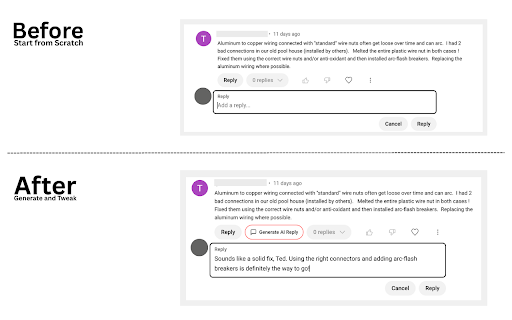


About
Stop spending hours crafting replies to YouTube comments and start growing your community. Let's face it... Responding to comments is tedious and time-consuming, but we all know engagement is key to building a loyal fanbase, not just chasing views.

This AI-powered assistant generates contextual, professional responses that match your channel's voice and expertise, so you can respond to more comments, more quickly and actually enjoy engaging with your audience.

✨ What Makes This Different:
Most AI tools give you generic responses that sound robotic. This extension actually gets your channel. Gaming channel? It speaks gamer. Home improvement? It knows the difference between a drill bit and a router bit. The AI adapts its expertise to match your content, so your responses sound like you, not a bot.

🚀 Key Features:

• Smart Context Analysis - AI reads comments and suggests appropriate response types (thank, agree, answer questions, etc.)

• Channel-Specific Intelligence - Optimized responses for 10+ channel types including Gaming, Education, Tech Reviews, Home Improvement, and more

• Dual AI Support - Choose between ChatGPT (OpenAI) or Claude (Anthropic) based on your preference

• Quick Context Buttons - One-click regeneration for common scenarios like "acknowledge oversight" or "encourage viewer"

• Customizable Tone & Style - Professional, friendly, casual, mentor, or humorous responses

• Video Context Integration - Includes video titles for more relevant replies

• Manual Review & Control - You always review, edit, and post responses yourself

🎯 Perfect If You're:
✓ Drowning in comments but know you need to respond to grow
✓ Running educational content where accuracy matters
✓ Managing multiple channels or have a team
✓ Tired of comment management eating into your creative time

🔧 How It Actually Works:
1) Quick setup: Add your AI provider key and tell it what kind of channel you run
2) Head to YouTube Studio like you normally do
3) See a comment that needs a reply? Click "Generate AI Reply"
4) Get a smart response that actually makes sense for your channel
5) Tweak it if you want (or use it as-is) and post

That's it. No complicated workflows, no learning curve.

🚀 Quick Setup:
1. Get API key from OpenAI (ChatGPT) or Anthropic (Claude)
2. Install extension and paste key in settings
3. Choose your channel type
4. Start generating replies in YouTube Studio!

💡 Smart Context Features:
The extension includes intelligent context recognition with quick options:

• Thank Them - For compliments and helpful tips
• Answer Question - For technical or how-to inquiries
• Acknowledge Oversight - For corrections with natural, casual tone
• Encourage - For viewers struggling with projects
• Explain Further - For requests for more detail

🛡️ Privacy & Security:

• Zero Data Collection - We never see your comments, responses, or API keys
• Local Storage Only - All settings stored securely in your browser
• Manual Control - No automated posting, you control everything
• YouTube ToS Compliant - Designed to enhance, not replace, genuine engagement

💰 Honesty About Costs: The extension is free. You just pay your AI provider directly (about a penny per response, so under $1 for light use up to a few bucks for heavy users).

Compare that to hiring a VA or spending 10+ hours a week on comments yourself.

🆘 Support & Updates:

• Comprehensive setup guide included
• Regular updates with new features
• Email support for technical issues
• Compatible with all YouTube Studio layouts

⚡ Recent Updates:

• Added quick context radio buttons for faster regeneration
• Enhanced channel-specific prompt building
• Better button styling integration with YouTube Studio

You got into YouTube to create content, not to spend half your day crafting comment replies. Get back to what you love doing (making great videos) while still building that engaged community that actually watches and shares your stuff.

Install now and see how much time you get back in your day.
Technical
- Version
- 1.0.0
- Manifest
- V3
- Size
- 23.76KiB
- Min Chrome
- 88
- Languages
- 1
- Featured
- No
Metadata
- ID
- cjbdnhidhoefhdidkikahobojpjfginl
- Developer ID
- u6a5e954290ae39a8bd35dddad3c38b83
- Developer Email
- [email protected]
- Created
- Jun 26, 2025
- Last Updated (Store)
- Jun 26, 2025
- Last Scraped
- May 31, 2026
- Website
- —
- Support URL
- —
- Privacy Policy
- https://www.beallsolutions.com/privacy-policy
Similar extensions
Alternatives to YouTube Comment AI Assistant, ranked by description similarity.

Replai: AI Replies for YouTube Comments
Instantly generate context-aware AI replies for YouTube comments. Save hours, boost engagement, and grow your channel faster.
4

EngageAI — AI Replies for YouTube
Generate AI-powered replies to YouTube comments instantly. Works on YouTube & YouTube Studio. 10 free credits/month!
10
★ 5.0

YouTube Reply Assistant
Suggest concise, safe replies to YouTube comments. Manual confirm by default.
22
★ 5.0

Studio Pro developed with YouTube
AI-powered comment management for YouTube Studio
22

Reply with AI for YouTube™
Generate natural, personalized replies to YouTube comments — instantly.
11

YT-Engage - AI Youtube Comment Assistant
Boost your YouTube engagement with AI-generated comments and replies by webresult.at .
12
★ 5.0

MailMagic AI assistant for Youtube comments
Use AI to craft or reply to YouTube comments efficiently.
918
★ 4.7

RespondPilot Pro: AI YouTube Comment Replier
Auto reply to YouTube comments using AI. Save time managing comments in YouTube Studio.
56
★ 5.0
Data sourced from the Chrome Web Store · last verified May 31, 2026.