
Detour
HTTP redirect and script injection rules for local testing
As of June 2026, Detour has 3 users in the Developer Tools category.
Usersno change0%
3
3
Ratingno change0%
—
— reviews
Reviewsno change0%
—
Version
0.1.2
Manifest V3
90-day change · In the last 90 days this extension 1 version update, changed permissions.
History
2 snapshotsTracking since Apr 22, 2026.
Not enough history yet for this metric — the chart fills in as we collect more snapshots.
View as table
| Date | Users | Rating | Reviews | Version |
|---|---|---|---|---|
| Apr 22, 2026 | — | — | — | 0.1.0 |
| Apr 26, 2026 | — | — | — | 0.1.0 |
| Now | 3 | — | — | 0.1.2 |
Changelog
- Apr 26, 2026description
Detour intercepts and redirects HTTP requests and injects scripts into any web page — useful for local development testing, mocking APIs, and prototyping UI changes against production sites.

Features:
— Redirect fetch and XHR requests using wildcard URL patterns
— Inject external scripts into any page, bypassing CSP restrictions
— Rules are stored locally and can be imported/exported as JSON
— Toggle rules on and off individually from the popup
— Supports both network-level redirects (declarativeNetRequest) and in-page request patching (fetch/XHR)
— Works in all frames

This extension is intended for developers and designers who need to test changes locally against live sites without modifying server configuration.
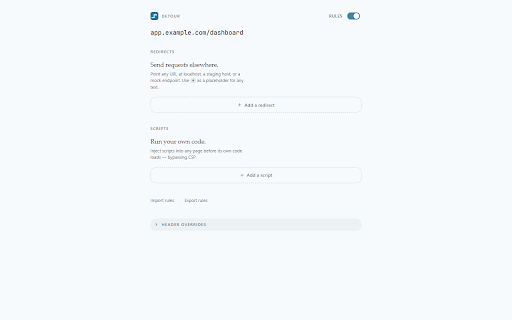
Detour is a Chromium extension for redirecting HTTP requests and injecting scripts during local development. Point an API at localhost, try a script on a live page, or strip a response header — without changing production.

REDIRECT RULES
• Send any URL to localhost, a staging host, or a mock endpoint
• Use * in the pattern to capture path segments, then substitute them into the destination URL as $1, $2, and so on
• Filter by HTTP method (GET, POST, …) when you need tighter control
• Block telemetry or third-party scripts by rerouting them to an empty response

SCRIPT INJECTION
• Load external JavaScript into any page before the page's own code runs
• Works on strict Content Security Policy (CSP) sites where inline scripts normally can't load — the extension injects with its own privileges, so CSP doesn't apply
• Useful for dev overlays, tracing, or experimental bundles without rebuilding the host app

ONE-CLICK HEADER OVERRIDES
• Allow CORS
• Disable Content Security Policy
• Disable X-Frame-Options

WORKFLOW DETAILS
• Per-tab badge showing how many rules fired on the current page
• One pattern language — just * for wildcards, $1 for captures. No "contains" or "equals" modes to learn.
• Import and export rules as JSON. A public schema lets VS Code autocomplete the file.

PRIVACY
Everything runs in your browser. No account, no telemetry, no remote configuration. Rules stay on your machine until you export them.
- Apr 26, 2026permissions
activeTab, tabs, scripting, storage, declarativeNetRequest, declarativeNetRequestWithHostAccess, webNavigation
activeTab, tabs, scripting, storage, declarativeNetRequestWithHostAccess, webNavigation
Permissions & access
- Permissions
- activeTabtabsscriptingstoragedeclarativeNetRequestWithHostAccesswebNavigation
- Host access
- <all_urls>
Screenshots


About
Detour is a Chromium extension for redirecting HTTP requests and injecting scripts during local development. Point an API at localhost, try a script on a live page, or strip a response header — without changing production.

REDIRECT RULES
• Send any URL to localhost, a staging host, or a mock endpoint
• Use * in the pattern to capture path segments, then substitute them into the destination URL as $1, $2, and so on
• Filter by HTTP method (GET, POST, …) when you need tighter control
• Block telemetry or third-party scripts by rerouting them to an empty response

SCRIPT INJECTION
• Load external JavaScript into any page before the page's own code runs
• Works on strict Content Security Policy (CSP) sites where inline scripts normally can't load — the extension injects with its own privileges, so CSP doesn't apply
• Useful for dev overlays, tracing, or experimental bundles without rebuilding the host app

ONE-CLICK HEADER OVERRIDES
• Allow CORS
• Disable Content Security Policy
• Disable X-Frame-Options

WORKFLOW DETAILS
• Per-tab badge showing how many rules fired on the current page
• One pattern language — just * for wildcards, $1 for captures. No "contains" or "equals" modes to learn.
• Import and export rules as JSON. A public schema lets VS Code autocomplete the file.

PRIVACY
Everything runs in your browser. No account, no telemetry, no remote configuration. Rules stay on your machine until you export them.
Technical
- Version
- 0.1.2
- Manifest
- V3
- Size
- 40.9KiB
- Min Chrome
- 88
- Languages
- 1
- Featured
- No
Metadata
- ID
- cinkplogkjggmgdkaflhlemcdhchninp
- Developer ID
- u40d6c73a6bdd2b6b88df2e05f36e8369
- Developer Email
- [email protected]
- Created
- Apr 21, 2026
- Last Updated (Store)
- Apr 23, 2026
- Last Scraped
- Jun 9, 2026
- Website
- —
- Support URL
- —
- Privacy Policy
- —
Data sourced from the Chrome Web Store · last verified Jun 9, 2026.