
EmailScout - Email Finder, Scraper & Extractor
Powerful Email Extractor & Scraper for Sales & Marketing
As of June 2026, EmailScout - Email Finder, Scraper & Extractor has 1,000 users and a 4.81/5 rating from 26 reviews in the Productivity category.
Usersup 7.9 percent+7.9%
1.0K
1,000
Ratingup 0.2 percent+0.2%
4.81
26 reviews
Reviewsup 4.0 percent+4.0%
26
Version
3.0.2
Manifest V3
History
2 snapshotsTracking since Apr 20, 2026.
View as table
| Date | Users | Rating | Reviews | Version |
|---|---|---|---|---|
| Apr 20, 2026 | 927 | 4.80 | 25 | 3.0.2 |
| May 5, 2026 | 918 | 4.80 | 25 | 3.0.2 |
| Now | 1.0K | 4.81 | 26 | 3.0.2 |
Permissions & access
- Permissions
- activeTabstorageclipboardWritescriptingdownloads
- Host access
- <all_urls>
Screenshots


About
EmailScout is the ultimate Chrome extension for effortless email finding, scraping, and extraction. Designed for sales professionals, marketers, recruiters, and anyone needing to build targeted contact lists, EmailScout helps you instantly discover and collect valid email addresses directly from any webpage you visit. Streamline your lead generation and outreach with this powerful, easy-to-use email extractor.

EmailScout automatically scans any webpage in real-time to find and extract all available email addresses. No more manual searching – get the contact information you need with a single click.

Easily scrape emails and download your collected email lists in convenient formats. Export your extracted email addresses as a simple TXT file or a structured CSV for seamless integration into your CRM or marketing tools.

Join our many users who trust EmailScout for their email finding and lead generation needs. Install EmailScout today and transform the way you collect email addresses online!

Premium Features: AutoSave and URL Explorer
Auto Save allows you to automatically save email addresses as you browse from tab to tab.
URL Explorer lets you upload a list of up to 1,500 URL, which EmailScout will then scrape for emails automatically

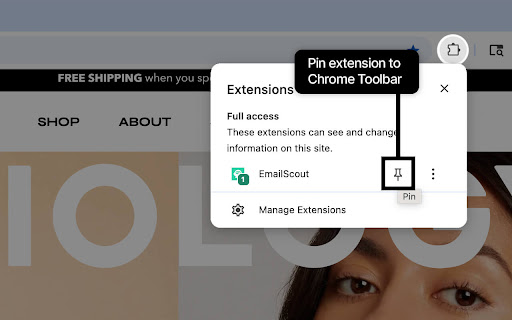
After installation, click on the Extensions icon (puzzle piece) in the Chrome toolbar.
-Find EmailScout in the list of extensions.
-Click on the pin icon next to Email Scout to keep it accessible in your toolbar for easy access.

Activate the Extension:
Click on the EmailScout icon in the Chrome toolbar to enable it.
The extension will start scanning the current webpage for email addresses.

Toggle On/Off:
In the top left corner of the EmailScout popup, you’ll find an on/off toggle.
Use this toggle to turn the extension on or off.

View Found Emails:
Once enabled, EmailScout will display a list of all email addresses found on the page.

Save Emails:
CSV: Click on the “Save as CSV” button to download the list of email addresses as a CSV file.
TXT: Click on the “Save as TXT” button to download the list as a text file.
Clipboard: Click on the “Copy to Clipboard” button to copy the list of email addresses to your clipboard.

Upgrade to Premium:
Click on the EmailScout gear icon, select your plan, and select “Upgrade to Premium”.
Follow the instructions to complete the purchase. You will then receive an email with a token. Copy this token into the token tab in the extension to activate your premium plan.

Activate Auto Save:
Once upgraded, click on the EmailScout icon and toggle the “Auto Save” feature.
As you browse, EmailScout will automatically save email addresses from each fully loaded tab.

Using Auto Save
Browse Normally:
Navigate to different webpages as you normally would.
Ensure each tab fully loads before moving to the next one.

Access Saved Emails:
Click on the EmailScout icon to view the list of saved email addresses.
Use the “Save as CSV”, “Save as TXT”, or “Copy to Clipboard” options to export the list.

Troubleshooting
Emails Not Found: Ensure the webpage has fully loaded. Some dynamic content may take time to appear.
Auto Save Not Working: Make sure each tab is fully loaded before switching. Auto Save only works on fully loaded pages.
Contact Support: If you encounter any issues, click on the “Contact” link in the EmailScout menu to get help.

NOTE: Do not use EmailScout to create spam lists.
Technical
- Version
- 3.0.2
- Manifest
- V3
- Size
- 93.28KiB
- Min Chrome
- 88
- Languages
- 1
- Featured
- No
Metadata
- ID
- cimcplcgdnbakbpdjbdiehmjlfpemofo
- Developer ID
- ufe1091f28442b335836ad8e64b493af3
- Developer Email
- [email protected]
- Created
- Jun 7, 2025
- Last Updated (Store)
- Sep 25, 2025
- Last Scraped
- Jun 9, 2026
- Website
- emailscout.io
- Support URL
- https://emailscout.io/contact/
- Privacy Policy
- https://emailscout.io/privacy-policy/
Similar extensions
Alternatives to EmailScout - Email Finder, Scraper & Extractor, ranked by description similarity.

Email Scraper - Automatically Extract Email Addresses from Any Webpage
Auto-extract emails from web pages with bulk URL support and easy export. Ideal for lead gen, marketing, and email list building.
188
★ 5.0

Email Scraper
Smart email scraper that collects and copies emails from websites. Includes an email extractor and powerful mail finder tools
398
★ 5.0

Email Scraper
Activate this extension that scrapes all emails present on any website.
143
★ 1.0

Email Extractor AI
Extract and auto-save email addresses from web pages
20
★ 5.0

Email Sweeper - Email Scraper & Finder
Scrape email addresses from visited pages. Email finder to efficiently gather leads!
2.0K

Easy Email Extractor
Free email extraction tool. Download any email address from the web with just one click.
2.0K
★ 5.0

Bulk Email Extractor - Collect Emails from Websites with Single Click
Extract emails from websites instantly. This extension scans pages & collects addresses with one click. Perfect for lead generation.
271
★ 5.0

Email Extractor
A beautiful and modern email extractor with instant copying and CSV export
45
Data sourced from the Chrome Web Store · last verified Jun 9, 2026.