
xify
A chrome extension that modifies twitter/x.com links to vxtwitter/fxtwitter on Copy/shortcut Ctrl+Shift+K and copies to clipboard.
As of June 2026, xify has 370 users and a 3.88/5 rating from 8 reviews in the Social & Communication category.
Usersup 9.5 percent+9.5%
370
370
Ratingup 4.6 percent+4.6%
3.88
8 reviews
Reviewsup 14.3 percent+14.3%
8
Version
2.1.6
Manifest V3
History
6 snapshotsTracking since Apr 18, 2026.
View as table
| Date | Users | Rating | Reviews | Version |
|---|---|---|---|---|
| Apr 18, 2026 | 338 | 3.71 | 7 | 2.1.6 |
| Apr 28, 2026 | 369 | 3.71 | 7 | 2.1.6 |
| May 7, 2026 | 381 | 3.71 | 7 | 2.1.6 |
| May 15, 2026 | 376 | 3.88 | 8 | 2.1.6 |
| May 24, 2026 | 389 | 3.88 | 8 | 2.1.6 |
| Jun 3, 2026 | 409 | 3.88 | 8 | 2.1.6 |
| Now | 370 | 3.88 | 8 | 2.1.6 |
Permissions & access
- Permissions
- clipboardWriteactiveTabstorage
- Host access
- None declared
Screenshots


About
Modifies twitter/x.com links to vxtwitter/fxtwitter. Use the keyboard shortcut ctrl+shift+K/cmd+shift+K to copy a twiiter link as vxtwiiter/fxtwitter link.

Why this?
Twitter link embeds in discord are often broken these days and it's annoying to edit each link manually whenever you want to share a twiiter link on discord, so this extension helps you use vxtwitter links to fix embeds with ease.

How to use?
Step1: Install the extension.
Step2: Go to any twitter.com url, and press Ctrl + Shift + K. And that's it. The extension will copy the link as a "vxtwiiter/fxtwitter" link and you can share the link to discord without thinking twice about embed fails.

How to switch between vxtwitter and fxtwitter?
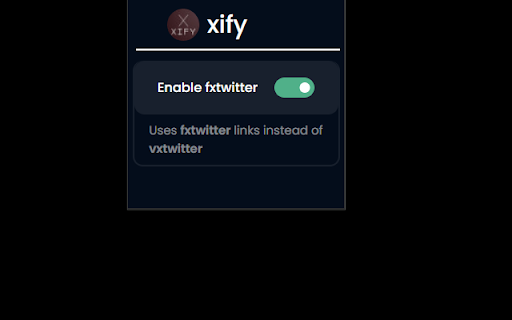
By default the extension uses "vxtwitter/fxtwitter" links. You can enable the option "Enable fxtwitter" from the extension popup to use fxtwitter links instead of vxtwitter.

How to get modified links on copy (Ctrl + C) shortcut directly?
By default, the extension only modifies links on custom shortuct (Ctrl+Shift+K). You can enable the option modify on copy from the extension popup to let the bot use modified links on copy shortuct (Ctrl+C) directly.

Note: If the modified url is not working when you use the Ctrl+Shift+K shortcut, manually register the shortcut by following the below steps.
1. Go to "chrome://extensions/shortcuts"
2. Look for xify extension
3. Click on the edit icon for the "copy to clipboard" option and press "Ctrl+Shift+k"


Have any issues or need help with using the extension?
Join the discord support server: https://discord.gg/S3hhw9kSKV
Technical
- Version
- 2.1.6
- Manifest
- V3
- Size
- 52.6KiB
- Min Chrome
- 88
- Languages
- 1
- Featured
- Yes
Metadata
- ID
- cihieeigmpndggpojmhjndlgjdmlgaoe
- Developer ID
- u4a1a2f8d34b0c8b6484326dfb2faf1ae
- Developer Email
- [email protected]
- Created
- Oct 23, 2023
- Last Updated (Store)
- Nov 25, 2025
- Last Scraped
- Jun 3, 2026
- Website
- —
- Support URL
- https://discord.gg/S3hhw9kSKV
- Privacy Policy
- —
Similar extensions
Alternatives to xify, ranked by description similarity.

Fixvx URL Modifier
Modifies Twitter(X) URLs to start with 'fixv' and copies the modified URL. Allows for easier sharing.
1.0K
★ 5.0

Twitter Link Rewriter
Rewrites Twitter/X links when copying via share button. Supports custom rules, alternative frontends, and tracking removal.
39

VxTwitter URL
Converts twitter.com URLs to VXTwitter URLS when copying them.
3.0K
★ 3.2

Share on Twitter
Share current tab, links and selected text on Twitter (X.com).
10.0K
★ 4.4

Twitter Mastodon Linkifier
Twitter Mastodon Linkifier makes Mastodon usernames (like `@[email protected]`) into clickable links on twitter.com.
9

Improvements for Twitter
Various helpful additions and changes for Twitter
663
★ 5.0

Embed Link Helper
Integrates with Twitter/X and Instagram share menus to copy transformed links for better previews in messaging platforms
7

Sharinger - copy url with </title>
Copy url with </title>
11
Data sourced from the Chrome Web Store · last verified Jun 3, 2026.