
Enhance.ai
Enhance prompts and access GPT-4 without leaving your keyboard!
As of May 2026, Enhance.ai has 9 users in the Functionality & UI category.
Usersno change0%
9
9
Ratingno change0%
—
— reviews
Reviewsno change0%
—
Version
1.0
Manifest V3
History
3 snapshotsTracking since Apr 1, 2026.
View as table
| Date | Users | Rating | Reviews | Version |
|---|---|---|---|---|
| Apr 1, 2026 | 9 | — | — | 1.0 |
| May 1, 2026 | 10 | — | — | 1.0 |
| May 30, 2026 | 6 | — | — | 1.0 |
| Now | 9 | — | — | 1.0 |
Permissions & access
- Permissions
- contextMenusactiveTabstorageidentitywindows
- Host access
- None declared
Screenshots

About
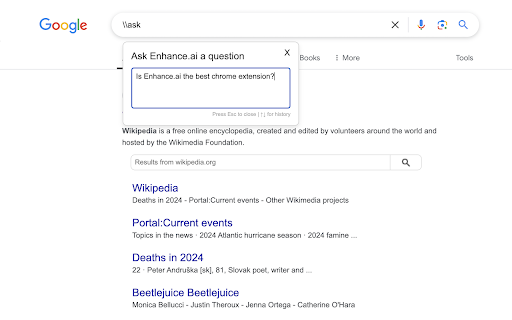
Do you hate having to keep open another tab and constantly switching when you only want to quickly as GPT-4 a question? This extension allows you to ask GPT-4 and enhance prompt without leaving your keyboard!

Simply type \\ask into a textbox to bring up the chatbot, or highlight and press Command+shift+K (Mac) or Ctrl+shift+K (Windows) to enhance a prompt.
Technical
- Version
- 1.0
- Manifest
- V3
- Size
- 3.62MiB
- Min Chrome
- 88
- Languages
- 1
- Featured
- No
Metadata
- ID
- ciebnidkmhlaflbmjjodbpdcfmbbmeog
- Developer ID
- u0f9551e66a6bb4911e3a5999b4915cd0
- Developer Email
- [email protected]
- Created
- Oct 10, 2024
- Last Updated (Store)
- Oct 10, 2024
- Last Scraped
- May 30, 2026
- Website
- —
- Support URL
- —
Similar extensions
Alternatives to Enhance.ai, ranked by description similarity.

AI Prompt Enhancer
Transform your prompts with AI. Free tier with Pro upgrade for unlimited access.
3
★ 5.0

Prompt Mic for GPT
This extension adds a mic button to the ChatGPT input field, allowing users to speak their prompts instead of typing them.
25

🤖 AI Prompt Manager
Save, organize, and manage your frequently-used AI prompts.
—

ChatGPT UX Suite
Rapid prompt navigation, token counter, easy context export, session time tracking, styling & sound notifications for chatgpt.
1

Open ChatGPT in New Tab
Replace your new tab with ChatGPT - the best AI chatbot for instant conversations and coding help
8

ChatGPT: Enter = New line + Explain (ChatGPT/Grok)
Enter creates a new line; send only with Ctrl/Cmd+Enter. Adds a context menu to explain selections in ChatGPT or Grok.
19

Prompt Autocraft – Save & Reuse Prompts
Save every prompt automatically and type faster with autocomplete. No setup required, just focus on your task!
42
★ 5.0

Prompt Manager
Store and auto-fill your most used prompts, organized by client folders, for Claude, Gemini, and ChatGPT.
4
Data sourced from the Chrome Web Store · last verified May 30, 2026.