
Search Check
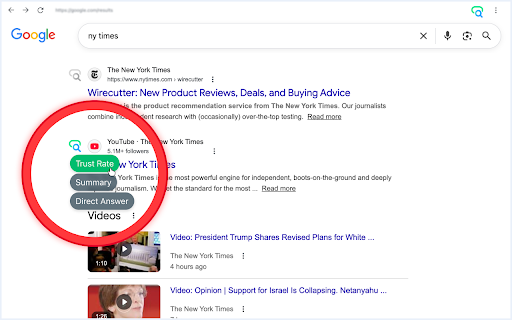
Add AI buttons to Google Search results to summarize pages, check website trust, and get direct answers with ChatGPT, DeepSeek, etc.
As of June 2026, Search Check has — users in the Workflow & Planning category.
Usersno change0%
—
—
Ratingno change0%
—
— reviews
Reviewsno change0%
—
Version
0.1
Manifest V3
History
1 snapshotsTracking since Apr 8, 2026.
Not enough history yet for this metric — the chart fills in as we collect more snapshots.
View as table
| Date | Users | Rating | Reviews | Version |
|---|---|---|---|---|
| Apr 8, 2026 | — | — | — | 0.1 |
| Now | — | — | — | 0.1 |
Permissions & access
- Permissions
- storage
- Host access
- *://*.google.com/search*
Screenshots


About
Add AI analysis buttons to Google Search results and check any search result in one click with Search Check.

Search Check is a lightweight Chrome extension that enhances Google Search with fast AI tools next to each result. Instead of copying links, opening tabs manually, and writing prompts from scratch, you can click a button and instantly send the page to your preferred AI assistant for analysis.

It is built for simple everyday use: clear actions, no complicated setup, no API keys, and no technical workflow.

What Search Check does

Search Check adds a compact AI action panel next to organic Google search results. For every supported result, you can launch one of three actions:

• Trust Rate — ask AI to review the linked website and check whether it looks reliable, misleading, aggressive, or potentially risky
• Summary — ask AI to read the page and explain the main idea in 3 short, simple sentences
• Direct Answer — send your original Google query together with the selected page and ask AI to find the exact answer from that source

This makes Search Check useful as a search result summarizer, website trust checker, and AI answer finder for Google Search.

Supported AI providers

You can choose your preferred AI tool from the extension popup and use it across your searches. Supported targets include:

• Perplexity
• ChatGPT
• Grok
• Le Chat

Search Check works as a smart URL router. It prepares the request for the selected AI service and opens it in a nearby tab, so you can keep your Google results visible while reviewing the response.

Why people use it

Search Check helps when you want to:

• summarize websites before opening multiple pages
• check whether a site looks suspicious or overloaded with ads
• get a direct answer from a specific search result
• compare several results faster
• reduce repetitive copy-paste work during research

Simple workflow

• Search in Google as usual
• See AI buttons next to search results
• Click Trust Rate, Summary, or Direct Answer
• Review the result in your selected AI assistant

Who it is for

Search Check is useful for everyday browsing, research, shopping checks, quick fact-finding, and first-pass website review. It is designed to make Google Search more actionable by turning search results into one-click AI analysis tasks.
Technical
- Version
- 0.1
- Manifest
- V3
- Size
- 22.72KiB
- Min Chrome
- 88
- Languages
- 1
- Featured
- No
Metadata
- ID
- chpfhjfcpibjodohbkdchifgjhnjbhaj
- Developer ID
- u740c4fa2b86759cce8ca36caa1a080d7
- Developer Email
- [email protected]
- Created
- Apr 8, 2026
- Last Updated (Store)
- Apr 8, 2026
- Last Scraped
- Jun 9, 2026
- Website
- —
- Support URL
- —
- Privacy Policy
- https://sites.google.com/view/searchcheck-extension
Data sourced from the Chrome Web Store · last verified Jun 9, 2026.