
MECNTEC – WhatsApp Bulk Sender (CSV & Auto Message)
Bulk WhatsApp sender with CSV import, media sharing, placeholders, scheduling & retry logic. Great for marketing & outreach
As of May 2026, MECNTEC – WhatsApp Bulk Sender (CSV & Auto Message) has 8 users and a 1.00/5 rating from 1 reviews in the Productivity category.
Usersno change0%
8
8
Ratingno change0%
1.00
1 reviews
Reviewsno change0%
1
Version
1.0.6
Manifest V3
History
4 snapshotsTracking since Apr 21, 2026.
View as table
| Date | Users | Rating | Reviews | Version |
|---|---|---|---|---|
| Apr 21, 2026 | 8 | 1.00 | 1 | 1.0.6 |
| May 6, 2026 | 10 | 1.00 | 1 | 1.0.6 |
| May 17, 2026 | 9 | 1.00 | 1 | 1.0.6 |
| May 31, 2026 | 10 | 1.00 | 1 | 1.0.6 |
| Now | 8 | 1.00 | 1 | 1.0.6 |
Permissions & access
- Permissions
- scriptingtabsstorageactiveTab
- Host access
- https://web.whatsapp.com/*, https://wa.me/*, https://api.whatsapp.com/*
Screenshots


About
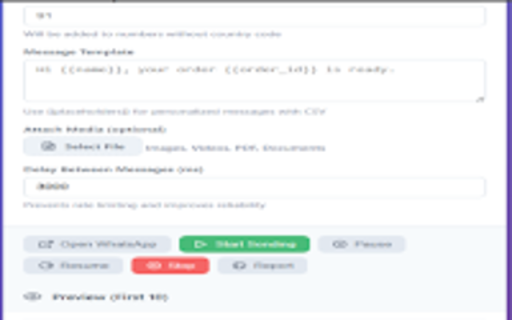
Send personalized WhatsApp messages in bulk from CSV or manual numbers. Attach media, use {{placeholders}} for personalization, and download per-run reports.
MECNTEC – WhatsApp Bulk Sender helps small businesses, support teams and marketers send personalized WhatsApp messages at scale — directly from your browser.

Import contacts using a CSV (headers like name, phone, order_id) or paste manual numbers. Use template placeholders (e.g. {{name}}, {{order_id}}) to personalize every message. Attach images, videos, PDFs and documents, control the delay between messages to avoid rate limits, and get a downloadable report after the run.

FEATURES
• CSV import with placeholder substitution ({{name}}, {{order_id}})
• Manual numbers mode for single-message broadcasts
• Attach media: images, videos, PDFs and documents
• Adjustable delay and retry logic to improve deliverability
• Live sending progress with per-number status
• Downloadable CSV report (sent / failed / timestamp / error info)
• Privacy-first — data stays in your browser; no cloud storage by default

HOW IT WORKS
1. Prepare a CSV with headers (name, phone, order_id, ...).
2. Select CSV import or paste manual numbers.
3. Create a message template using placeholders ({{name}}).
4. Optionally attach media and set a delay between sends.
5. Open WhatsApp Web and start sending — monitor live progress and download the report.

USE CASES
• Order & shipping updates
• Appointment reminders
• Event invites and RSVPs
• Customer support follow-ups
• Marketing and promotional broadcasts

PRIVACY & SAFETY
MECNTEC runs in your browser and does not upload your contact list to our servers. If you export a report, that file is created locally. Automated sending is subject to WhatsApp's Terms of Service — use responsibly.

GET SUPPORT
Visit our homepage for setup instructions, sample CSV, screenshots and FAQs: https://mecntech.com/contact
Privacy Policy: https://mnts.in/privacy-policy.html

DOWNLOAD & INSTALL
Install the extension and open WhatsApp Web. We recommend testing with a small number of contacts before sending large broadcasts.

If you have questions or need help, contact [email protected].
Technical
- Version
- 1.0.6
- Manifest
- V3
- Size
- 96.25KiB
- Min Chrome
- 88
- Languages
- 1
- Featured
- No
Metadata
- ID
- chldckhdefopcaokbdabgpdmhjlliinm
- Developer ID
- u0459ed07f82e8bef5f0455dd3b20d56b
- Developer Email
- [email protected]
- Created
- Sep 26, 2025
- Last Updated (Store)
- Sep 26, 2025
- Last Scraped
- May 31, 2026
- Website
- —
- Support URL
- https://mecntech.com/contact
- Privacy Policy
- https://mnts.in/privacy-policy.html
Similar extensions
Alternatives to MECNTEC – WhatsApp Bulk Sender (CSV & Auto Message), ranked by description similarity.

MECNTEC – WhatsApp Bulk Sender (CSV & Auto Message)
Send personalized WhatsApp messages in bulk from CSV or manual numbers. Supports images, videos, documents, and templates.
13
★ 3.0

MECNTEC – WhatsApp Bulk Sender
WhatsApp Bulk Sender with Media support. Send personalized messages via CSV upload with name personalization.
10

MECNTEC
Send WhatsApp messages from CSV or paste numbers manually. Supports images, videos, and documents.
4
★ 5.0

WhatsApp Bulk Sender
Send bulk messages on WhatsApp Web
9
★ 5.0

WhatSender PRO - WhatsApp Bulk Sender
Professional WhatsApp Bulk Message Sender - Send bulk messages to contacts and groups directly from your PC
1.0K
★ 4.9

WA Bulk Message Sender | Premium Sender Plus
Send bulk WhatsApp messages via Excel numbers and more. Customize templates and send attachments like images, videos...
1.0K
★ 4.7

WASender Bulk Messaging, AI Replies, and CRM
WASender is the easiest Chrome extension for sending bulk messages on WhatsApp without saving numbers.
This bulk WhatsApp plugin…
100.0K
★ 3.5

WhatsApp Sender Pro
Professional WhatsApp Bulk Messaging - Send campaigns, manage contacts, track analytics for business communication growth
15
Data sourced from the Chrome Web Store · last verified May 31, 2026.