
Unlimited Watchlists for TradingView
Unlimited TradingView watchlists in a side panel. One-click charts, plus CSV and Chartink screener import.
As of June 2026, Unlimited Watchlists for TradingView has — users in the Workflow & Planning category.
Usersno change0%
—
—
Ratingno change0%
—
— reviews
Reviewsno change0%
—
Version
1.0
Manifest V3
History
1 snapshotsTracking since Jun 15, 2026.
Not enough history yet for this metric — the chart fills in as we collect more snapshots.
View as table
| Date | Users | Rating | Reviews | Version |
|---|---|---|---|---|
| Jun 15, 2026 | — | — | — | 1.0 |
| Now | — | — | — | 1.0 |
Permissions & access
- Permissions
- storagesidePaneltabs
- Host access
- https://www.tradingview.com/*, https://in.tradingview.com/*, https://*.tradingview.com/*, https://chartink.com/*, https://www.chartink.com/*
Screenshots



About
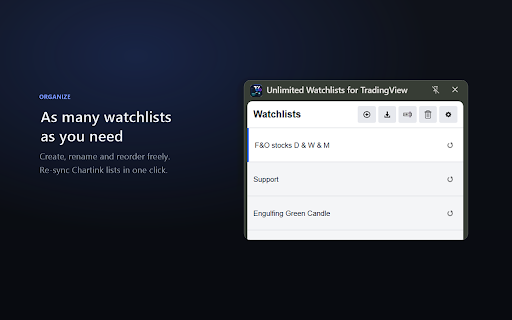
Unlimited Watchlists for TradingView removes the watchlist limits of TradingView's free plan. Create as many watchlists as your strategy needs — right inside a convenient browser side panel that sits next to your chart.

★ KEY FEATURES

• Unlimited watchlists — Create, rename, reorder, and delete as many lists as you want. No caps.
• One-click charts — Click any symbol to instantly open or switch its chart on TradingView, without leaving your current tab.
• Add from TradingView — A floating "Add to Watchlist" button on any TradingView chart saves the current symbol to any of your lists.
• Chartink import — Pull every stock from a Chartink screener into a watchlist named after that screener, with a single button. Re-sync anytime to refresh with the latest scan results.
• CSV import — Bulk-add symbols to a watchlist from a CSV file.
• Search & sort — Filter symbols as you type, or sort a list alphabetically (A–Z).
• Drag & drop — Reorder watchlists and stocks with simple drag-and-drop.
• Keyboard shortcut — Press Space to cycle to the next symbol in the active list, hands-free.
• Light & dark themes — Match your TradingView setup.

★ PRIVATE BY DESIGN

Your watchlists are stored locally on your device using Chrome's storage. No account, no sign-up, no analytics, no ads. The extension only makes a network request to Chartink — and only when you choose to import a screener, to read that screener's stock list.

★ NOTE

This is an independent extension and is not affiliated with, endorsed by, or sponsored by TradingView or Chartink. "TradingView" and "Chartink" are trademarks of their respective owners.
Technical
- Version
- 1.0
- Manifest
- V3
- Size
- 107KiB
- Min Chrome
- 88
- Languages
- 1
- Featured
- No
Metadata
- ID
- chjgeokhoafgiendihkdkijpbapabckb
- Developer ID
- uccaa6f8f107c4ce460b2c06d11fad6f1
- Developer Email
- [email protected]
- Created
- Jun 14, 2026
- Last Updated (Store)
- Jun 14, 2026
- Last Scraped
- Jun 15, 2026
- Website
- —
Data sourced from the Chrome Web Store · last verified Jun 15, 2026.