
DontSpoof Vault: Local Storage with Strong Encryption
Manage, generate, and share passwords securely with local encryption and zero cloud storage.
As of May 2026, DontSpoof Vault: Local Storage with Strong Encryption has 55 users and a 5.00/5 rating from 7 reviews in the Privacy & Security category.
Usersup 48.6 percent+48.6%
55
55
Ratingno change0%
5.00
7 reviews
Reviewsno change0%
7
Version
1.6
Manifest V3
History
3 snapshotsTracking since Apr 1, 2026.
View as table
| Date | Users | Rating | Reviews | Version |
|---|---|---|---|---|
| Apr 1, 2026 | 37 | 5.00 | 7 | 1.6 |
| May 1, 2026 | 40 | 5.00 | 7 | 1.6 |
| May 30, 2026 | 107 | 5.00 | 7 | 1.6 |
| Now | 55 | 5.00 | 7 | 1.6 |
Permissions & access
- Permissions
- storagetabsactiveTabscripting
- Host access
- <all_urls>
Screenshots


About
DontSpoof Vault - Local Password Manager for Privacy and Security

DontSpoof Vault is a local password manager designed for maximum security and privacy. Created by cybersecurity journalist "Iam Waqas", this tool is perfect for those who take their privacy seriously. Unlike cloud-based password managers, DontSpoof Vault stores everything locally, ensuring your data stays on your device and never gets transmitted online.

◉ Who Should Use DontSpoof Vault?
DontSpoof Vault is designed for:
----------------------------------------------------
▷ Cybersecurity professionals who demand local, encrypted storage for sensitive information.
▷Journalists and whistleblowers who cannot risk storing sensitive data in the cloud.
▷Privacy advocates who want to avoid tracking and keep their data offline.
▷Everyday users who are looking for a simple, secure, and private way to manage passwords.


◉ Why Choose DontSpoof Vault?
------------------------------------------------
DontSpoof Vault is built with privacy and usability in mind. It encrypts your data locally using AES-GCM encryption, meaning only you can decrypt it. With no cloud storage or tracking, it’s ideal for journalists, professionals, whistleblowers, and anyone concerned about cybersecurity.

◉ How to Get Started:
----------------------------------
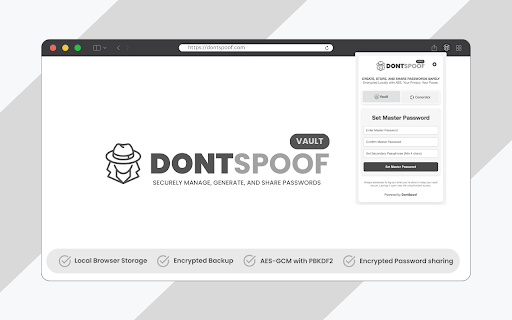
1. After installation, set up your Master Password and Passphrase. These two keys are essential for encrypting and securing your data.
2. Use your Master Password and Passphrase each time to log in.
3. By default, your session will time out after 2 minutes of inactivity for added security. You can customize this in the settings to suit your workflow.

◉ How to Add and Use Passwords:
--------------------------------------------------------
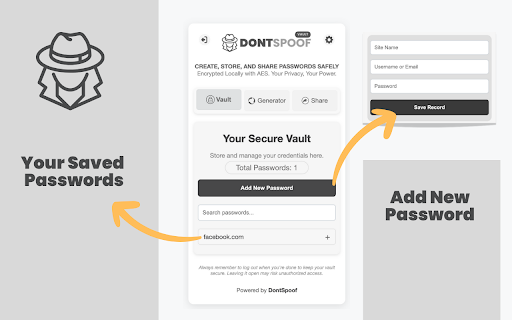
1. Go to the Save Password section to add new credentials by entering the website name, username, and password.
2. Saved passwords are grouped by domain for easy organization and can be searched instantly.
3. Use the Autofill feature to log in with a single click.

◉ Testing Encryption:
------------------------------
All passwords are stored locally with AES-GCM encryption. You can verify this by checking your browser storage. Without your Master Password and Passphrase, your data is unreadable.

⦿ Advanced Features:
----------------------------------
✔ Generate strong, complex passwords with customisable options.
✔ Share passwords securely using a passphrase and the recipient’s User ID.
✔ The shared message is encrypted end-to-end.
✔ Import shared passwords with complete security.
✔ Export your vault as an encrypted backup file and restore it later using the correct passphrase.
✔ Control session timeouts to balance security and convenience.

⦿ What’s New:
-----------------------
✔ A redesigned user interface for a smoother and more intuitive experience.
✔ The new Autofill feature allows you to quickly input saved credentials into login forms.
✔ Improved password sharing with enhanced encryption tied to User IDs.
✔ Better session timeout controls, starting with a default 2-minute timeout for enhanced security.

◉ Why It Matters:
----------------------------
DontSpoof Vault is for anyone who values security and privacy. Whether you're protecting sensitive work or managing personal accounts, this tool ensures your data stays secure, private, and under your control—offline and encrypted.

No cloud. No tracking. Just privacy, security, and peace of mind.
Technical
- Version
- 1.6
- Manifest
- V3
- Size
- 121KiB
- Min Chrome
- 88
- Languages
- 1
- Featured
- No
Metadata
- ID
- chigcokbhnpdcieoohamgknplehgnklb
- Developer ID
- u93942023ee1d42440f38f01204816fe9
- Developer Email
- [email protected]
- Created
- Nov 22, 2024
- Last Updated (Store)
- Mar 26, 2025
- Last Scraped
- May 30, 2026
- Website
- dontspoof.com
- Privacy Policy
- https://dontspoof.com/dontspoof-vault-privacy-policy/
Similar extensions
Alternatives to DontSpoof Vault: Local Storage with Strong Encryption, ranked by description similarity.

Smart Key Vault
A locally hosted password vault with secure, on-device encryption
4

Personal password vault
Chrome extension to store and manage personal passwords
6

Mind Vault - Stateless Password Generator
Generate unbreakable SHA-256 passwords without storage. No cloud, no DB. You control your keys. Your mind is your fortress.
7

PearPass
Password manager extension for PearPass
2.0K
★ 4.0

Bitdefender SecurePass
Vault-like protection for passwords and sensitive data across all your devices.
100.0K
★ 2.8

Vault Password Manager Beta
This extension will help you to manage your passwords
59
★ 4.6

PasswordGuard
Secure password manager with password generation, auto-fill, and encrypted storage by Andromiks
15

SecurePass Analytics - Smart Password Manager
Smart password manager with encryption, breach alerts, and health monitoring.
2
Data sourced from the Chrome Web Store · last verified May 30, 2026.