
ProfileBoost AI — LinkedIn Profile Enhancer
AI-powered LinkedIn profile optimization. Enhance your About, Headline, and Experience sections with one click.
As of June 2026, ProfileBoost AI — LinkedIn Profile Enhancer has — users in the Productivity category.
Usersno change0%
—
—
Ratingno change0%
—
— reviews
Reviewsno change0%
—
Version
1.0.0
Manifest V3
History
2 snapshotsTracking since Apr 18, 2026.
Not enough history yet for this metric — the chart fills in as we collect more snapshots.
View as table
| Date | Users | Rating | Reviews | Version |
|---|---|---|---|---|
| Apr 18, 2026 | — | — | — | 1.0.0 |
| Apr 23, 2026 | — | — | — | 1.0.0 |
| Now | — | — | — | 1.0.0 |
Permissions & access
- Permissions
- storageactiveTab
- Host access
- https://www.linkedin.com/*, https://api.openai.com/*
Screenshots
About
ProfileBoost AI — LinkedIn Profile Enhancer by NexoItec

Transform your LinkedIn presence with AI-powered profile optimization. Whether you're job hunting, building your personal brand, or expanding your professional network, ProfileBoost AI helps you craft a compelling LinkedIn profile that stands out.

WHAT IT DOES

ProfileBoost AI analyzes your existing LinkedIn profile sections and uses advanced AI to suggest professional, impactful improvements. Instead of spending hours wordsmithing your headline or agonizing over your About section, let AI do the heavy lifting while you stay in control of the final result.

KEY FEATURES

One-Click Profile Enhancement
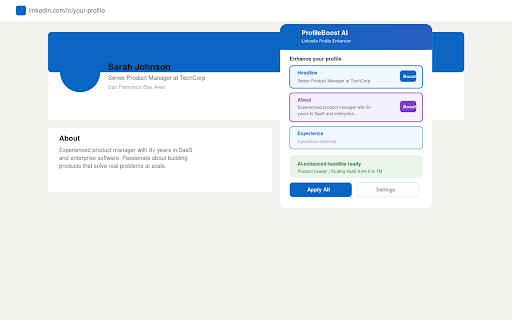
Simply navigate to any LinkedIn profile page, click the ProfileBoost AI icon, and select which sections you want to improve. The AI analyzes your current content and generates polished alternatives instantly.

Smart Section Detection
ProfileBoost AI automatically detects your About section, Headline, and Experience entries. No copying and pasting between tools — everything happens right on the LinkedIn page.

Industry-Aware Optimization
The AI understands professional contexts across industries. Whether you're in tech, finance, healthcare, creative arts, or any other field, suggestions are tailored to your professional domain.

Tone Control
Choose between professional, creative, executive, or casual tones to match your personal brand. Your profile should sound like you — just the best version of you.

Before & After Preview
Review every suggested change before applying it. Compare your original text with the AI-enhanced version side by side, so you never lose control of your narrative.

WHO IS IT FOR

Job seekers looking to attract recruiters and hiring managers with a polished, keyword-optimized profile that gets noticed in search results.

Entrepreneurs and founders who want their LinkedIn presence to reflect their vision and establish thought leadership in their industry.

Career changers who need help repositioning their experience and skills for a new professional direction.

Professionals at any level who know their work speaks for itself but struggle to translate that into compelling written content.

Freelancers and consultants who use LinkedIn as a primary channel for attracting clients and building credibility.

HOW TO GET STARTED

1. Install ProfileBoost AI from the Chrome Web Store
2. Navigate to linkedin.com and open any profile page
3. Click the ProfileBoost AI icon in your browser toolbar
4. Select the sections you want to enhance
5. Review the AI-generated suggestions
6. Apply the changes you love with one click

FREE AND PRO

ProfileBoost AI includes a generous free tier so you can experience the power of AI profile optimization. Upgrade to Pro for unlimited enhancements, advanced tone controls, and priority processing.

PRIVACY AND SECURITY

ProfileBoost AI only accesses LinkedIn pages when you activate it. Your profile data is processed securely and never stored or shared. We believe your professional information belongs to you.

Built by NexoItec — Intelligent automation for modern professionals.
Technical
- Version
- 1.0.0
- Manifest
- V3
- Size
- 21.52KiB
- Min Chrome
- 88
- Languages
- 1
- Featured
- No
Metadata
- ID
- chdeegiceeeddokfcohpljckoggajlpn
- Developer ID
- uf7d3eb7886511788bfab9f905b238a0d
- Developer Email
- [email protected]
- Created
- Apr 17, 2026
- Last Updated (Store)
- Apr 17, 2026
- Last Scraped
- Jun 14, 2026
- Website
- —
- Support URL
- https://nexoitec.com
- Privacy Policy
- https://nexoitec.com/privacy.html
Data sourced from the Chrome Web Store · last verified Jun 14, 2026.