
Show Star Rating
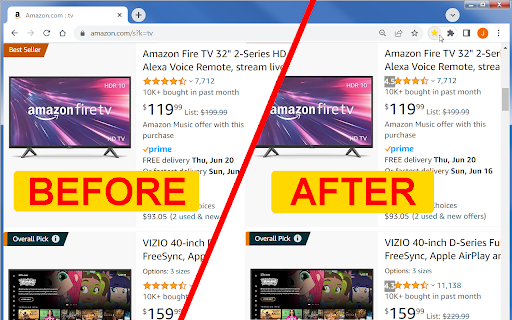
Shows the star rating values on shopping websites that are only showing images of stars instead of the star rating number.
As of May 2026, Show Star Rating has 64 users and a 5.00/5 rating from 6 reviews in the Shopping category.
Usersup 12.3 percent+12.3%
64
64
Ratingno change0%
5.00
6 reviews
Reviewsno change0%
6
Version
0.9.2
Manifest V3
History
3 snapshotsTracking since Apr 1, 2026.
View as table
| Date | Users | Rating | Reviews | Version |
|---|---|---|---|---|
| Apr 1, 2026 | 57 | 5.00 | 6 | 0.9.2 |
| May 1, 2026 | 64 | 5.00 | 6 | 0.9.2 |
| May 30, 2026 | 68 | 5.00 | 6 | 0.9.2 |
| Now | 64 | 5.00 | 6 | 0.9.2 |
Permissions & access
- Permissions
- scriptingtabsstorageunlimitedStorageactiveTab
- Host access
- *://www.seabreezecomputers.com/*, *://seabreezecomputers.com/*, *://192.168.1.5/*, <all_urls>
Screenshots


About
Show Star Rating - Browser Extension

Extension that shows the star rating values on shopping websites that are only showing images of stars instead of the star rating number.

For some reason many shopping websites are no longer displaying the star rating value on their product search pages. Instead they are showing only the star images. It is often difficult to see the difference between 4.3 stars and 4.6 stars when viewing the star images only.

It works with these websites and more:
Amazon, eBay, Temu, Walmart, Target.

INSTRUCTIONS:

To show the star rating values on a website for the first time, go to the shopping website and then click on the extension icon ★ in the browser toolbar. It will then always show the ratings automatically when you visit that website. If you no longer want to display the star ratings on a certain website then remove the website from the whitelist box in the extension pop-up and reload the website.

Support
FAQ (Frequently Asked Questions)

Q. Where is the extension icon?
A. If you can't find the extension icon after adding the extension to chrome then click on the "Extensions" icon 🧩 that looks like a jigsaw puzzle piece at the top right corner of Chrome in the Chrome Toolbar. Look for the extension's name in the list and then click on the pin icon 📌 next to it.

Q. How do I make it work on a new website?
A. Go to the website and then click on the extension icon ★ in the Chrome Toolbar. It will run on that website and show the extension pop-up. You can then close the extension pop-up by clicking on the extension icon ★ again. Now whenever you visit that website again it will show the star ratings automatically.

Q. How do I stop it from showing the star rating on a certain website?
A. If you are at the website that you don't want to display the star ratings at anymore, then click on the extension icon and then click on the button "Remove current website from whitelist". If you are not at the website then you can remove the website from the whitelist text box manually.

Q. What if it doesn't work on a certain website?
A. If the extension is not showing the star rating value on a specific website then please let us know. Tell us the complete website address domain name and we will see if we can update the extension to work on that website.

Q. How do I see the text behind the star rating number?
A. If the star rating number is blocking text then click on the star rating number and it will disappear for two seconds so that you can read the text behind it.

Q. How do I remove the extension?
A. Right click on the extension icon ★ in the Chrome Toolbar and click on "Remove..."

Q. Why is the star rating value inaccurate?
A. Unfortunately, some websites like Home Depot (homedepot.com), sephora.com and wayfair.com product search rounds the star rating to the nearest 0.5. You may need to click on the product to see the non-rounded star rating on the product listing page.

Q. How much is it?
A. Show Star Rating - Browser Extension is free.

Copyright 2024 Sea Breeze Computers

Version History

Version 0.9.2 - 7/3/2024 - Added better support for walgreens.com

Version 0.9.1 - 6/26/2024 - Added support for Amazon "Customers who bought this item also bought" section.

Version 0.9.0 – 6/21/2024 – ‘Show Star Rating’ browser extension created.
Technical
- Version
- 0.9.2
- Manifest
- V3
- Size
- 37.55KiB
- Min Chrome
- 88
- Languages
- 12
- Featured
- No
Metadata
- ID
- chbgflijedakagkohodjgioggkcoicel
- Developer ID
- ub5b9d857164cc7c8ee797ebc9d41b9ea
- Developer Email
- [email protected]
- Created
- Jun 23, 2024
- Last Updated (Store)
- Sep 23, 2024
- Last Scraped
- May 30, 2026
- Privacy Policy
- https://seabreezecomputers.com/privacy.htm
Similar extensions
Alternatives to Show Star Rating, ranked by description similarity.

Amazon Review & Rating Filter
Instantly highlights top-rated Amazon products, helping you spot the best deals and most-reviewed items at a glance.
410
★ 4.1

Amazon Sort by Review Count & Ratings - Shop Smarter!
Amazon Sort by Review Count & Ratings lets you sort results by review count and rating breakdown to find trusted products faster
3.0K
★ 4.3

Sort By Review Count for Amazon
Sort By Review Count for Amazon sorts product search results by most reviewed.
4.0K
★ 1.8

SmartCustomer: Ratings & Reviews on Every Site
Get reviews and ratings on every website you visit: Find great businesses and surf safely with the SmartCustomer Chrome Extension.
1.0K
★ 4.1

Aliexpress SuperStar, price history
Aliexpress Superstar - The Best Advisor for Shopping in China
1.0K
★ 3.7

ebay Sold History, Offer History - Average High Mid Low Price - eBextractor
eBay Price Insights, ebay Sold History, Offer History - High, Low, Average, Mid prices + keyword & price Counter
3.0K
★ 4.5

Star - Your Wishlist Companion
Save items from any website to your personal wishlist
3
★ 5.0

E-commerce Side-to-side to AI
E-commerce products (price, specs) compared side-to-side (right click to add)
4.0K
★ 4.5
Data sourced from the Chrome Web Store · last verified May 30, 2026.