
Font Detector
Identify any font on any webpage instantly. Click to inspect font family, size, weight & color. The easiest web font finder.
As of June 2026, Font Detector has 12 users in the Developer Tools category.
Usersno change0%
12
12
Ratingno change0%
—
— reviews
Reviewsno change0%
—
Version
1.0
Manifest V3
History
7 snapshotsTracking since Apr 7, 2026.
View as table
| Date | Users | Rating | Reviews | Version |
|---|---|---|---|---|
| Apr 7, 2026 | — | — | — | 1.0 |
| Apr 19, 2026 | — | — | — | 1.0 |
| Apr 26, 2026 | 1 | — | — | 1.0 |
| May 9, 2026 | 2 | — | — | 1.0 |
| May 20, 2026 | 4 | — | — | 1.0 |
| May 27, 2026 | 6 | — | — | 1.0 |
| Jun 3, 2026 | 9 | — | — | 1.0 |
| Now | 12 | — | — | 1.0 |
Permissions & access
- Permissions
- storagetabsactiveTab
- Host access
- <all_urls>
Screenshots

About
Font Detector is the fastest, cleanest way to identify fonts on any website — no developer tools, no guessing.

Ever land on a page and wonder "what font is that?" Font Detector gives you the answer in a single click. Hover over any text element, see the font name, size, weight, style, and color in a floating tooltip — then click to capture it. It's the font finder chrome extension designers and developers actually want.

--

HOW IT WORKS

**Font Picker Mode**
Click the extension icon, hit "Click to Pick a Font," and your cursor transforms into a precision font inspector. Hover over any text on the page to see a live tooltip with complete typography details. Click to capture and save the font for later reference.

**Page Fonts Scanner**
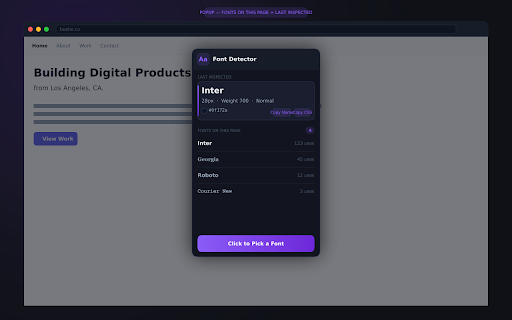
Open the popup and instantly see every font in use on the current page, sorted by how frequently each one appears. 10 fonts? 3 fonts? Font Detector finds them all.

**Last Inspected Panel**
Your most recently captured font is always a click away — font name rendered in its own face, plus size, weight, style, color swatch, and hex code. One-click copy of the font name or ready-to-paste CSS snippet.

---

WHO IT'S FOR

- Web designers who need to identify fonts on websites they're taking inspiration from
- Front-end developers who want a fast web font inspector without opening DevTools
- Brand managers checking that a site's typography matches brand guidelines
- Typographers cataloguing font usage across the web
- Anyone who's ever asked "what font is that?"

---

FEATURES

- Point-and-click font identifier — hover over any text for instant results
- Shows: font family name, font size, font weight, font style, line height, text color (hex)
- Full page font scanner — lists every font on the page ranked by usage count
- Last Inspected panel with color swatch and hex code
- One-click copy: font name or `font-family: 'Inter', sans-serif;` CSS snippet
- Works on virtually any website
- Dark, minimal UI — stays out of your way
- 100% local — no data sent to any server, no account required
- Lightweight: no background processes when idle

---

PRIVACY

Font Detector does not collect, transmit, or share any data. The only thing stored locally (in your browser) is the last font you inspected — so you can reference it after closing the tab. Nothing leaves your device.

---

PERMISSIONS

Font Detector requests only the permissions it actually needs to function. See the Permission Justifications section for details.

---

font detector, font finder chrome extension, what font, identify fonts on website, font identifier, web font inspector, font family detector, font picker, check font on webpage, font size checker
Technical
- Version
- 1.0
- Manifest
- V3
- Size
- 40.16KiB
- Min Chrome
- 88
- Languages
- 1
- Featured
- No
Metadata
- ID
- cgncoankficfiehdibnhimiodebdmadp
- Developer ID
- ue205c0015032a992a8cdc67600cc4e46
- Developer Email
- [email protected]
- Created
- Apr 6, 2026
- Last Updated (Store)
- Apr 6, 2026
- Last Scraped
- Jun 8, 2026
- Website
- bushe.co
- Support URL
- https://bushe.co/?view=contact
- Privacy Policy
- https://bushe.co/font-detector/privacy-policy.html
Data sourced from the Chrome Web Store · last verified Jun 8, 2026.