
Cherry Tomato
A tool to boost your productivty
As of May 2026, Cherry Tomato has 4,000 users and a 4.58/5 rating from 144 reviews.
Usersno change0%
4.0K
4,000
Ratingno change0%
4.58
144 reviews
Reviewsno change0%
144
Version
3.2.25
Manifest V2
History
1 snapshotsTracking since May 1, 2026.
View as table
| Date | Users | Rating | Reviews | Version |
|---|---|---|---|---|
| May 1, 2026 | 4.0K | 4.58 | 144 | 3.2.25 |
| Now | 4.0K | 4.58 | 144 | 3.2.25 |
Permissions & access
- Permissions
- notificationsstorageidlealarmspowersystem.displayapp.window.alwaysOnTop
- Host access
- https://sentry.io/*, http://cil.rocks/*
Screenshots


About
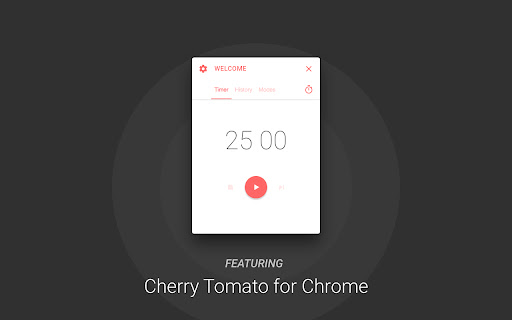
This app was designed to boost your productivity with an altered version of Pomodoro Technique®.

  Highlights:
    Different modes for different scenarios
    History summary
    Mini timer

  * Important: Require Chrome version 57+

Update 3.2.21:
  Bug fix:
    · Now the timer will play the clock ticking sound at correct time

Update 3.2.19:
  Bug fixes:
    · Two invisible bugs
  UI improvement:
    · Preference panel toggle animation will no longer be disrupted by quickly clicking on the gear button
  Improvement:
    · Project structure optimization and package size reduction

Update 3.2.14:
  Improvement:
    · Improved timer accuracy

Update 3.2.13:
  New features:
    · Language picker
  UI improvement:
    · Splash screen

Update 3.1.12:
  New language:
    · German
    Special thanks to Maik

Update 3.0.10:
  UI Changes:
    · Now always showing toggle button for mini mode

Update 3.0.9:
  New language:
    · Portuguese (Portugal)
    · Portuguese (Brazil)
    Special thanks: Sérgio Mota

Update 3.0.8:
  Bug fixes:
    · Fixed a bug that cause the user could not start the timer if Auto Focus is disabled in active mode.
    · Now when a user skipped a phase, app will not send any notification about this change.

Update 3.0.7:
  Bug fixes:
    · Fixed a issue that cause timer stop working during the phase after first focus phase.
    · Now gap notification will only show up during focus phase.

Major update 3.0.5:
  Multiple UI changes:
    · Now you can use tabs to navigate
    · A tab action button for major operation in different tabs
    · Mode picker function is now the action button on timer page
    · The mini mode is now accessible using the lock button in header area

  New features:
    · Now you can reset your history data in preference panel
    · You can use the quick generation button to generate all phase durations from your focus time setting. It's located next to focus time input in editor.
    · A summary card is now provided in history tab. You can get most important history data quicker than ever.
    · Now you can navigate on timeline when checking out your history chart
    · A new option in mode editor lets you play clock ticking sound when using the timer.

  Function changes:
    · Now idle detection is disabled by default when you create new modes.

Update 2.0.07:
  Changes:
    · Now double click the title area will toggle app mini mode

Major update 2.0.0:
  Code rewrite. All new experience.
  New features:
    · Modes: You can now create modes for different scenarios
    · History:Check history data in last 7 or 30 days
    · Mini mode: Use Ctrl (Cmd) + Shift + 0 to toggle mini mode
    · Endless loop: Long rest will be disabled once this option is on
    · Gap for work session: A notification will be send few minutes before the end of focus to give you time finish up work on your hand
    · Advanced idle detection settings
    · The auto begin for work and rest is now separated
  Changes:
    · Removed main notification and in-notification controls

Update 1.3.1:
  UI enhancement:
    *Now with categorized settings.
  New features:
    *Alarm:
      Now provides alarm. By far, the app is using audio clips from android lollipop ringtones, will find other audio
      clips on the near future. If you have great recommendation, please let me know. : )
  Bug fixes:
    *Fixed the bug that causes windows users could not open setting panel and close the app using buttons.
    *Fixed the bug that actual work cycles does not fit the setting.

Update 1.2:
  New feature:
    *Detect idle state:
       App will pause the clock when your system is idle or locked, and it will resume the clock when the system is
       active again.
       If you turned on the auto cycle function, the app will not auto reset and start the timer if your system is idle
       or locked. The app will start the timer only if it the system state is changed to active.
  Bug fixes:
    *Fixed the bug that causes the app could not initialize correctly and freeze at timer interface.

Update 1.1:
  New features:
    * Stop timer inside the app
    * Skip this state inside the app or notification
    * Two more settings
        Automatically Cycle: App will not stop the timer between two phases
        Send Notification: App will send you notification: 1. when a phase ends 2. as a controller

  Change:
   * Removed the stop button inside the notification
Technical
- Version
- 3.2.25
- Manifest
- V2
- Size
- 1.44MiB
- Min Chrome
- 57
- Languages
- 5
- Featured
- No
Metadata
- ID
- cghomilbbfdmgfidkdinillpmdpdjgmm
- Developer ID
- ud79091d7ec316227c8213926504429ff
- Developer Email
- [email protected]
- Created
- Jun 21, 2015
- Last Updated (Store)
- Feb 14, 2022
- Last Scraped
- May 30, 2026
- Website
- cil.rocks
- Support URL
- https://spectrum.chat/cherry-tomato
- Privacy Policy
- —
Similar extensions
Alternatives to Cherry Tomato, ranked by description similarity.

Pomodoro Timer PRO
Pomodoro Timer is a free and great tool that can help you boost your productivity and quality of your work.
6.0K
★ 4.0

Timer app
Use Timer app as simple and offline countdown tool. This Chrome extension offers 5 minute timer, 1 hour, and other options.
20.0K
★ 4.9

Pomotime
A simple pomodoro timer for productivity
3
★ 5.0

Focus Timer - Pomodoro Clock
Simple Pomodoro timer to boost your productivity. Customizable work and break intervals with desktop notifications.
—

Nice NewTab | Minimalist new tabs and focused workbench
Quickly searching bookmarks and web pages, setting today's goals, starting the tomato clock and focusing on the workbench.
153
★ 4.2

16-Bit Timer
A retro 16-bit themed study timer with customizable sessions
11
★ 5.0

Simple Focus Mode
A Chrome extension to improve productivity and reduce distractions.
43
★ 5.0

Pomodoro Timer
A Pomodoro timer with task scheduling to boost your productivity
11
Data sourced from the Chrome Web Store · last verified May 30, 2026.