
Tab Sticky Notes
Tab-scoped sticky notes that survive refresh and disappear when the tab closes.
As of June 2026, Tab Sticky Notes has — users in the Productivity category.
Usersno change0%
—
—
Ratingno change0%
—
— reviews
Reviewsno change0%
—
Version
0.1.2
Manifest V3
History
1 snapshotsTracking since Jun 6, 2026.
Not enough history yet for this metric — the chart fills in as we collect more snapshots.
View as table
| Date | Users | Rating | Reviews | Version |
|---|---|---|---|---|
| Jun 6, 2026 | — | — | — | 0.1.2 |
| Now | — | — | — | 0.1.2 |
Permissions & access
- Permissions
- storagetabscontextMenus
- Host access
- None declared
Screenshots
About
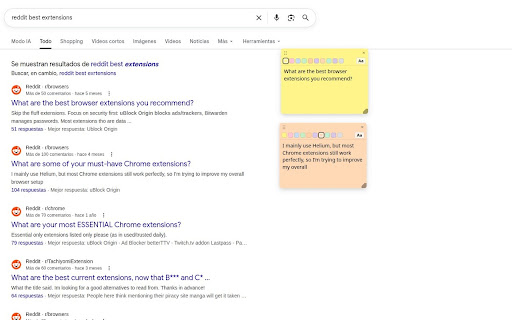
**Tab Sticky Notes** is a privacy-first sticky-note extension that lives on the browser tab, not the page.

Drop a quick reminder, a half-formed thought, a quote, a snippet of code — anything you want to remember while you're reading or researching on a particular site. Your notes stay anchored to that tab. Refresh the page? Your notes are still there. Navigate to a different article? Your notes stay behind (because they were for *this* tab). Close the tab? Your notes go with it — no orphaned clutter in a sidebar you'll never open again.

**Made for how you actually use tabs**
- **Per-tab scope.** Each tab gets its own independent set of notes. A note you put on a Wikipedia article doesn't follow you to Twitter.
- **Survives refreshes and back/forward navigation.** The note is in the tab's identity, not the URL.
- **Auto-cleanup.** When you close the tab, the notes close with it. No "delete me" inbox.
- **Undo for accidental deletes.** A 10-second window to bring back a note (or a whole batch) you just removed.

**Built for quick capture**
- **Keyboard shortcut** to create a note in the current tab: `Ctrl+Shift+Y` (Windows/Linux) or `⌘⇧Y` (Mac). Bind it to whatever you like from `chrome://extensions/shortcuts`.
- **Right-click → "Add copy to sticky note".** Select any text on a page, right-click, and a new sticky note appears pre-filled with the selection. Multi-line selections keep their line breaks. The original page is not modified.
- **Nine color swatches** to organize visually — yellow for "to read", pink for "action item", green for "done", whatever system works for you.
- **Rich text formatting** — bold, italic, links, inline code, sans/serif/mono font family, four font sizes. Sanitized to keep pasted snippets from breaking the note layout.
- **Drag, resize, stack** notes anywhere in the tab. Cascade-positioned by default so consecutive creates don't overlap.
- **Encrypted backup** — export your notes to a single string, locked with a passphrase you choose. Import them back on another machine. PBKDF2 + AES-GCM, no cloud.

**Privacy**
- **100% local.** Your notes never leave your browser. No accounts, no servers, no analytics, no telemetry. Verified: no `localStorage` / `sessionStorage` / `window.name` / URL params / hash / `history.state` writes anywhere in the codebase.
- **No remote code.** All dependencies are bundled. Content Security Policy blocks anything but `'self'` scripts.
- **Minimal permissions.** `storage` (for the notes), `tabs` (to identify which tab a note belongs to and clean up on close), and `host_permissions` for `http://*/*` and `https://*/*` so the overlay can render on any page you want to annotate.
Technical
- Version
- 0.1.2
- Manifest
- V3
- Size
- 109KiB
- Min Chrome
- 88
- Languages
- 1
- Featured
- No
Metadata
- ID
- cghcdmcebpkibpgngmneiadccbgppkjk
- Developer ID
- u714a02a283fea7948fcd543a62c5f7a3
- Developer Email
- [email protected]
- Created
- Jun 5, 2026
- Last Updated (Store)
- Jun 5, 2026
- Last Scraped
- Jun 16, 2026
- Website
- —
- Support URL
- —
- Privacy Policy
- —
Data sourced from the Chrome Web Store · last verified Jun 16, 2026.