Dictionary
Search words on Wiktionary.org
As of May 2026, Dictionary has 222 users and a 5.00/5 rating from 2 reviews in the Education category.
Usersup 1.4 percent+1.4%
222
222
Ratingno change0%
5.00
2 reviews
Reviewsno change0%
2
Version
0.3.3
Manifest V3
History
3 snapshotsTracking since Apr 1, 2026.
View as table
| Date | Users | Rating | Reviews | Version |
|---|---|---|---|---|
| Apr 1, 2026 | 219 | 5.00 | 2 | 0.3.3 |
| May 1, 2026 | 210 | 5.00 | 2 | 0.3.3 |
| May 30, 2026 | 219 | 5.00 | 2 | 0.3.3 |
| Now | 222 | 5.00 | 2 | 0.3.3 |
Permissions & access
- Permissions
- sidePanelcontextMenusstorage
- Host access
- None declared
Screenshots


About
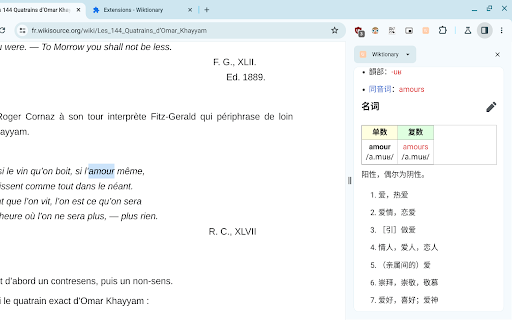
Find the definition of any word on a web page. Uses the side panel.

- search on highlight
- popup mode (English only)
- available in 162 languages
- free and open source

Usage instructions:

- Open the side panel by clicking the extension icon.
     Note: You need to enable the Side Panel feature in Chrome.
- Once the side panel is open, search Dictionary by highlighting a word.
- To change the language of Dictionary, right-click the extension icon and select "Options".
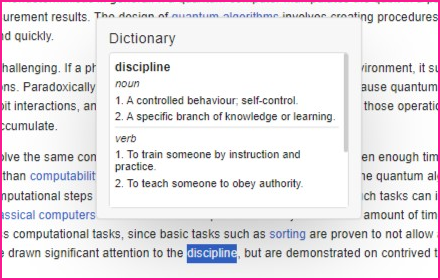
- Popup Mode: Highlight a word by double-clicking or dragging to see its definition(s) in a popup. Popup Mode is only available in English.
Alt + P is the shortcut to enable/disable popup mode. You can change this shortcut in chrome://extensions/shortcuts

Note: In PDF files, the methods above do not work. Instead, while the side panel is open, highlight a word, right-click it and select "Search on Wiktionary.org".
Technical
- Version
- 0.3.3
- Manifest
- V3
- Size
- 24.26KiB
- Min Chrome
- 116
- Languages
- 1
- Featured
- Yes
Metadata
- ID
- cgeoeehlcbijkefhlmcnoahlelccfndj
- Developer ID
- u0581cc9135e2b6f9fbf84dedf4606f1c
- Developer Email
- [email protected]
- Created
- Jul 31, 2023
- Last Updated (Store)
- Nov 1, 2023
- Last Scraped
- May 30, 2026
- Website
- danial23.com
- Privacy Policy
- —
Similar extensions
Alternatives to Dictionary, ranked by description similarity.
English Dictionary
On any web page, just double-click on the word and see the meaning of it!
565
★ 4.7

Quick Word Definition
Stop interrupting your reading. Get instant word definitions while reading - just right-click!
160
★ 4.2

Word Highlighter + Dictionary
Highlight words and show dictionary meaning when clicked.
10

Quick Dictionary Lookup
A simple and powerful Chrome extension that adds a right-click context menu to look up selected words in online dictionaries.
55

V-ast : Your vast vocabulary assistant
Find the definition of selected words
5
★ 5.0

Word Meaning Search
Search the meaning of a word based on context.
13

On Page Meaning Lookup Extension
Get definitions of highlighted words using DictionaryAPI.dev.
71
★ 5.0

Quick Dictionary
Double-click any word to get instant definitions - works on any website
13
★ 5.0
Data sourced from the Chrome Web Store · last verified May 30, 2026.