Send to Kindle for Google Chrome™
Sending and reading web content such as news articles and blog posts to your Kindle device or reading app is now easier than ever.
As of May 2026, Send to Kindle for Google Chrome™ has 500,000 users and a 3.23/5 rating from 1,062 reviews in the Workflow & Planning category.
Usersno change0%
500.0K
500,000
Ratingno change0%
3.23
1.1K reviews
Reviewsup 0.1 percent+0.1%
1.1K
Version
2.1.1.7
Manifest V3
History
1 snapshotsTracking since May 1, 2026.
View as table
| Date | Users | Rating | Reviews | Version |
|---|---|---|---|---|
| May 1, 2026 | 500.0K | 3.23 | 1.1K | 2.1.1.7 |
| Now | 500.0K | 3.23 | 1.1K | 2.1.1.7 |
Permissions & access
- Permissions
- tabsactiveTabstorageunlimitedStoragealarmsscriptingwebNavigation
- Host access
- *://*/*
Screenshots

About
[Official Amazon.com extension.]

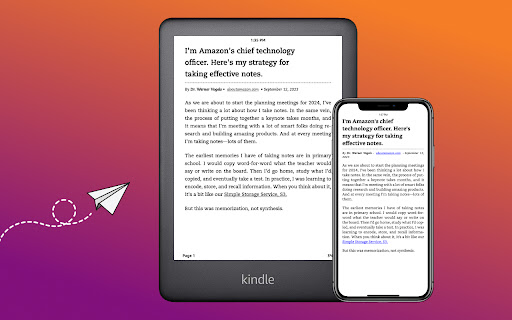
Send to Kindle for Google Chrome makes it easier to read web content with Kindle. Send articles, blog posts, and more to your Kindle. Read anytime, anywhere on a Kindle E-reader or with the Kindle app.

You can
Use quick send to instantly send full pages to your library.
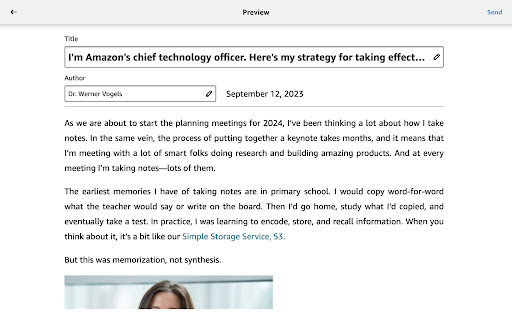
Preview how content will appear on Kindle.
Select text and send just the selection to your Kindle.
Edit the title and author of your document before sending.
Add content to your library on all devices or send only to specific devices.

Learn more about Send to Kindle at https://www.amazon.com/sendtokindle.

----------------
For customers located within the European Union, United Kingdom, or Brazil: By downloading or using Send to Kindle, you agree to the terms applicable for your country or territory located at http://www.amazon.com/sendtokindleterms.  Please also see the applicable Privacy Notice, Cookies Notice, and Interest-Based Ads Notice for your country; links to these notices can be found in the footer of your local Amazon homepage.

For all other customers: By downloading or using Send to Kindle, you agree to the terms applicable for your country or territory located at http://www.amazon.com/sendtokindleterms.  You also agree to the applicable Privacy Notice (e.g. http://www.amazon.com/privacy) for your country; the link to your applicable Privacy Notice can be found in the footer of your local Amazon homepage.

----------------
Note: Send to Kindle for Google Chrome may not work properly in the Chrome Web Store or other sites that prevent its use. The extension may also not work properly if you have extensions that block the use of JavaScript running. If you continue to experience problems, please submit your feedback to [email protected].

----------------
Changes in version 2.1.1.7 – Jan 2024
  • Bug fixes.
Technical
- Version
- 2.1.1.7
- Manifest
- V3
- Size
- 3.03MiB
- Min Chrome
- 88
- Languages
- 29
- Featured
- No
Metadata
- ID
- cgdjpilhipecahhcilnafpblkieebhea
- Developer ID
- u877b7581ac3348888e9524492c71737d
- Developer Email
- [email protected]
- Created
- Aug 14, 2012
- Last Updated (Store)
- Jan 9, 2024
- Last Scraped
- May 30, 2026
- Website
- —
- Privacy Policy
- http://www.amazon.com/privacy
Similar extensions
Alternatives to Send to Kindle for Google Chrome™, ranked by description similarity.

Push to Kindle
Send web articles to your Kindle
50.0K
★ 4.7

Doc Genie - Send Web as PDF to Kindle Scribe
Convert web pages to PDF and send them directly to your Amazon Kindle Scribe.
481
★ 5.0

Also Boughts Downloader by Kindletrends
Downloads Also Bought, Also Viewed and Also Read data, as well as Top 100s and Hot New Releases from the Amazon Kindle Store
5.0K
★ 4.7

Kindle Scholar
Kindle Scholar - Send to Kindle
40
★ 1.0

Kindle Notes Downloader
Download your Kindle notes and highlights in a variety of file formats.
45
★ 4.0

EchoRead - Your AI Reading Companion
Your reading companion—uncover insights, spark ideas, and shape a unique knowledge journey.
28
★ 5.0

DropKind - Send to Kindle
Send web pages and selected text to your Kindle with one click
34
★ 5.0
Export Kindle Highlights to Notion V2 (2023)
Export Kindle Highlights and clippings to Notion easily.
2.0K
★ 4.4
Data sourced from the Chrome Web Store · last verified May 30, 2026.