
Scrollbar of Contents
Adds clickable heading markers on the scrollbar.
As of May 2026, Scrollbar of Contents has 6,000 users and a 4.47/5 rating from 76 reviews in the Productivity category.
Usersno change0%
6.0K
6,000
Ratingdown 0.2 percent−0.2%
4.47
76 reviews
Reviewsdown 1.3 percent−1.3%
76
Version
0.4.1
Manifest V3
History
2 snapshotsTracking since Apr 30, 2026.
View as table
| Date | Users | Rating | Reviews | Version |
|---|---|---|---|---|
| Apr 30, 2026 | 6.0K | 4.48 | 77 | 0.4.1 |
| May 29, 2026 | 6.0K | 4.48 | 77 | 0.4.1 |
| Now | 6.0K | 4.47 | 76 | 0.4.1 |
Permissions & access
- Permissions
- activeTabstorage
- Host access
- None declared
Screenshots
About
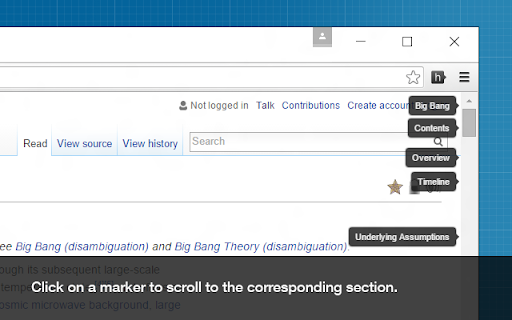
This extension creates clickable markers for all the headings on a page and places them proportionately on the scrollbar.

The markers enable you to jump between different sections of the page and help to quickly find what you are looking for. They are especially useful when navigating long webpages.

Featured in CNET, Lifehacker and Mashable.


How to use:

• After a page is loaded, click on the extension icon on the toolbar to display the heading markers.

• Click on a marker to scroll to the corresponding section.

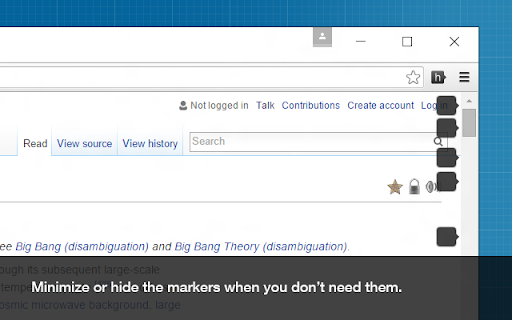
• You can minimize, hide, or show the markers using these keyboard shortcuts:
  ⁃ show/hide ( Shift + Alt + v )
  ⁃ minimize/maximize ( Shift + Alt + b )

• You can customize the behavior of this extension on the options page.


View the source code, contribute, report issues, or request new features here:
github.com/mlijanto/scrollbar-of-contents

Thanks for your comments and suggestions, keep them coming!
Technical
- Version
- 0.4.1
- Manifest
- V3
- Size
- 44.25KiB
- Min Chrome
- 88
- Languages
- 1
- Featured
- Yes
Metadata
- ID
- cfmkncejaemmcobmaabfigljmnkeecdm
- Developer ID
- u8b22187215df1e81324e87a7153f5f12
- Developer Email
- [email protected]
- Created
- May 28, 2011
- Last Updated (Store)
- Jun 19, 2024
- Last Scraped
- May 29, 2026
- Website
- —
- Privacy Policy
- —
Similar extensions
Alternatives to Scrollbar of Contents, ranked by description similarity.

Scroll marker
Create a scroll mark on a page and scroll down to the marker
237
★ 4.0

TabMarker
Save active tabs and quickly switch or remove them via a popup.
9
★ 5.0

Scroll To Top Or Bottom
Quickly Scroll To Top Or Bottom Of the Page On clicking the extension
34
★ 3.0

Essay Outline
Instant, clickable outline of all headings (H1–H6) on the current page.
24

Snap Scroll Redux
Advanced scrolling: Hold left + right-click to snap scroll, middle-click paragraphs to jump to next
—
★ 5.0

ScrollKeeper for browsers
Save and jump to scroll positions with hotkeys, titles, and a visual list of bookmarks in the popup.
32
★ 5.0

Mokuji
Create a scrollable table of contents from the headings of the site you are viewing.
15
★ 5.0

Scroll to Top - All Elements
Adds scroll-to-top buttons for all scrollable elements on any webpage. Smooth scrolling with intelligent button positioning.
14
Data sourced from the Chrome Web Store · last verified May 29, 2026.