
README.md Generator — Offline & Private
Create professional README.md files from project descriptions. Runs entirely in your browser — no servers, no tracking.
As of June 2026, README.md Generator — Offline & Private has 1 users in the Developer Tools category.
Usersno change0%
1
1
Ratingno change0%
—
— reviews
Reviewsno change0%
—
Version
2.0.0
Manifest V3
History
6 snapshotsTracking since Apr 11, 2026.
View as table
| Date | Users | Rating | Reviews | Version |
|---|---|---|---|---|
| Apr 11, 2026 | — | — | — | 2.0.0 |
| Apr 21, 2026 | — | — | — | 2.0.0 |
| Apr 25, 2026 | — | — | — | 2.0.0 |
| May 3, 2026 | — | — | — | 2.0.0 |
| May 9, 2026 | 1 | — | — | 2.0.0 |
| Jun 8, 2026 | — | — | — | 2.0.0 |
| Now | 1 | — | — | 2.0.0 |
Permissions & access
- Permissions
- storage
- Host access
- None declared
Screenshots



About
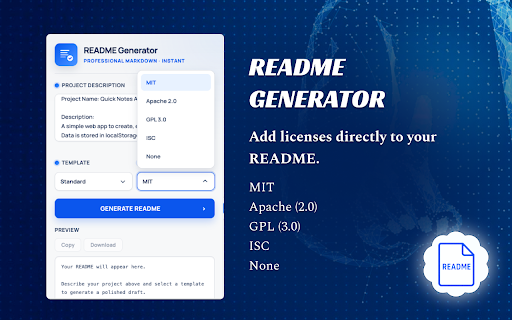
Generate professional README.md files quickly and efficiently with a simple and user-friendly interface.

This extension allows developers to create well-structured README files by entering essential project details such as title, description, features, installation steps, usage instructions, and license information. The content is automatically formatted into a clean and organized structure, saving time and improving documentation quality.

Users can preview the generated README in real time, copy it to the clipboard, or download it as a Markdown (.md) file. The extension is lightweight, fast, and designed to streamline the documentation process.

All functionality runs entirely within the browser. No external servers or APIs are used, ensuring complete privacy and secure handling of user input.

This tool is ideal for developers who want to produce clear, consistent, and professional project documentation with minimal effort.
Technical
- Version
- 2.0.0
- Manifest
- V3
- Size
- 410KiB
- Min Chrome
- 88
- Languages
- 1
- Featured
- No
Metadata
- ID
- cflpdndeffgicpkpebjdchnahoembkkm
- Developer ID
- u724257d4f098ab1ec5e5e43b1615c9d1
- Developer Email
- [email protected]
- Created
- Apr 10, 2026
- Last Updated (Store)
- Apr 10, 2026
- Last Scraped
- Jun 8, 2026
- Website
- —
- Support URL
- —
Data sourced from the Chrome Web Store · last verified Jun 8, 2026.