
GleanMark
Save web pages to your GleanMark knowledge base. Find articles later by meaning, not just keywords.
As of June 2026, GleanMark has 4 users in the Productivity category.
Usersno change0%
4
4
Ratingno change0%
—
— reviews
Reviewsno change0%
—
Version
0.1.0
Manifest V3
History
7 snapshotsTracking since Apr 4, 2026.
View as table
| Date | Users | Rating | Reviews | Version |
|---|---|---|---|---|
| Apr 4, 2026 | — | — | — | 0.1.0 |
| Apr 17, 2026 | — | — | — | 0.1.0 |
| Apr 23, 2026 | 7 | — | — | 0.1.0 |
| Apr 28, 2026 | 5 | — | — | 0.1.0 |
| May 29, 2026 | 5 | — | — | 0.1.0 |
| Jun 5, 2026 | 4 | — | — | 0.1.0 |
| Jun 11, 2026 | 5 | — | — | 0.1.0 |
| Now | 4 | — | — | 0.1.0 |
Permissions & access
- Permissions
- activeTabscriptingstorage
- Host access
- http://localhost/*, http://127.0.0.1/*
Screenshots

About
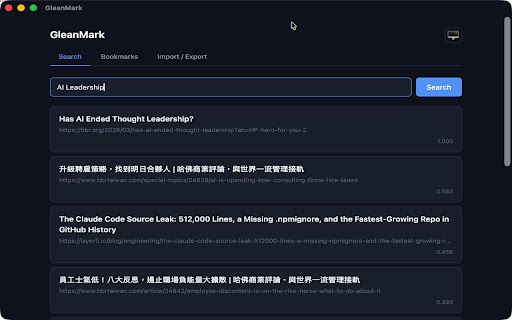
GleanMark saves web pages to your personal knowledge base with semantic search.

When you find an article worth keeping, click the GleanMark icon to capture its content — not just the URL, but the actual text. Later, search
by meaning: ask "leadership challenges in remote teams" and find that Harvard Business Review article you saved months ago, even if those exact
words never appeared.

How it works:
- Click the GleanMark icon on any web page
- The extension extracts the page title and main content automatically
- Add optional tags for organization
- Click Save — the content is indexed for both semantic and keyword search

Key features:
- Saves page content, not just URLs — your bookmarks survive even if the original page goes offline
- Semantic search powered by local AI embeddings — find articles by meaning
- Works with the GleanMark desktop app or CLI server
- All data stays on your machine — no cloud accounts, no tracking
- Configurable server URL via extension options

Requirements:
GleanMark is a local-first tool. You need the GleanMark app running on your machine for the extension to work. Download the app at:
https://github.com/jiayun/gleanmark

This extension connects only to your local GleanMark server (default: localhost:21580). No data is sent to any external service.

---

GleanMark 將網頁儲存到你的個人知識庫,支援語意搜尋。

看到值得收藏的文章時,點擊 GleanMark 圖示即可擷取內容——不只是網址,而是實際的文字內容。之後用語意搜尋:輸入「遠端團隊的領導挑戰」就能找到幾個月
前存的那篇哈佛商業評論文章,即使原文沒有出現這些字。

使用方式:
- 在任何網頁點擊 GleanMark 圖示
- 自動擷取頁面標題和主要內容
- 可選擇加入標籤分類
- 點擊儲存——內容會被索引,支援語意和關鍵字搜尋

主要特色:
- 儲存網頁內容而非僅有網址——即使原始頁面下線,你的書籤依然可搜尋
- 本機 AI 嵌入模型驅動的語意搜尋——用意思找文章
- 搭配 GleanMark 桌面應用程式或 CLI 使用
- 所有資料留在你的電腦上——無需雲端帳號,無追蹤
- 可在擴充功能設定中自訂伺服器網址

需求:
GleanMark 是本機優先的工具,需要在電腦上執行 GleanMark 應用程式。下載地址:https://github.com/jiayun/gleanmark

本擴充功能僅連線到你本機的 GleanMark 伺服器(預設:localhost:21580),不會將任何資料傳送到外部服務。
Technical
- Version
- 0.1.0
- Manifest
- V3
- Size
- 17.17KiB
- Min Chrome
- 88
- Languages
- 1
- Featured
- No
Metadata
- ID
- cfjgpigaopnacbmgnljfjlafjpfogble
- Developer ID
- uaf28d6edd19816464b729434ac31cac7
- Developer Email
- [email protected]
- Created
- Apr 3, 2026
- Last Updated (Store)
- Apr 3, 2026
- Last Scraped
- Jun 11, 2026
- Website
- —
- Support URL
- —
- Privacy Policy
- https://github.com/jiayun/gleanmark/blob/main/PRIVACY.md
Data sourced from the Chrome Web Store · last verified Jun 11, 2026.