
Docs to PDF (Bulk Convert for Google Drive)
Bulk convert Google Docs & Word files to PDF directly in Google Drive.
As of June 2026, Docs to PDF (Bulk Convert for Google Drive) has 32 users and a 5.00/5 rating from 1 reviews in the Workflow & Planning category.
Usersno change0%
32
32
Ratingno change0%
5.00
1 reviews
Reviewsno change0%
1
Version
1.1.1
Manifest V3
90-day change · In the last 90 days this extension 4 version updates.
History
6 snapshotsTracking since May 9, 2026.
View as table
| Date | Users | Rating | Reviews | Version |
|---|---|---|---|---|
| May 9, 2026 | — | — | — | 1.0.0 |
| May 13, 2026 | — | — | — | 1.0.0 |
| May 19, 2026 | — | — | — | 1.0.1 |
| May 25, 2026 | 5 | — | — | 1.0.2 |
| Jun 1, 2026 | 8 | 5.00 | 1 | 1.0.2 |
| Jun 7, 2026 | 18 | 5.00 | 1 | 1.1.0 |
| Now | 32 | 5.00 | 1 | 1.1.1 |
Changelog
- Jun 1, 2026description
🎯Why Convert Docs to PDF in Google Drive?
Converting Google Docs or Word files to PDF one by one is slow and breaks your workflow. This extension adds a Convert to PDF button right inside Google Drive. Choose a folder, select files, and get high-quality PDFs — all without leaving your Google Drive.

What You Can Do
Everything happens directly in your Google Drive interface:
✅ Bulk convert Google Docs to PDF — convert multiple files at once.
✅ Bulk convert Word files (.doc and .docx) to PDF — convert multiple files at once.
✅ Save to any folder — PDFs are saved to the folder you're currently viewing.

🎯 Perfect For
🏆 Business Professionals – Turn reports, proposals, and contracts into professional PDFs.
🏆 Educators & Students – Convert class notes, assignments, or research papers to PDF for submission.
🏆 Project Managers – Archive project documentation in a universal, non-editable format.
🏆 Anyone who converts many docs to PDF — securely and efficiently, right inside Google Drive.

How to Use This Extension
1. Open Google Drive in your browser.
2. Navigate to the folder where you want to save your PDFs.
3. Click the "Convert to PDF" button.
4. Select one or more files in the file picker (Ctrl/Shift for multiple).
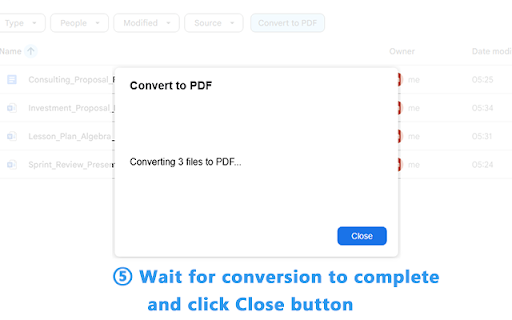
5. Wait a few seconds — your PDFs will appear in the folder.

Why This Extension?
Unlike generic PDF converters that force you to download files to your computer and upload them again, we take a completely different approach:
☑️ Stays inside Google Drive — No downloading, no re-uploading. Everything happens in your Drive.
☑️ Bulk conversion built-in — Convert multiple files at once. No tedious, repetitive work.
☑️ Supports both Google Docs & Word — One tool for multiple formats.
☑️ Secure by design — Unlike extensions that request full access, we only need permission to convert the files you explicitly select and write PDFs to your Drive.

🔒 Privacy & Security
We take your privacy seriously:
1. No file storage — Your files are never stored on our servers. They go directly from Google Drive to PDF and back to your Drive.
2. Minimal permissions — We only ask for what's needed: access to the files you explicitly select and permission to write PDFs to your Drive.
3. Secure API — Uses Google Drive API & Picker API, following Google's security standards.

📝 Important Notes
1. Google Drive™ and Google Docs™ are trademarks of Google LLC. This extension is not affiliated with or endorsed by Google LLC.
2. Large files — For very large Word files (15MB or larger), conversion may take a few extra seconds.
🎯Why Convert Docs to PDF in Google Drive?
Converting Google Docs or Word files to PDF one by one is slow and breaks your workflow. This extension adds a Convert to PDF button right inside Google Drive. Choose a folder, select files, and get high-quality PDFs — all without leaving your Google Drive.

What You Can Do
Everything happens directly in your Google Drive interface:
✅ Bulk convert Google Docs to PDF — convert multiple files at once.
✅ Bulk convert Word files (.doc and .docx) to PDF — convert multiple files at once.
✅ Save to any folder — PDFs are saved to the folder you're currently viewing.

🎯 Perfect For
🏆 Business Professionals — Turn reports, proposals, and contracts into professional PDFs.
🏆 Educators & Students — Convert class notes, assignments, or research papers to PDF for submission.
🏆 Project Managers — Archive project documentation in a universal, non-editable format.
🏆 Anyone who converts many docs to PDF — securely and efficiently, right inside Google Drive.

How to Use This Extension
1. Open Google Drive in your browser.
2. Navigate to the folder where you want to save your PDFs.
3. Click the "Convert to PDF" button.
4. Select one or more files in the file picker (Ctrl/Shift for multiple).
5. Wait a few seconds — your PDFs will appear in the folder.

Why This Extension?
Unlike generic PDF converters that force you to download files to your computer and upload them again, we take a completely different approach:
☑️ Stays inside Google Drive — No downloading, no re-uploading. Everything happens in your Drive.
☑️ Bulk conversion built-in — Convert multiple files at once. No tedious, repetitive work.
☑️ Supports both Google Docs & Word — One tool for multiple formats.
☑️ Secure by design — Unlike extensions that request full access, we only need permission to convert the files you explicitly select and write PDFs to your Drive.

🔒 Privacy & Security
We take your privacy seriously:
1. No file storage — Your files are never stored on our servers. They go directly from Google Drive to PDF and back to your Drive.
2. Minimal permissions — We only ask for what's needed: access to the files you explicitly select and permission to write PDFs to your Drive.
3. Secure API — Uses Google Drive API & Picker API, following Google's security standards.

📝 Important Notes
1. Google Drive™ and Google Docs™ are trademarks of Google LLC. This extension is not affiliated with or endorsed by Google LLC.
2. Large files — For very large Word files (15MB or larger), conversion may take a few extra seconds.
Permissions & access
- Permissions
- identitystorage
- Host access
- https://vercel-api-gateway-one.vercel.app/*
Screenshots



About
🎯Why Convert Docs to PDF in Google Drive?
Converting Google Docs or Word files to PDF one by one is slow and breaks your workflow. This extension adds a Convert to PDF button right inside Google Drive. Choose a folder, select files, and get high-quality PDFs — all without leaving your Google Drive.

What You Can Do
Everything happens directly in your Google Drive interface:
✅ Bulk convert Google Docs to PDF — convert multiple files at once.
✅ Bulk convert Word files (.doc and .docx) to PDF — convert multiple files at once.
✅ Save to any folder — PDFs are saved to the folder you're currently viewing.

🎯 Perfect For
🏆 Business Professionals — Turn reports, proposals, and contracts into professional PDFs.
🏆 Educators & Students — Convert class notes, assignments, or research papers to PDF for submission.
🏆 Project Managers — Archive project documentation in a universal, non-editable format.
🏆 Anyone who converts many docs to PDF — securely and efficiently, right inside Google Drive.

How to Use This Extension
1. Open Google Drive in your browser.
2. Navigate to the folder where you want to save your PDFs.
3. Click the "Convert to PDF" button.
4. Select one or more files in the file picker (Ctrl/Shift for multiple).
5. Wait a few seconds — your PDFs will appear in the folder.

Why This Extension?
Unlike generic PDF converters that force you to download files to your computer and upload them again, we take a completely different approach:
☑️ Stays inside Google Drive — No downloading, no re-uploading. Everything happens in your Drive.
☑️ Bulk conversion built-in — Convert multiple files at once. No tedious, repetitive work.
☑️ Supports both Google Docs & Word — One tool for multiple formats.
☑️ Secure by design — Unlike extensions that request full access, we only need permission to convert the files you explicitly select and write PDFs to your Drive.

🔒 Privacy & Security
We take your privacy seriously:
1. No file storage — Your files are never stored on our servers. They go directly from Google Drive to PDF and back to your Drive.
2. Minimal permissions — We only ask for what's needed: access to the files you explicitly select and permission to write PDFs to your Drive.
3. Secure API — Uses Google Drive API & Picker API, following Google's security standards.

📝 Important Notes
1. Google Drive™ and Google Docs™ are trademarks of Google LLC. This extension is not affiliated with or endorsed by Google LLC.
2. Large files — For very large Word files (15MB or larger), conversion may take a few extra seconds.
Technical
- Version
- 1.1.1
- Manifest
- V3
- Size
- 29.37KiB
- Min Chrome
- 88
- Languages
- 22
- Featured
- No
Metadata
- ID
- cfhnmhnnipeiianlfofnffdlboemledl
- Developer ID
- ud402a91629e7a0d76a3bf3f54f42937d
- Developer Email
- [email protected]
- Created
- May 8, 2026
- Last Updated (Store)
- Jun 3, 2026
- Last Scraped
- Jun 7, 2026
- Website
- —
- Support URL
- —
Data sourced from the Chrome Web Store · last verified Jun 7, 2026.