
Screenshot Redactor Pro
Capture screenshots and redact sensitive info with solid black, blur, or pixelate.
As of June 2026, Screenshot Redactor Pro has — users in the Productivity category.
Usersno change0%
—
—
Ratingno change0%
—
— reviews
Reviewsno change0%
—
Version
1.0.1
Manifest V3
History
2 snapshotsTracking since Apr 20, 2026.
Not enough history yet for this metric — the chart fills in as we collect more snapshots.
View as table
| Date | Users | Rating | Reviews | Version |
|---|---|---|---|---|
| Apr 20, 2026 | — | — | — | 1.0.1 |
| Apr 25, 2026 | — | — | — | 1.0.1 |
| Now | — | — | — | 1.0.1 |
Permissions & access
- Permissions
- storageactiveTabclipboardWrite
- Host access
- None declared
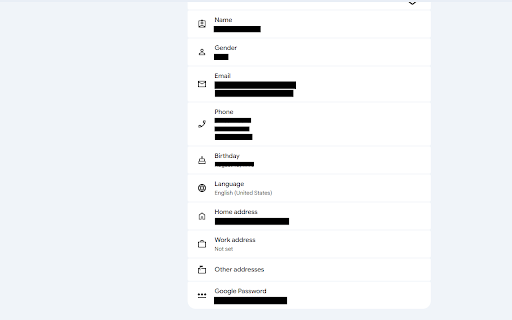
Screenshots


About
Screenshot Redactor Pro helps you protect sensitive information before sharing screenshots.

HOW IT WORKS
1. Click the extension icon and hit "Capture Screenshot"
2. Draw boxes over sensitive data (names, emails, phone numbers, addresses)
3. Drag boxes to reposition, double-click to delete
4. Zoom in/out to inspect details
5. Download or copy to clipboard

REDACTION STYLES
- Solid Black — Completely opaque, nothing visible underneath
- Gaussian Blur — Professional blur effect that obscures text
- Pixelate — Mosaic effect with chunky pixel blocks

KEY FEATURES
✓ Draw redaction boxes with click and drag
✓ Reposition boxes by dragging them anywhere
✓ Double-click any box to delete it
✓ Zoom controls (+/−) and fit-to-window button
✓ Scroll wheel zoom (hold Ctrl/Cmd)
✓ Copy to clipboard or download as PNG
✓ Works on any webpage
✓ All processing happens locally — your data never leaves your device

PERFECT FOR
- Remote workers sharing screens in meetings
- Customer support teams handling sensitive tickets
- Developers sharing code screenshots
- HR teams redacting personal information
- Anyone who values privacy when sharing screenshots

FREE VERSION
- 3 screenshots per day
- All redaction styles included
- Full editing capabilities

PRO VERSION ($1.99/month or $11.99/year or $143 lifetime)
- Unlimited screenshots per day
- Priority support
- Support continued development

PRIVACY FIRST
All screenshot processing happens entirely on your device. No images are uploaded to any server. No data is collected or stored externally. Your sensitive information stays private.
Technical
- Version
- 1.0.1
- Manifest
- V3
- Size
- 21.93KiB
- Min Chrome
- 88
- Languages
- 1
- Featured
- No
Metadata
- ID
- cfhlopabpmgoaghfbbgeofcdakdibdlh
- Developer ID
- u40317f14ba4bf09f48ff30ccb09a8e4f
- Developer Email
- [email protected]
- Created
- Mar 12, 2026
- Last Updated (Store)
- Mar 27, 2026
- Last Scraped
- Jun 8, 2026
- Website
- —
Similar extensions
Alternatives to Screenshot Redactor Pro, ranked by description similarity.

Smart Screenshot + Blur
Capture screenshots and quickly blur/redact sensitive information with auto-detection of PII. Privacy-first, local-only processing.
47
★ 5.0

Privacy Screenshot - Blur & Redact Images
Blur, pixelate or redact images — paste, screenshot or drag & drop. 100% local, zero tracking. 15 free blurs/day.
4

BlurIt — Screenshot & Auto-Redact
One-click screenshots with auto PII blur. Emails, phones, credit cards & IDs redacted before saving. 100% local.
4
★ 5.0

Screenshot Capture & Redactor — HNE
Screenshot capture (select area / visible / full-page), annotate, blur, undo/redo, zoom, and export (copy, save, print)
—

Screenshot Extension
Take a screenshot and save it to a location of your choice.
89

Redact It™
Redact sensitive information from PDFs and images locally. No uploads. 100% private.
1.0K
★ 5.0

ScreenDraw Pro
Draw, highlight, blur, and annotate on any webpage with keyboard shortcuts
4

Free Screenshot Tool
Professional screenshot tool with full page, selection, and scrolling capture capabilities
6
Data sourced from the Chrome Web Store · last verified Jun 8, 2026.