
Browser JSON Viewer
Automatically formats and renders raw JSON API responses as an interactive visual tree, powered by visual-json.
As of June 2026, Browser JSON Viewer has 15 users and a 5.00/5 rating from 2 reviews in the Developer Tools category.
Usersup 66.7 percent+66.7%
15
15
Ratingno change0%
5.00
2 reviews
Reviewsup 100.0 percent+100.0%
2
Version
0.0.9
Manifest V3
90-day change · In the last 90 days this extension 2 version updates.
History
6 snapshotsTracking since Apr 1, 2026.
View as table
| Date | Users | Rating | Reviews | Version |
|---|---|---|---|---|
| Apr 1, 2026 | 9 | 5.00 | 1 | 0.0.7 |
| Apr 17, 2026 | 9 | 5.00 | 1 | 0.0.7 |
| May 1, 2026 | 11 | 5.00 | 1 | 0.0.8 |
| May 8, 2026 | 10 | 5.00 | 1 | 0.0.9 |
| May 18, 2026 | 10 | 5.00 | 2 | 0.0.9 |
| May 25, 2026 | 12 | 5.00 | 2 | 0.0.9 |
| Now | 15 | 5.00 | 2 | 0.0.9 |
Permissions & access
- Permissions
- storage
- Host access
- <all_urls>
Screenshots

About
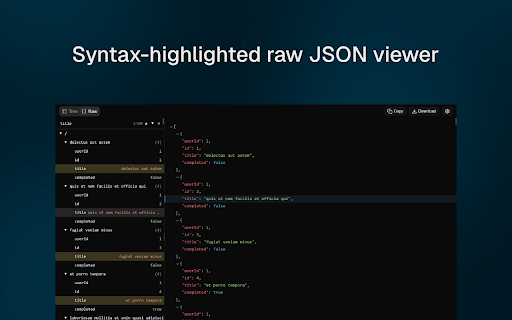
Browser JSON Viewer automatically detects raw JSON responses and transforms them into a clean, interactive visual tree - no copy-pasting into external tools required.

How it works

Whenever you open a URL that returns a raw JSON response - a REST API endpoint, a local JSON file, or any direct link to a .json file - the extension instantly replaces the plain text with a rich interactive viewer powered by visual-json.

Features
- Interactive tree view - expand and collapse nested objects and arrays to explore complex structures
- Search - quickly locate keys or values anywhere in the document
- Form view - inspect and edit individual fields in a structured form layout
- Works on API endpoints - open any REST API GET endpoint directly in the browser and get a formatted view instantly
- Works on local JSON files - drag and drop a .json file into the browser or open it with File -> Open, and it renders the same way
- Zero configuration - install and it just works on every tab, automatically
- Style isolated - runs inside a Shadow DOM so it never interferes with page styles

Use cases
- Debugging REST APIs without Postman or DevTools
- Quickly inspecting configuration files or data exports saved as .json
- Exploring API responses from third-party services
- Sharing API response URLs with teammates who can view them formatted without any setup
Technical
- Version
- 0.0.9
- Manifest
- V3
- Size
- 592KiB
- Min Chrome
- 88
- Languages
- 1
- Featured
- No
Metadata
- ID
- cfhgjijaidmkcbofiipgchfnncceoolj
- Developer ID
- u5b6f33b95e25d18b9d862c58cf9c062e
- Developer Email
- [email protected]
- Created
- Mar 24, 2026
- Last Updated (Store)
- Apr 27, 2026
- Last Scraped
- Jun 7, 2026
- Website
- —
- Support URL
- —
- Privacy Policy
- —
Data sourced from the Chrome Web Store · last verified Jun 7, 2026.