
Best Dials
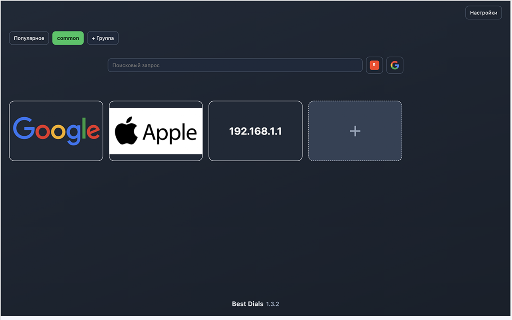
Visual speed dial page for saved bookmarks.
As of June 2026, Best Dials has 2 users in the Productivity category.
Usersno change0%
2
2
Ratingno change0%
—
— reviews
Reviewsno change0%
—
Version
1.3.2
Manifest V3
History
3 snapshotsTracking since May 12, 2026.
View as table
| Date | Users | Rating | Reviews | Version |
|---|---|---|---|---|
| May 12, 2026 | — | — | — | 1.3.2 |
| Jun 6, 2026 | — | — | — | 1.3.2 |
| Jun 19, 2026 | 1 | — | — | 1.3.2 |
| Now | 2 | — | — | 1.3.2 |
Permissions & access
- Permissions
- bookmarksidentitystorageunlimitedStorage
- Host access
- https://www.googleapis.com/*
Screenshots
About
Best Dials turns your new tab into a fast, visual speed dial for the sites you use most.

Main features
• Groups — organize bookmarks into tabs; reorder with drag and drop
• Rich cards — up to three text lines per bookmark; colors, outlines, font sizes; light and dark backgrounds per card
• Images — optional dial image with fit, scale, and dim
• Quick row — pin bookmarks that appear on every group
• Popular — automatic group based on click counts
• Profiles — save and apply style presets for cards
• Import and export — Best Dials JSON and Speed Dial [FVD]
• Interface language — many languages; auto mode follows the browser
• Optional cloud sync — merge bookmarks via Google Drive (app data folder only; sign in from extension settings)

Your data stays in the browser unless you enable Google sync. Sync uses Google Drive application data storage for a small sync file, not your visible Drive folders.

Manifest V3. Needs bookmarks permission to open sites from dials; storage for local data; identity and Drive app data scope only if you use optional sync.
Technical
- Version
- 1.3.2
- Manifest
- V3
- Size
- 134KiB
- Min Chrome
- 88
- Languages
- 1
- Featured
- No
Metadata
- ID
- cfhdocamkcbejppgojjfmkddaphnnhkj
- Developer ID
- u10cdb1f5f5c53ceb09430a63933f7942
- Developer Email
- [email protected]
- Created
- May 11, 2026
- Last Updated (Store)
- May 11, 2026
- Last Scraped
- Jun 19, 2026
- Website
- —
- Support URL
- —
- Privacy Policy
- https://xoal.ru/best-dials/privacy/
Data sourced from the Chrome Web Store · last verified Jun 19, 2026.