
UTM Eraser
Clean tracking query parameters from URLs, such as utm, fbclid, gclid, etc
As of June 2026, UTM Eraser has 1,000 users and a 4.86/5 rating from 7 reviews in the Privacy & Security category.
Usersup 3.5 percent+3.5%
1.0K
1,000
Ratingup 1.3 percent+1.3%
4.86
7 reviews
Reviewsup 40.0 percent+40.0%
7
Version
1.3.1
Manifest V3
90-day change · In the last 90 days this extension 1 version update.
History
4 snapshotsTracking since Apr 1, 2026.
View as table
| Date | Users | Rating | Reviews | Version |
|---|---|---|---|---|
| Apr 1, 2026 | 966 | 4.80 | 5 | 1.2.0 |
| Apr 21, 2026 | 1.0K | 4.83 | 6 | 1.2.0 |
| May 6, 2026 | 1.0K | 4.86 | 7 | 1.2.0 |
| May 31, 2026 | 1.0K | 4.86 | 7 | 1.2.0 |
| Now | 1.0K | 4.86 | 7 | 1.3.1 |
Changelog
- May 31, 2026description
An extension to clean tracking request parameters from URLs.

Please note that due to Chrome developer policy, it is no longer possible to dynamically change the list of parameters to remove before loading the page — it is hardcoded when developing the extension.

You can see the current list of rules with tags that will be applied BEFORE loading the page (i.e. will really interfere with tracking) at this address:
https://github.com/Psychosynthesis/Eraser/blob/main/src/chrome/rules.json

Eraser also has the ability to clean custom params (place the extension icon on the panel and click on it to edit). Your custom set of tags will allow you to cosmetically remove parameters after the page has loaded (this is convenient, for example, to share links). Keep in mind that this will not interfere with tracking by your custom tags, this is literally just a cosmetic edit of the address bar - Chrome policy is to blame.

You can edit custom params list in the settings (by clicking on the extension icon).
This extension clears URL parameters used to track user behavior and also prevents tracking by common analytics systems (Google, Yandex, etc.)

Please note that due to Chrome developer policy, it is no longer possible to dynamically change the list of parameters to remove before loading the page — it is hardcoded when developing the extension.

You can see the current list of rules with tags that will be applied BEFORE loading the page (i.e. will really interfere with tracking) at this address:
https://github.com/Psychosynthesis/Eraser/blob/main/src/chrome/rules.json

Eraser also has the ability to clean custom params (place the extension icon on the panel and click on it to edit). Your custom set of tags will allow you to cosmetically remove parameters after the page has loaded (this is convenient, for example, to share links). Keep in mind that this will not interfere with tracking by your custom tags, this is literally just a cosmetic edit of the address bar - Chrome policy is to blame.

You can edit custom params list in the settings (by clicking on the extension icon).
- May 31, 2026short_description
Clean tracking query parameters from URLs, such as utm, fbclid, gclid, etc.
Clean tracking query parameters from URLs, such as utm, fbclid, gclid, etc
Permissions & access
- Permissions
- storagedeclarativeNetRequest
- Host access
- <all_urls>
Screenshots
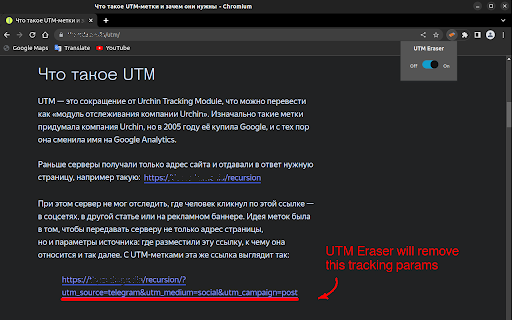
About
This extension clears URL parameters used to track user behavior and also prevents tracking by common analytics systems (Google, Yandex, etc.)

Please note that due to Chrome developer policy, it is no longer possible to dynamically change the list of parameters to remove before loading the page — it is hardcoded when developing the extension.

You can see the current list of rules with tags that will be applied BEFORE loading the page (i.e. will really interfere with tracking) at this address:
https://github.com/Psychosynthesis/Eraser/blob/main/src/chrome/rules.json

Eraser also has the ability to clean custom params (place the extension icon on the panel and click on it to edit). Your custom set of tags will allow you to cosmetically remove parameters after the page has loaded (this is convenient, for example, to share links). Keep in mind that this will not interfere with tracking by your custom tags, this is literally just a cosmetic edit of the address bar - Chrome policy is to blame.

You can edit custom params list in the settings (by clicking on the extension icon).
Technical
- Version
- 1.3.1
- Manifest
- V3
- Size
- 33.59KiB
- Min Chrome
- 88
- Languages
- 3
- Featured
- No
Metadata
- ID
- cepijkcnhhbjgiofhdhbomcgdmfjbbhb
- Developer ID
- uc516acdbdd4bab90ad22bccfa7b4ad0a
- Developer Email
- [email protected]
- Created
- Oct 22, 2022
- Last Updated (Store)
- May 25, 2026
- Last Scraped
- Jun 6, 2026
- Website
- —
- Support URL
- —
- Privacy Policy
- —
Similar extensions
Alternatives to UTM Eraser, ranked by description similarity.

URL Parameter Eraser
Reclaim Your Digital Footprint: Erase Tracking Parameters from Your Webpages.
46
★ 5.0

Clean URL
Remove tracking parameters from URLs with a single click. Cleaning UTM, social media, and affiliate tracking parameters.
199
★ 1.0

Advanced URL Cleaner
Automatically removes tracking parameters like fbclid, gclid, UTM tags, and TikTok IDs to protect your privacy.
229
★ 5.0

URL Sanitizer
Sanitize web page URL by striping tracking parameters
287

Linkumori (URLs Cleaner) - formerly Neat URL
Remove tracking parameters from URLs and protect your privacy
5.0K
★ 3.7

Link Cleaner for YouTube
Blocks tracking tags when visiting YouTube pages and removes unnecessary parameters from the address bar and shared links.
64
★ 1.0

Copy Clean Link - Remove URL Tracking
Remove UTM, fbclid & tracking parameters from URLs. Visual management interface for custom rules. Privacy-focused URL link cleaner.
72

Privacy-First Link Cleaner
Remove tracking parameters from URLs for cleaner, privacy-friendly links.
7
Data sourced from the Chrome Web Store · last verified Jun 6, 2026.